> ## Documentation Index
> Fetch the complete documentation index at: https://docs.usetuner.ai/llms.txt
> Use this file to discover all available pages before exploring further.
# Configure Red Flags & Labels
> Red flags and labels are condition-based tags that Tuner applies to calls when specific patterns are detected. This guide covers how to define rules using the Rule Builder, what data is captured when a tag fires, and how to use that data for triage.
## What Are Red Flags?
A **red flag** is a structured signal that Tuner attaches to a call when one or more rule conditions are satisfied. Unlike evals — which score individual behaviors — red flags represent a composite judgment: a call is flagged when a combination of eval failures, voice metrics, and call classification outcomes cross a threshold you define.
The same Rule Builder that creates red flags also creates **labels** — contextual tags that categorize calls without marking them as failures (e.g. `long_agent_monologue`, `sluggish_conversation`). Both types appear in the call logs and are surfaced in the Overview dashboard.
***
## Where Red Flags and Labels Surface
### Overview Dashboard
Red flags appear in the **Recent Red Flags** section of the Overview dashboard, giving you a prioritized queue of calls that need attention without requiring you to manually filter call logs.
 Each entry in the table exposes:
| Column | What it tells you |
| --------------- | -------------------------------------------------------------------------------------------- |
| **Flag Type** | The name of the rule that triggered — e.g. `negative_sentiment`, `conversation_freeze` |
| **Call ID** | Direct link into the Call Details view for that conversation |
| **Call Intent** | The intent Tuner detected for the call, useful for spotting intent-specific failure patterns |
| **Outcome** | How the call was classified — e.g. Resolved, Escalated/transferred |
| **Timestamp** | When the call occurred |
### Call Logs
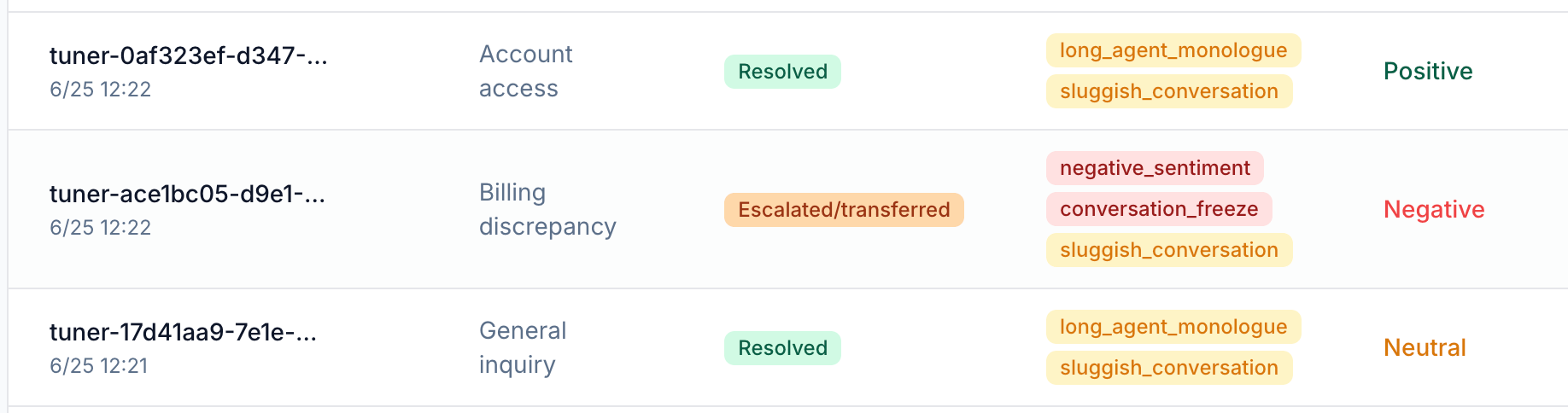
Both red flags and labels appear as color-coded tags on every call row in the call logs. This lets you filter and sort the full call history by the behavioral patterns you care about.
Each entry in the table exposes:
| Column | What it tells you |
| --------------- | -------------------------------------------------------------------------------------------- |
| **Flag Type** | The name of the rule that triggered — e.g. `negative_sentiment`, `conversation_freeze` |
| **Call ID** | Direct link into the Call Details view for that conversation |
| **Call Intent** | The intent Tuner detected for the call, useful for spotting intent-specific failure patterns |
| **Outcome** | How the call was classified — e.g. Resolved, Escalated/transferred |
| **Timestamp** | When the call occurred |
### Call Logs
Both red flags and labels appear as color-coded tags on every call row in the call logs. This lets you filter and sort the full call history by the behavioral patterns you care about.
 ***
## How Red Flags Are Triggered
Red flags and labels are defined in the **Rule Builder** inside **Agent Settings → Evaluation Rules**. Each rule is a named condition set. When all conditions in the set evaluate to true for a call, Tuner applies the corresponding tag to that call.
### Adding a Rule
Click **+ Add Rule** in the Evaluation Rules tab to open the rule builder.
***
## How Red Flags Are Triggered
Red flags and labels are defined in the **Rule Builder** inside **Agent Settings → Evaluation Rules**. Each rule is a named condition set. When all conditions in the set evaluate to true for a call, Tuner applies the corresponding tag to that call.
### Adding a Rule
Click **+ Add Rule** in the Evaluation Rules tab to open the rule builder.
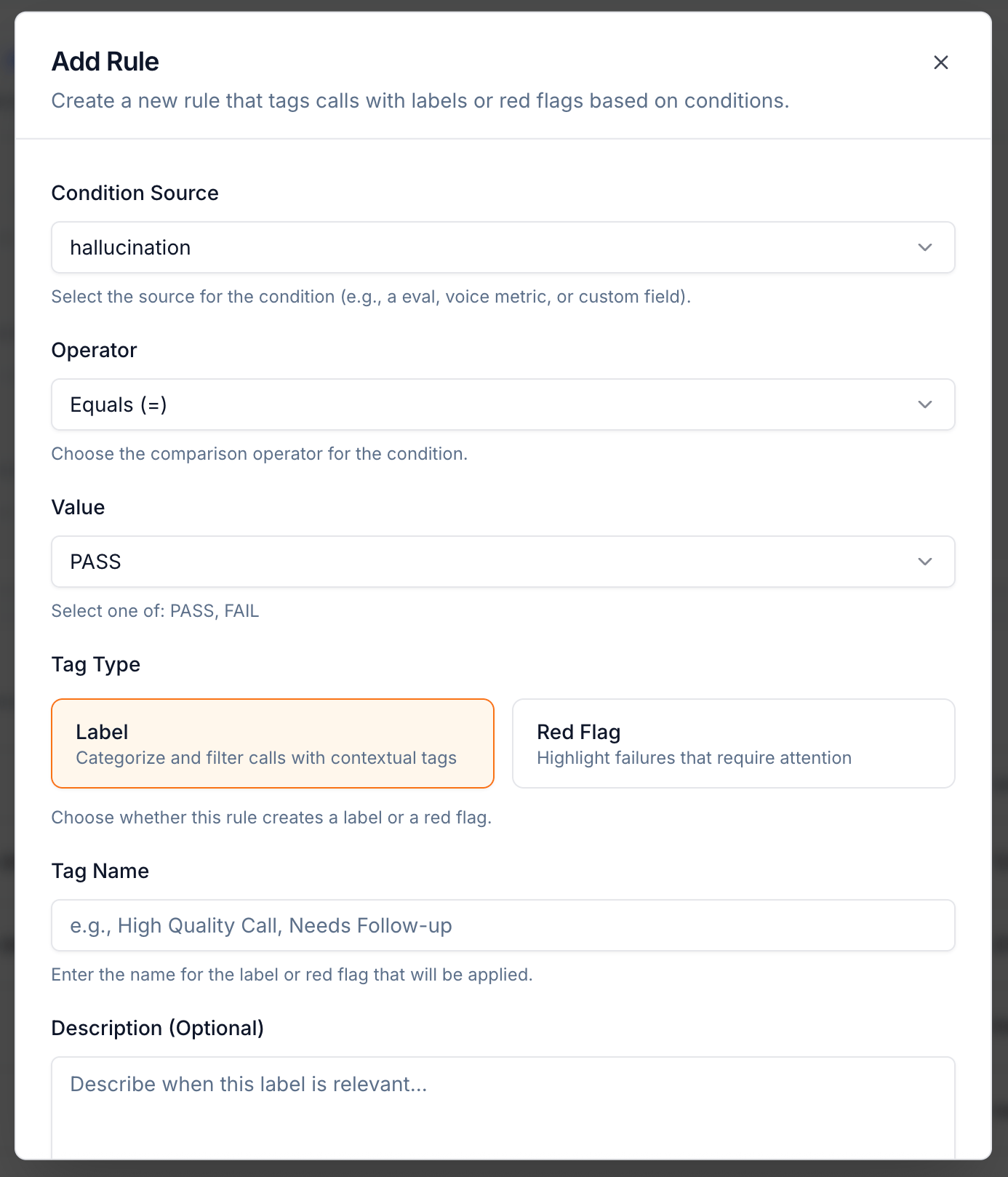 Each rule is configured with:
| Field | Description |
| -------------------- | ----------------------------------------------------------------------------------------------- |
| **Condition Source** | The signal to evaluate — an eval (e.g. `hallucination`), a voice metric, or a custom data field |
| **Operator** | The comparison — `Equals (=)`, greater than, less than, etc. |
| **Value** | The threshold — e.g. `PASS`, `FAIL`, a numeric value, or a sentiment category |
| **Tag Type** | **Label** (categorize and filter) or **Red Flag** (highlight failures that require attention) |
| **Tag Name** | The name that appears on the call in logs and the dashboard |
| **Description** | Optional — describe when this label or flag is relevant |
### Available Condition Types
You can build conditions from any of the following signal sources:
| Condition type | Examples |
| ----------------- | ---------------------------------------------------------------------------- |
| **Eval result** | `hallucination = FAIL`, `Politeness < 3`, `Confirmation accuracy = FAIL` |
| **Voice metric** | `Sentiment = Negative`, `Crosstalk Duration > 10s`, `Silence Duration > 15s` |
| **Call outcome** | `Outcome = Failure`, `Outcome = "User Hung Up Early"` |
| **Call duration** | `Duration > 8 minutes` |
| **Cost** | `Cost > $0.50` |
Combining condition types lets you express nuanced failure patterns. For example, a "Frustrated and Mishandled" flag might require `Sentiment = Negative` AND `Missed Intent = FAIL` AND `Escalation Handling = FAIL` — ensuring only calls with all three problems get flagged, not every slightly negative call.
***
## Example Rules
### Hallucination Detection
| Field | Value |
| -------------- | ----------------------------------------------------------------------------------------- |
| **Tag Type** | Red Flag |
| **Tag Name** | `hallucination_detected` |
| **Conditions** | `hallucination = FAIL` |
| **Why** | Any hallucination is a critical trust issue. Flag immediately regardless of call outcome. |
### Compliance Breach
| Field | Value |
| -------------- | --------------------------------------------------------------------------------------------------------- |
| **Tag Type** | Red Flag |
| **Tag Name** | `compliance_failure` |
| **Conditions** | `Identity verification compliance = FAIL` OR `Required disclosures = FAIL` OR `Prohibited content = FAIL` |
| **Why** | Any single compliance failure warrants review. Use OR logic to catch any violation. |
### High-Risk Failed Call
| Field | Value |
| -------------- | --------------------------------------------------------------------------- |
| **Tag Type** | Red Flag |
| **Tag Name** | `high_risk_failure` |
| **Conditions** | `Outcome = Failure` AND `Sentiment = Negative` AND `Duration > 5 minutes` |
| **Why** | Long, negative calls that didn't succeed represent maximum customer impact. |
### Sluggish Conversation (Label)
| Field | Value |
| -------------- | ------------------------------------------------------------------------------------------- |
| **Tag Type** | Label |
| **Tag Name** | `sluggish_conversation` |
| **Conditions** | `Silence Duration > 15s` OR `TTFB p90 > 3s` |
| **Why** | Not every slow call is a failure, but tagging them lets you filter and analyze the pattern. |
***
## Investigating a Red Flag
Clicking **View** on any entry in the Recent Red Flags table — or clicking a flagged call in the call logs — opens the **Call Details** view. From there:
* **Transcript** — Read the conversation verbatim to see exactly what was said at the point of failure.
* **Events timeline** — Trace the sequence of tool calls, transfers, and state transitions to find where the call went off track.
* **Eval results panel** — See all eval scores for the call in one view. A flag triggered by `hallucination = FAIL` will show exactly which eval tripped and at what point in the transcript.
* **Voice metrics** — Check for anomalies like extended silence, excessive crosstalk, or a large talk-time imbalance that correlate with the flag.
### Investigating Patterns at Scale
When the same flag type recurs across many calls, investigating one at a time becomes impractical. The Tuner MCP Diagnose agent reads all calls sharing a flag type, clusters them by intent and outcome, surfaces the shared root cause, and can write a fix directly to your agent configuration.
Find the root cause behind recurring red flags across all your calls.
***
## Alerting on Red Flags
Red flags are silent by default — they surface in the dashboard and call logs but do not notify anyone. To get notified when a flag fires, create an alert in **Agent Settings → Alerts**.
When creating an alert, you can select a specific red flag as the trigger field — either by individual flag name (e.g. `hallucination_detected`, `negative_sentiment`) or by **Red Flag Count** to fire when any flag exceeds a threshold within a time window.
Each rule is configured with:
| Field | Description |
| -------------------- | ----------------------------------------------------------------------------------------------- |
| **Condition Source** | The signal to evaluate — an eval (e.g. `hallucination`), a voice metric, or a custom data field |
| **Operator** | The comparison — `Equals (=)`, greater than, less than, etc. |
| **Value** | The threshold — e.g. `PASS`, `FAIL`, a numeric value, or a sentiment category |
| **Tag Type** | **Label** (categorize and filter) or **Red Flag** (highlight failures that require attention) |
| **Tag Name** | The name that appears on the call in logs and the dashboard |
| **Description** | Optional — describe when this label or flag is relevant |
### Available Condition Types
You can build conditions from any of the following signal sources:
| Condition type | Examples |
| ----------------- | ---------------------------------------------------------------------------- |
| **Eval result** | `hallucination = FAIL`, `Politeness < 3`, `Confirmation accuracy = FAIL` |
| **Voice metric** | `Sentiment = Negative`, `Crosstalk Duration > 10s`, `Silence Duration > 15s` |
| **Call outcome** | `Outcome = Failure`, `Outcome = "User Hung Up Early"` |
| **Call duration** | `Duration > 8 minutes` |
| **Cost** | `Cost > $0.50` |
Combining condition types lets you express nuanced failure patterns. For example, a "Frustrated and Mishandled" flag might require `Sentiment = Negative` AND `Missed Intent = FAIL` AND `Escalation Handling = FAIL` — ensuring only calls with all three problems get flagged, not every slightly negative call.
***
## Example Rules
### Hallucination Detection
| Field | Value |
| -------------- | ----------------------------------------------------------------------------------------- |
| **Tag Type** | Red Flag |
| **Tag Name** | `hallucination_detected` |
| **Conditions** | `hallucination = FAIL` |
| **Why** | Any hallucination is a critical trust issue. Flag immediately regardless of call outcome. |
### Compliance Breach
| Field | Value |
| -------------- | --------------------------------------------------------------------------------------------------------- |
| **Tag Type** | Red Flag |
| **Tag Name** | `compliance_failure` |
| **Conditions** | `Identity verification compliance = FAIL` OR `Required disclosures = FAIL` OR `Prohibited content = FAIL` |
| **Why** | Any single compliance failure warrants review. Use OR logic to catch any violation. |
### High-Risk Failed Call
| Field | Value |
| -------------- | --------------------------------------------------------------------------- |
| **Tag Type** | Red Flag |
| **Tag Name** | `high_risk_failure` |
| **Conditions** | `Outcome = Failure` AND `Sentiment = Negative` AND `Duration > 5 minutes` |
| **Why** | Long, negative calls that didn't succeed represent maximum customer impact. |
### Sluggish Conversation (Label)
| Field | Value |
| -------------- | ------------------------------------------------------------------------------------------- |
| **Tag Type** | Label |
| **Tag Name** | `sluggish_conversation` |
| **Conditions** | `Silence Duration > 15s` OR `TTFB p90 > 3s` |
| **Why** | Not every slow call is a failure, but tagging them lets you filter and analyze the pattern. |
***
## Investigating a Red Flag
Clicking **View** on any entry in the Recent Red Flags table — or clicking a flagged call in the call logs — opens the **Call Details** view. From there:
* **Transcript** — Read the conversation verbatim to see exactly what was said at the point of failure.
* **Events timeline** — Trace the sequence of tool calls, transfers, and state transitions to find where the call went off track.
* **Eval results panel** — See all eval scores for the call in one view. A flag triggered by `hallucination = FAIL` will show exactly which eval tripped and at what point in the transcript.
* **Voice metrics** — Check for anomalies like extended silence, excessive crosstalk, or a large talk-time imbalance that correlate with the flag.
### Investigating Patterns at Scale
When the same flag type recurs across many calls, investigating one at a time becomes impractical. The Tuner MCP Diagnose agent reads all calls sharing a flag type, clusters them by intent and outcome, surfaces the shared root cause, and can write a fix directly to your agent configuration.
Find the root cause behind recurring red flags across all your calls.
***
## Alerting on Red Flags
Red flags are silent by default — they surface in the dashboard and call logs but do not notify anyone. To get notified when a flag fires, create an alert in **Agent Settings → Alerts**.
When creating an alert, you can select a specific red flag as the trigger field — either by individual flag name (e.g. `hallucination_detected`, `negative_sentiment`) or by **Red Flag Count** to fire when any flag exceeds a threshold within a time window.
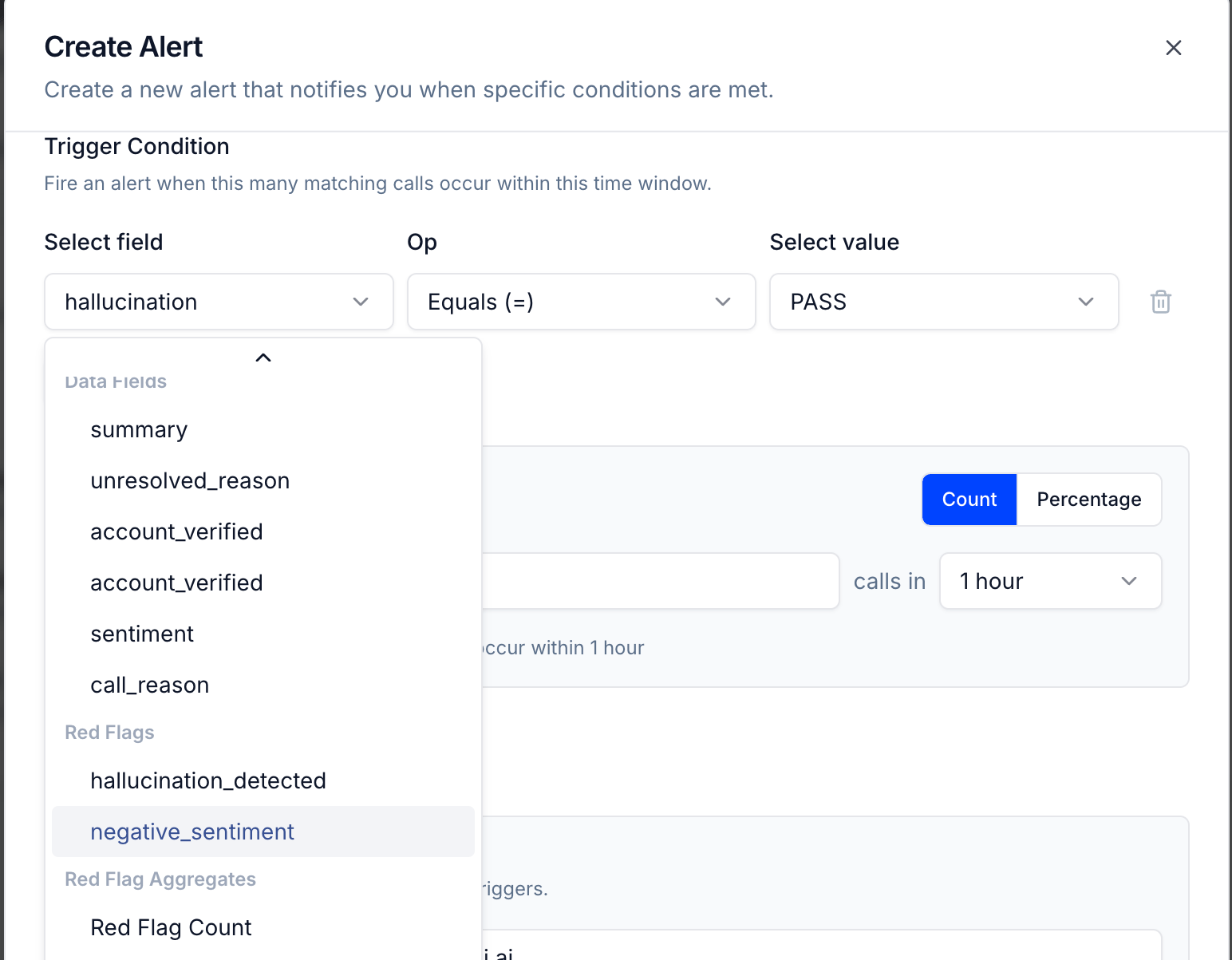 You can configure:
* **Trigger field** — a specific red flag, a data field, or Red Flag Count
* **Operator and value** — e.g. `Equals FAIL`, `greater than 3`
* **Count vs Percentage** — fire when N calls match, or when X% of calls match
* **Time window** — evaluate the condition over the last 1 hour, 24 hours, etc.
See [How to Configure Real-Time Alerts](/docs/agent-configurations/how-to-configure-real-time-alerts) for a full step-by-step guide.
***
### Next Steps
Route red flag notifications to Slack, email, or a webhook.
Use the MCP agent to find root causes behind recurring red flags.
You can configure:
* **Trigger field** — a specific red flag, a data field, or Red Flag Count
* **Operator and value** — e.g. `Equals FAIL`, `greater than 3`
* **Count vs Percentage** — fire when N calls match, or when X% of calls match
* **Time window** — evaluate the condition over the last 1 hour, 24 hours, etc.
See [How to Configure Real-Time Alerts](/docs/agent-configurations/how-to-configure-real-time-alerts) for a full step-by-step guide.
***
### Next Steps
Route red flag notifications to Slack, email, or a webhook.
Use the MCP agent to find root causes behind recurring red flags.