> ## Documentation Index
> Fetch the complete documentation index at: https://docs.usetuner.ai/llms.txt
> Use this file to discover all available pages before exploring further.
# Data Redaction (PII)
> Automatically detect and remove sensitive caller information from your call transcripts, so it is never stored in Tuner.
PII redaction is available on the **Growth plan** and is set at the **workspace level**, so it applies to every agent in the workspace.
## What is PII?
PII stands for **personally identifiable information**: details that identify a specific person, such as their name, phone number, or credit card number. In a voice agent, callers often say these out loud, so they end up in your call transcripts.
If your workspace handles sensitive calls, such as in healthcare or finance, you may not want that information stored anywhere. PII redaction finds it in each transcript and replaces it with a label before the transcript is saved, so the raw details never live in Tuner.
## How redaction works
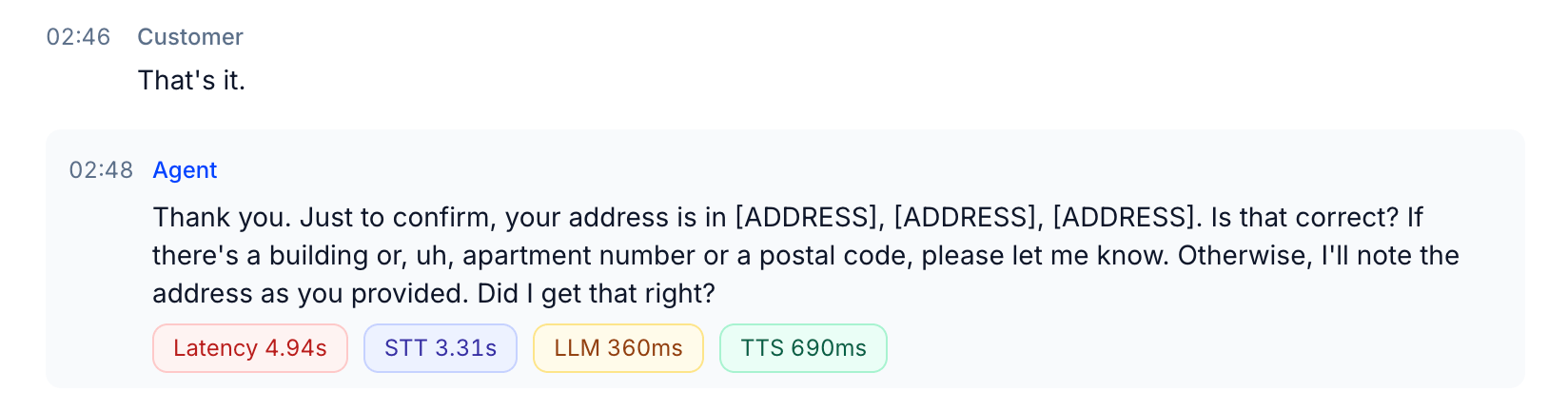
When redaction is on, every new call goes through detection before Tuner analyzes it. Anything sensitive is swapped for a typed label like `[NAME]` or `[ADDRESS]`, and the redacted version is the only one Tuner keeps. The original, unredacted transcript is never stored.
Because analysis runs on the redacted transcript, everything Tuner shows you afterwards, including outcomes, intents, evals, and the quotes they cite, is already clean.
## Turn on redaction
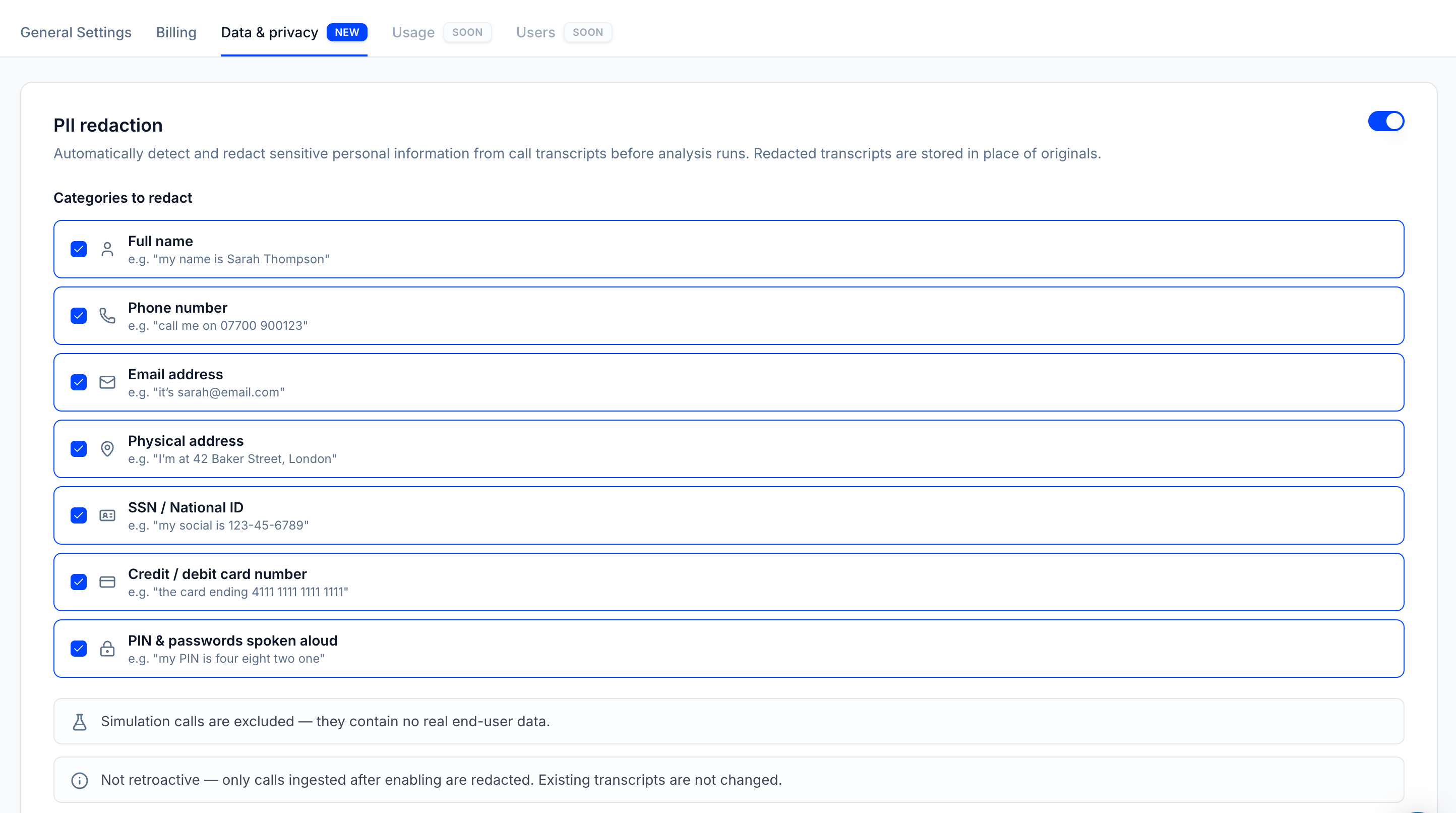
Go to **Workspace Settings** and open the **Data & Privacy** tab.
Turn on the **PII redaction** toggle at the top of the page.
Pick the categories you want removed. All of them are selected by default, and at least one must stay selected. Your changes apply to calls that come in from this point on.
 ## What Tuner can redact
You can choose any combination of these categories. Each detected item is replaced with the label shown here.
| Category | Example caught | Replaced with |
| ---------------------------- | ------------------------------------------------ | ---------------- |
| Full name | "my name is Sarah Thompson" | `[NAME]` |
| Phone number | "call me on 07700 900123" | `[PHONE_NUMBER]` |
| Email address | "it's [sarah@email.com](mailto:sarah@email.com)" | `[EMAIL]` |
| Physical address | "I'm at 42 Baker Street, London" | `[ADDRESS]` |
| SSN / National ID | "my social is 123-45-6789" | `[SSN]` |
| Credit / debit card number | "the card ending 4111 1111 1111 1111" | `[CREDIT_CARD]` |
| PIN & passwords spoken aloud | "my PIN is four eight two one" | `[PIN]` |
## What a redacted call looks like
In the transcript, redacted details appear as labels in place of the original words. Everything else about the call, including timing and voice metrics, stays exactly as it was.
## What Tuner can redact
You can choose any combination of these categories. Each detected item is replaced with the label shown here.
| Category | Example caught | Replaced with |
| ---------------------------- | ------------------------------------------------ | ---------------- |
| Full name | "my name is Sarah Thompson" | `[NAME]` |
| Phone number | "call me on 07700 900123" | `[PHONE_NUMBER]` |
| Email address | "it's [sarah@email.com](mailto:sarah@email.com)" | `[EMAIL]` |
| Physical address | "I'm at 42 Baker Street, London" | `[ADDRESS]` |
| SSN / National ID | "my social is 123-45-6789" | `[SSN]` |
| Credit / debit card number | "the card ending 4111 1111 1111 1111" | `[CREDIT_CARD]` |
| PIN & passwords spoken aloud | "my PIN is four eight two one" | `[PIN]` |
## What a redacted call looks like
In the transcript, redacted details appear as labels in place of the original words. Everything else about the call, including timing and voice metrics, stays exactly as it was.
 ## Good to know
* **Growth plan only.** On other plans you can see the PII redaction settings, but the controls are disabled with an option to upgrade.
* **Workspace-wide.** Redaction applies to every agent in the workspace. There is no per-agent setting.
* **Permanent and forward-only.** Redaction cannot be undone, and it only affects calls ingested after you turn it on. Calls you already have are left unchanged.
* **Simulation calls are never redacted.** Simulated calls contain no real caller data, so they are always left as they are.
## Good to know
* **Growth plan only.** On other plans you can see the PII redaction settings, but the controls are disabled with an option to upgrade.
* **Workspace-wide.** Redaction applies to every agent in the workspace. There is no per-agent setting.
* **Permanent and forward-only.** Redaction cannot be undone, and it only affects calls ingested after you turn it on. Calls you already have are left unchanged.
* **Simulation calls are never redacted.** Simulated calls contain no real caller data, so they are always left as they are.