> ## Documentation Index
> Fetch the complete documentation index at: https://docs.usetuner.ai/llms.txt
> Use this file to discover all available pages before exploring further.
# Webhooks
> Send Tuner events to any endpoint. Get notified when a call is analyzed, when an alert fires, and, for Vapi and Retell, receive the original provider payload so your existing automations keep working.
## Overview
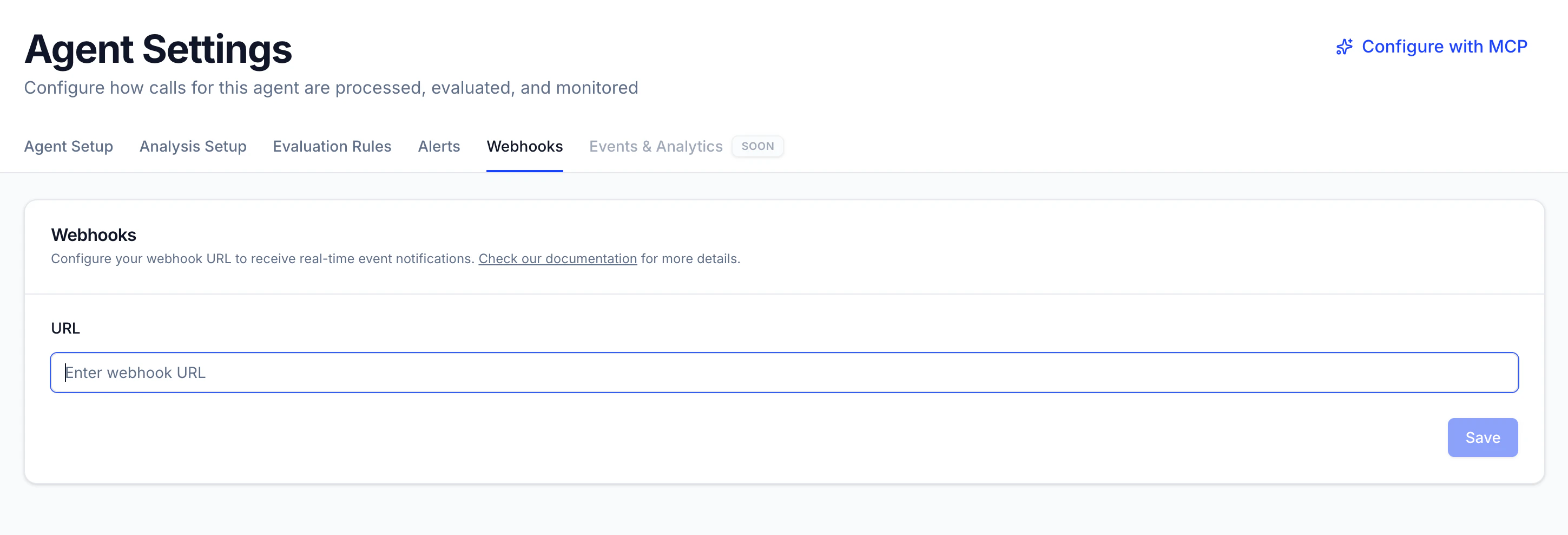
Every agent in Tuner can have a webhook URL, regardless of which provider. Configure it once in **Agent Settings** → **Webhooks**, and Tuner will deliver events to it as they happen.
Tuner sends up to three types of events:
| Event | When it's sent | Available for |
| --------------- | ----------------------------------------------------------------------------------------------------------------------------- | ------------------ |
| `call.analyzed` | Tuner finishes analyzing a call | All providers |
| `alert.fired` | A [real-time alert](/docs/agent-configurations/how-to-configure-real-time-alerts) triggers (with the Webhook channel enabled) | All providers |
| `call.ended` | The original call payload from your provider, forwarded as-is | Vapi & Retell only |
## Setup
Select the agent from the sidebar, then open **Agent Settings** and go to the **Webhooks** tab.
Enter the endpoint that should receive events (for example, your n8n, Zapier, or custom server endpoint).
Tuner will start delivering events to your URL.
 ## Event envelope
All events share the same envelope, so a single handler can process everything:
* **`event`**: the event type (`call.analyzed`, `alert.fired`, or `call.ended`).
* **`event_id`**: a unique ID for this delivery. Use it to deduplicate if your endpoint receives a retry.
* **`created_at`**: ISO 8601 timestamp of when the event was emitted.
* **`payload`**: the event-specific data.
## Event types
### `call.analyzed`: call analysis complete
Sent for **all providers** once Tuner has finished analyzing a call. It includes a direct link to the call in Tuner, so you can route it into ticketing systems, QA queues, or internal dashboards.
```json theme={null}
{
"event": "call.analyzed",
"event_id": "call.analyzed:call_d6e56839d80a34474f2f57f06a7",
"created_at": "2026-07-03T14:39:33.677818+00:00",
"payload": {
"tuner_call_url": "https://app.usetuner.ai/call-logs/8379",
"provider_agent_id": "agent_5410a3ec3f429c24c36e79e356"
},
"call_id": "call_d6e56839d80a34474f2f57f06a7"
}
```
### `alert.fired`: a real-time alert triggered
Sent for **all providers** when a [real-time alert](/docs/agent-configurations/how-to-configure-real-time-alerts) with the **Webhook** notification channel enabled fires. The payload includes the alert definition, the threshold and time window that were breached, and the call that tipped it over: everything you need to page an on-call engineer or kick off an automated workflow.
```json theme={null}
{
"event": "alert.fired",
"event_id": "alert.fired:155:66",
"created_at": "2026-07-06T03:10:35.868197+00:00",
"payload": {
"alert_id": 155,
"alert_name": "hallucination-happened",
"severity": "critical",
"alert_trigger_id": 66,
"call_id": 8383,
"agent_id": 466,
"qualifying_count": 1,
"threshold_n": 1,
"window_ms": 3600000,
"window_start": "2026-06-25T09:18:22+00:00",
"window_end": "2026-06-25T10:18:22+00:00",
"triggered_at": "2026-07-06T03:10:35.513644+00:00"
}
}
```
### `call.ended`: provider payload forwarding (Vapi & Retell only)
Vapi and Retell only support a **single webhook URL** per agent. When you connect one of these agents to Tuner, Tuner takes that webhook slot, which would normally break any automation you already had wired to it (an n8n workflow, a Zapier trigger, a custom server).
The `call.ended` event solves this: Tuner forwards the **complete, unmodified payload** your provider sends, wrapped in the standard envelope. Your existing automations keep working exactly as before, and you simply gain Tuner's analysis on top.
**Payload is unchanged.** The `payload` field contains the exact event structure Vapi or Retell sends, so existing handlers only need to read `payload` instead of the request body root.
```json theme={null}
{
"event": "call.ended",
"event_id": "call.ended:call_d6e56839d80a34474f2f57f06a7",
"created_at": "2026-07-03T14:37:57.231241+00:00",
"payload": {
// The exact call data Vapi or Retell sends, unchanged
// (transcript, recording, analysis, etc.)
}
}
```
For providers other than Vapi and Retell (LiveKit, Pipecat, Dograh, custom integrations), calls reach Tuner through the SDK or API rather than a provider webhook, so there is nothing to forward. Those agents receive `call.analyzed` and `alert.fired` only.
## Next steps
Create alerts and route them to email and your webhook.
Connect your Vapi assistant to Tuner in minutes.
Connect your Retell agent to Tuner in minutes.
Integrate your custom voice AI stack with the Tuner API.
## Event envelope
All events share the same envelope, so a single handler can process everything:
* **`event`**: the event type (`call.analyzed`, `alert.fired`, or `call.ended`).
* **`event_id`**: a unique ID for this delivery. Use it to deduplicate if your endpoint receives a retry.
* **`created_at`**: ISO 8601 timestamp of when the event was emitted.
* **`payload`**: the event-specific data.
## Event types
### `call.analyzed`: call analysis complete
Sent for **all providers** once Tuner has finished analyzing a call. It includes a direct link to the call in Tuner, so you can route it into ticketing systems, QA queues, or internal dashboards.
```json theme={null}
{
"event": "call.analyzed",
"event_id": "call.analyzed:call_d6e56839d80a34474f2f57f06a7",
"created_at": "2026-07-03T14:39:33.677818+00:00",
"payload": {
"tuner_call_url": "https://app.usetuner.ai/call-logs/8379",
"provider_agent_id": "agent_5410a3ec3f429c24c36e79e356"
},
"call_id": "call_d6e56839d80a34474f2f57f06a7"
}
```
### `alert.fired`: a real-time alert triggered
Sent for **all providers** when a [real-time alert](/docs/agent-configurations/how-to-configure-real-time-alerts) with the **Webhook** notification channel enabled fires. The payload includes the alert definition, the threshold and time window that were breached, and the call that tipped it over: everything you need to page an on-call engineer or kick off an automated workflow.
```json theme={null}
{
"event": "alert.fired",
"event_id": "alert.fired:155:66",
"created_at": "2026-07-06T03:10:35.868197+00:00",
"payload": {
"alert_id": 155,
"alert_name": "hallucination-happened",
"severity": "critical",
"alert_trigger_id": 66,
"call_id": 8383,
"agent_id": 466,
"qualifying_count": 1,
"threshold_n": 1,
"window_ms": 3600000,
"window_start": "2026-06-25T09:18:22+00:00",
"window_end": "2026-06-25T10:18:22+00:00",
"triggered_at": "2026-07-06T03:10:35.513644+00:00"
}
}
```
### `call.ended`: provider payload forwarding (Vapi & Retell only)
Vapi and Retell only support a **single webhook URL** per agent. When you connect one of these agents to Tuner, Tuner takes that webhook slot, which would normally break any automation you already had wired to it (an n8n workflow, a Zapier trigger, a custom server).
The `call.ended` event solves this: Tuner forwards the **complete, unmodified payload** your provider sends, wrapped in the standard envelope. Your existing automations keep working exactly as before, and you simply gain Tuner's analysis on top.
**Payload is unchanged.** The `payload` field contains the exact event structure Vapi or Retell sends, so existing handlers only need to read `payload` instead of the request body root.
```json theme={null}
{
"event": "call.ended",
"event_id": "call.ended:call_d6e56839d80a34474f2f57f06a7",
"created_at": "2026-07-03T14:37:57.231241+00:00",
"payload": {
// The exact call data Vapi or Retell sends, unchanged
// (transcript, recording, analysis, etc.)
}
}
```
For providers other than Vapi and Retell (LiveKit, Pipecat, Dograh, custom integrations), calls reach Tuner through the SDK or API rather than a provider webhook, so there is nothing to forward. Those agents receive `call.analyzed` and `alert.fired` only.
## Next steps
Create alerts and route them to email and your webhook.
Connect your Vapi assistant to Tuner in minutes.
Connect your Retell agent to Tuner in minutes.
Integrate your custom voice AI stack with the Tuner API.