> ## Documentation Index
> Fetch the complete documentation index at: https://docs.usetuner.ai/llms.txt
> Use this file to discover all available pages before exploring further.
# Benchmark your stack on your own calls
> Test a new model or provider on your own callers, in your own stack, before you switch. Same calls, same scoring, latency measured on every run.
There's a new model every week. It tops the leaderboard, and a few days later another one takes its place.
A leaderboard can't tell you if that model is right for your agent. Public benchmarks run on generic audio that may overlap with what the models were trained on. Your callers are specific: their language, their accents, their background noise, your industry's words. And a model never runs alone. Turn detection, orchestration, and noise handling change how the same model performs, and the latency your caller actually feels.
So test it on your calls, in your stack. Replay the same Dataset calls on your current setup and on the one you're considering, and compare the results. Same calls, same scoring, latency measured on every run. That's your own benchmark: built on your data, for your use case, and it doesn't change every week.
***
## What to collect
| What you're comparing | Calls to add | What to look at after a replay |
| - | - | - |
| **Response latency** | Ordinary calls of normal length, a few for each of your top Intents | The **Voice Metrics** tab of each replayed call, and the latency badges on each agent turn in the transcript |
| **Speech-to-text accuracy** | Accents, fast talkers, names, numbers, addresses, your industry's vocabulary | The replayed call's transcript next to the Dataset call's reference transcript, turn by turn |
| **Turn detection** | Callers who pause mid-sentence, hesitate ("um, so..."), trail off, or answer with a single word | Whether the agent jumped in before the caller finished, or waited too long to answer |
| **Interruptions** | Callers who talk over the agent | How the agent handles being talked over. A replay always plays each caller turn in full, even if the agent is still speaking. |
| **Noise and line quality** | Calls from the car, the street, a café, speakerphone, or a bad line | Transcription errors and turns cut off by background sound |
Cover your real mix. If a third of your callers phone from the car, a third of these calls should too.
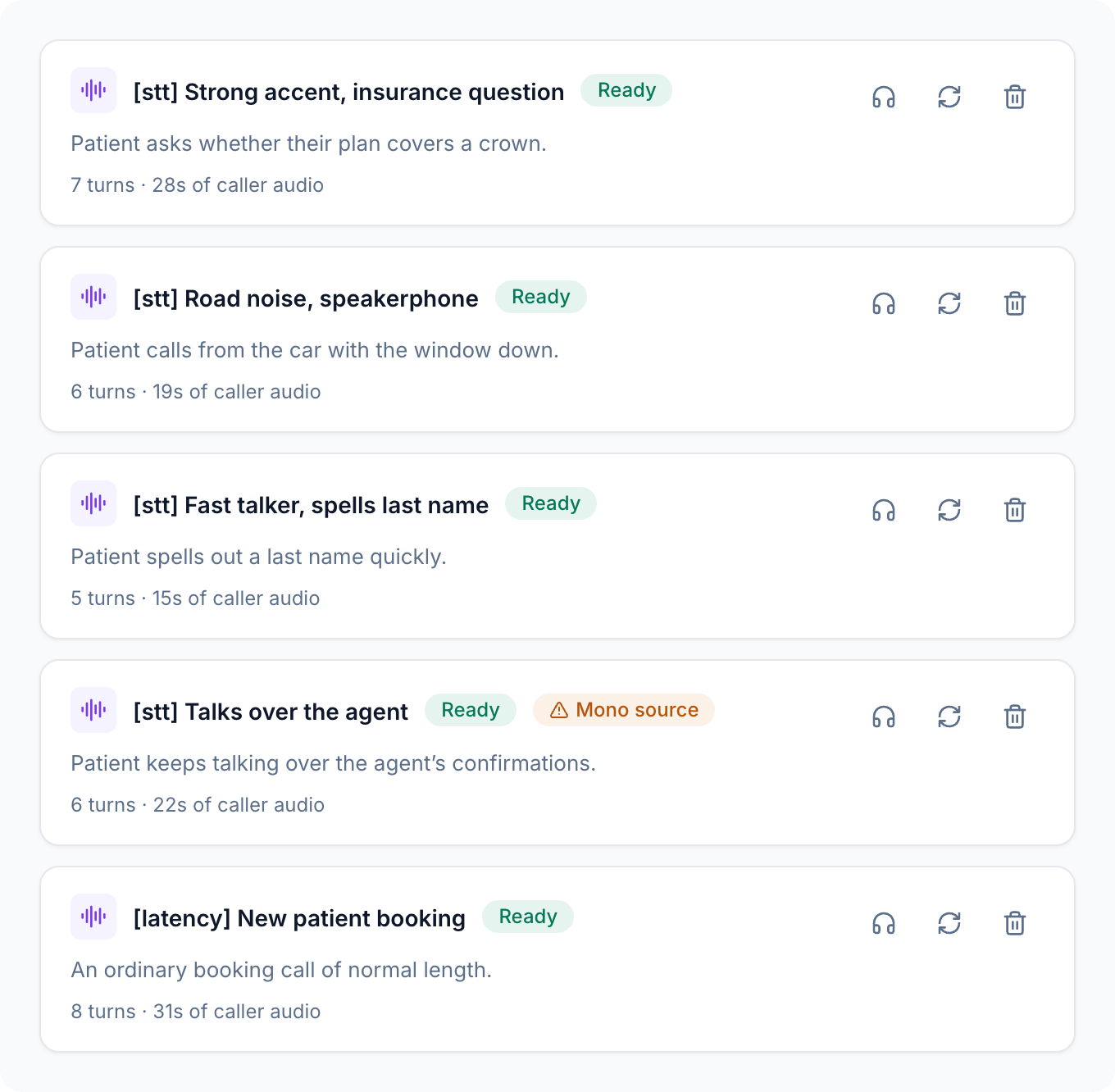 Replays don't add simulated noise, change the language, or apply a test profile. The recording already carries the real conditions. To test conditions you don't have recordings for, use a [generated simulation](/docs/simulation/overview) with background noise or a different accent.
***
## Compare two setups
Choose the Dataset calls that cover what you're changing, up to 10 per run. Keep the same set for every run in the comparison.
Replay each call 3 to 5 times on your current setup. Repeats show you how much results vary on their own, before you change anything.
Swap in the new speech-to-text model, LLM, or TTS voice, or adjust your turn detection or endpointing. Only one change, so any difference has one cause.
Use the same calls, the same number of repeats, the same **Max call duration**, and the same **Advanced turn-taking** settings.
Open the matching calls from each run and compare their Voice Metrics, transcripts, and eval results. Keep the change only if it helps across the set, not on one lucky call.
Every run card on the **Replays** tab lists the calls, repeats, and turn-taking settings it used, so you can confirm two runs are comparable before you read the results. See [Replays](/docs/simulation/replays#replay-a-dataset-call).
Replays don't add simulated noise, change the language, or apply a test profile. The recording already carries the real conditions. To test conditions you don't have recordings for, use a [generated simulation](/docs/simulation/overview) with background noise or a different accent.
***
## Compare two setups
Choose the Dataset calls that cover what you're changing, up to 10 per run. Keep the same set for every run in the comparison.
Replay each call 3 to 5 times on your current setup. Repeats show you how much results vary on their own, before you change anything.
Swap in the new speech-to-text model, LLM, or TTS voice, or adjust your turn detection or endpointing. Only one change, so any difference has one cause.
Use the same calls, the same number of repeats, the same **Max call duration**, and the same **Advanced turn-taking** settings.
Open the matching calls from each run and compare their Voice Metrics, transcripts, and eval results. Keep the change only if it helps across the set, not on one lucky call.
Every run card on the **Replays** tab lists the calls, repeats, and turn-taking settings it used, so you can confirm two runs are comparable before you read the results. See [Replays](/docs/simulation/replays#replay-a-dataset-call).
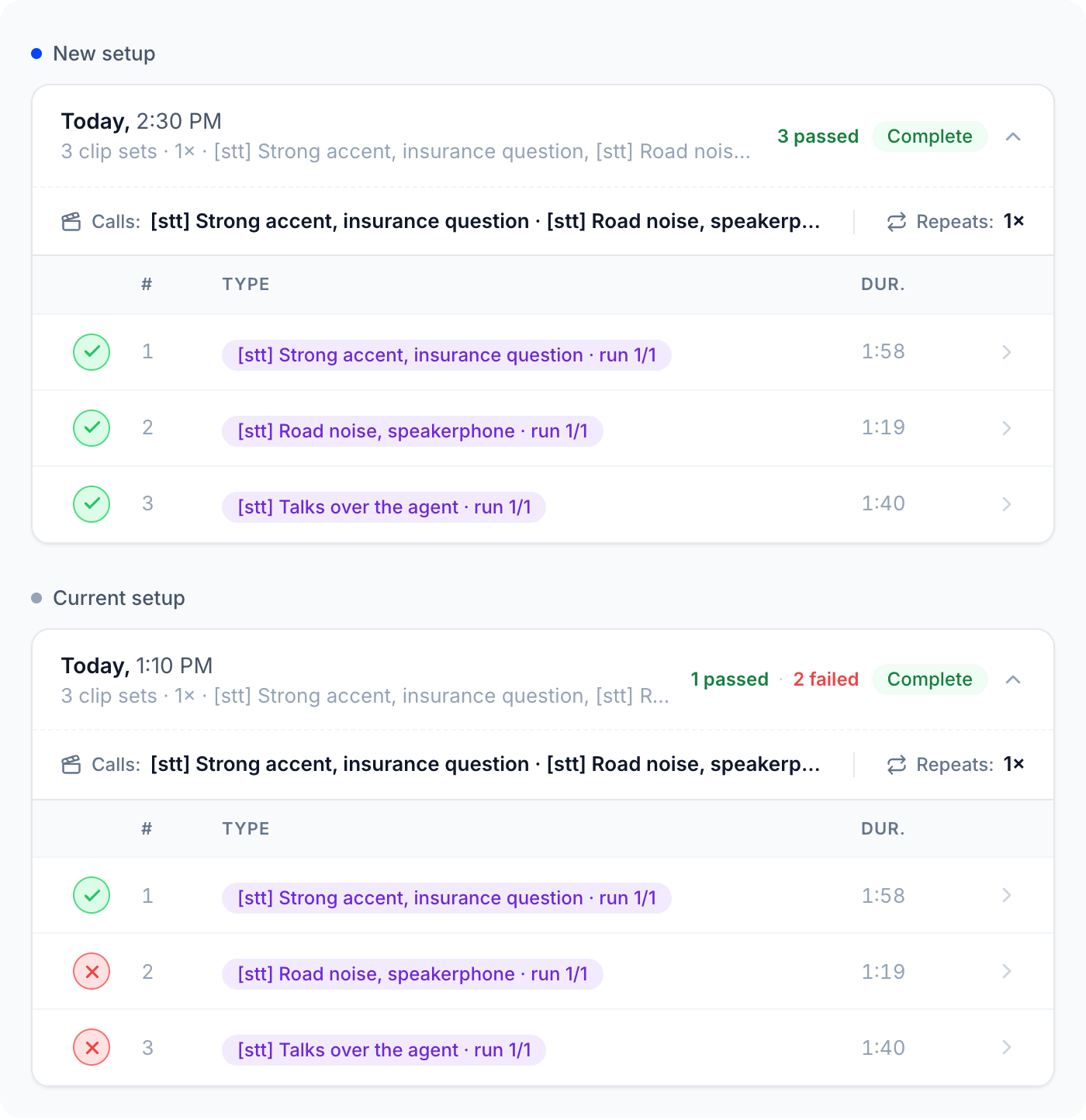 Then open the same call from each run to see where the difference comes from:
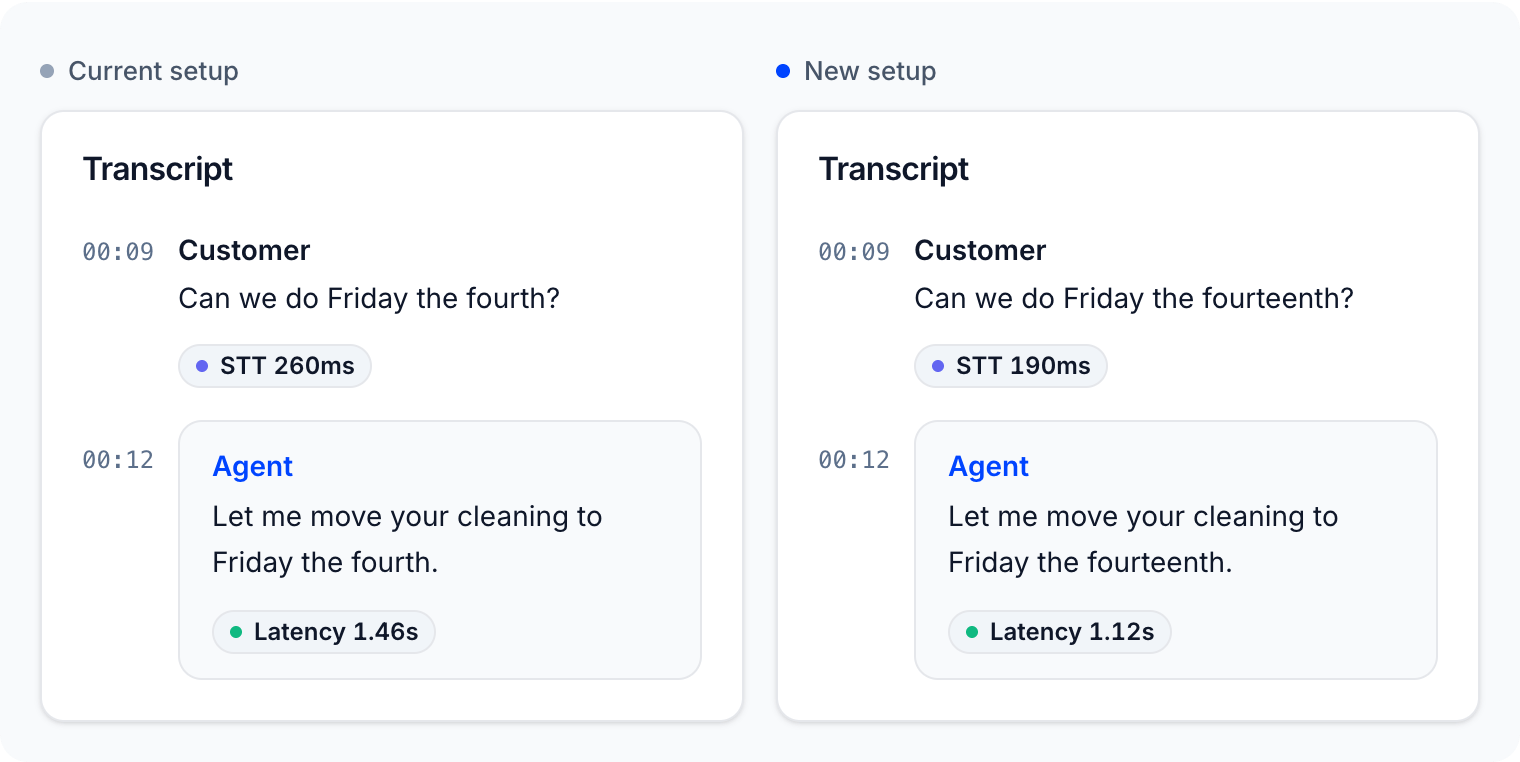 ***
## Read latency on a replayed call
Open any replayed call from the **Replays** tab. The **Voice Metrics** tab shows its latency like any other call, and the transcript shows per-turn badges when your platform reports them: total response **Latency** on each agent turn, and **STT**, **LLM**, and **TTS** time where available.
***
## Read latency on a replayed call
Open any replayed call from the **Replays** tab. The **Voice Metrics** tab shows its latency like any other call, and the transcript shows per-turn badges when your platform reports them: total response **Latency** on each agent turn, and **STT**, **LLM**, and **TTS** time where available.
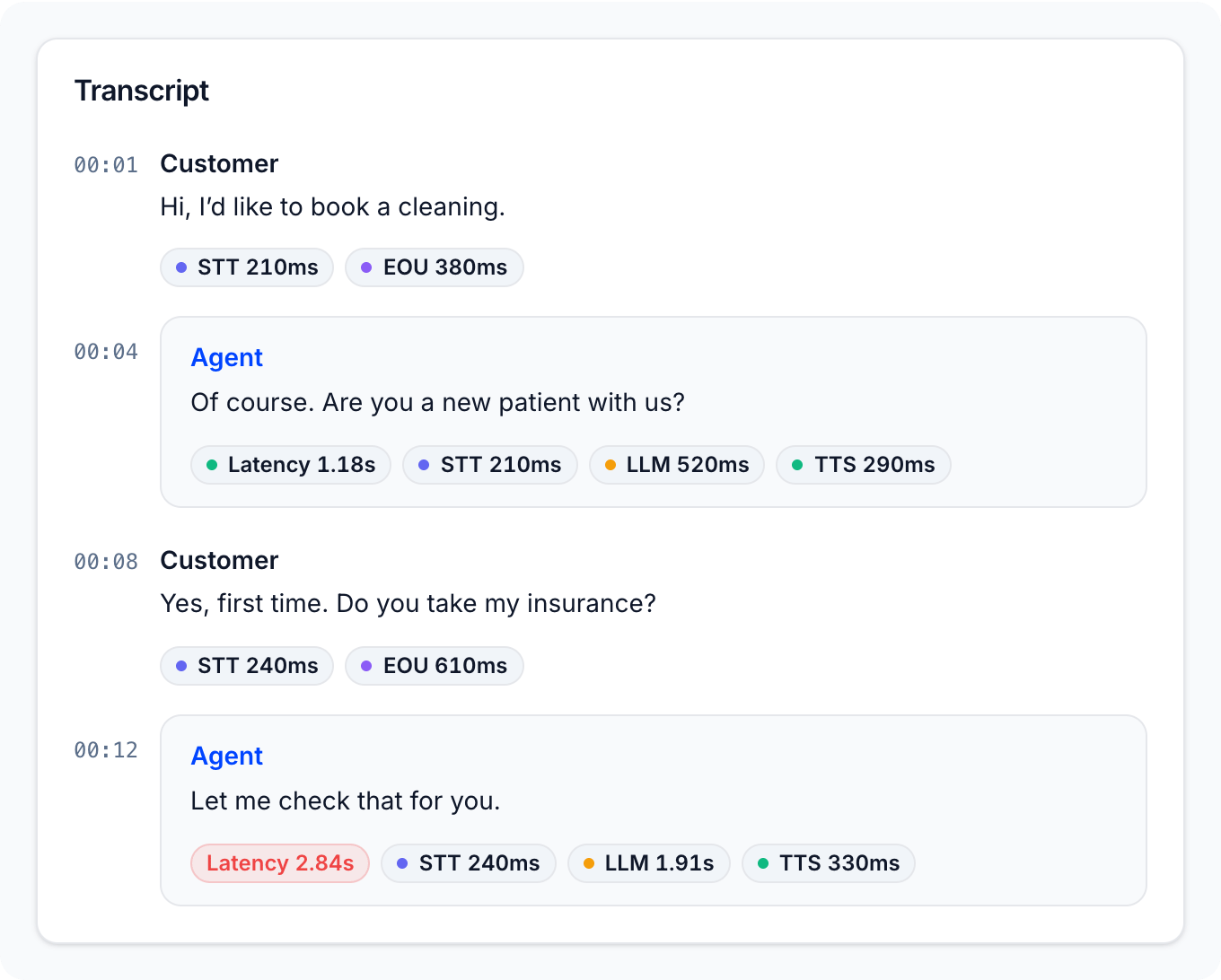 For per-turn timing measured by Tuner itself, use the public API. The call details endpoint returns each replay turn's timings under `simulation_replay.turn_timings`: when the caller's clip ended (`clip_ended_ms`), when the agent's first audio arrived (`agent_first_audio_ms`), and whether the agent spoke over the clip (`overlapped`). The difference between the first two is the agent's response time for that turn.
***
## Tips
* **Keep calls short.** Latency shows up in the first few turns. Short calls replay faster, cost less, and fit within the max call duration.
* **Prefer multi-channel calls.** In a mono source, fragments of the original agent can leak into the caller's turns and confuse your agent's turn detection.
* **Re-run the baseline after big changes.** Provider-side model updates can shift results even when you changed nothing.
### Next steps
Reproduce the call that failed and prove your fix.
How a replay plays, and how to read its results.
This documentation is built and hosted on [Mintlify](https://mintlify.com), a developer documentation platform.
For per-turn timing measured by Tuner itself, use the public API. The call details endpoint returns each replay turn's timings under `simulation_replay.turn_timings`: when the caller's clip ended (`clip_ended_ms`), when the agent's first audio arrived (`agent_first_audio_ms`), and whether the agent spoke over the clip (`overlapped`). The difference between the first two is the agent's response time for that turn.
***
## Tips
* **Keep calls short.** Latency shows up in the first few turns. Short calls replay faster, cost less, and fit within the max call duration.
* **Prefer multi-channel calls.** In a mono source, fragments of the original agent can leak into the caller's turns and confuse your agent's turn detection.
* **Re-run the baseline after big changes.** Provider-side model updates can shift results even when you changed nothing.
### Next steps
Reproduce the call that failed and prove your fix.
How a replay plays, and how to read its results.
This documentation is built and hosted on [Mintlify](https://mintlify.com), a developer documentation platform.