> ## Documentation Index
> Fetch the complete documentation index at: https://docs.usetuner.ai/llms.txt
> Use this file to discover all available pages before exploring further.
# Outbound Simulation
> Test agents that place calls: Tuner tells your system who to call, your agent dials a simulation agent, and the call links back automatically.
Outbound simulation tests agents that **place** calls. Tuner can't dial into an outbound agent, so the flow is flipped: Tuner tells your system **who to call**, and your agent calls a **simulation agent** — the AI caller that plays the customer in each scenario.
The "who to call" is a [SIP URI](/docs/simulation/inbound/setup) rather than a phone number — `sip:sim-abc123@sip.usetuner.ai` instead of `+15551234567`. It goes in the same field your API already uses for the number, and your platform dials it like any other call.
**Prerequisite:** your agent must already be integrated with Tuner and sending real calls — [LiveKit](/docs/integrations/livekit), [Pipecat](/docs/integrations/pipecat), or [Custom stack](/docs/integrations/custom-stack/overview). Your agent must also be set up as **outbound**.
## How it works
1. **You describe your call-starting API to Tuner, once.** Every outbound agent has some endpoint that kicks off a call. You give Tuner that endpoint and Tuner uses it for every simulated call.
2. **Tuner builds the scenarios.** Each run generates simulation agents with a persona, an intent, and something to stress-test — the same as inbound simulation. Each gets its own SIP URI.
3. **Tuner triggers your endpoint once per scenario**, passing the SIP URI where your body expects the number, plus scenario context your agent can use.
4. **Your agent dials and the conversation happens.** From your agent's side this is an ordinary outbound call.
5. **You sync the call back with the SIP URI in `recipient`.** That's the key that matches the call to the simulation instead of treating it as production traffic.
6. **Your production Evals run**, and results appear in the **Simulations** table.
## Configure the trigger endpoint
Open **Agent Settings → Simulation Setup**. This is where you describe your API to Tuner:
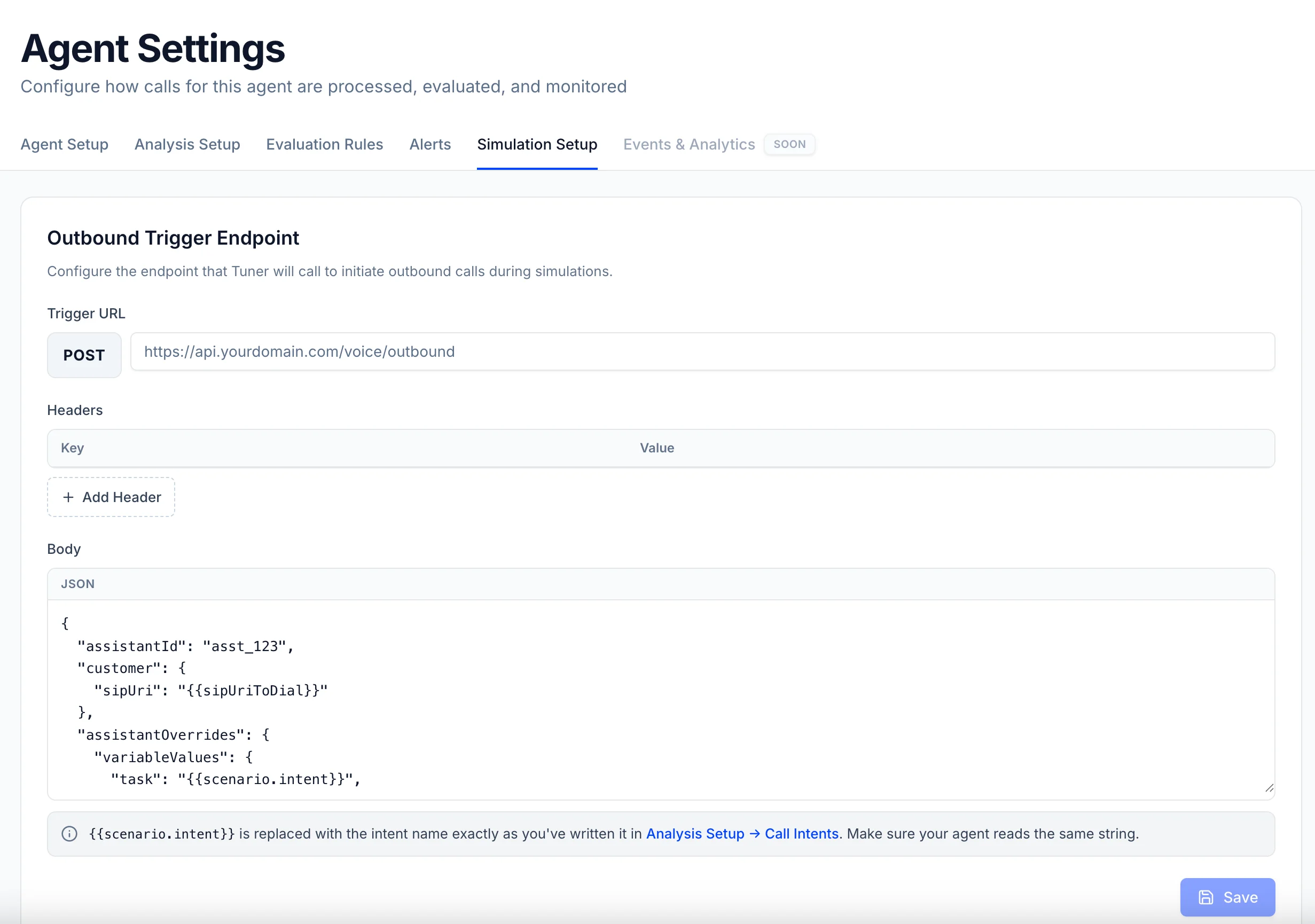 * **Trigger URL** — the endpoint on your side that places an outbound call.
* **Headers** — whatever your endpoint needs to accept the request (an `Authorization` token, for example).
* **Body** — a JSON template in **your** endpoint's shape, containing Tuner's three placeholders:
| Placeholder | Replaced with |
| ---------------------------- | ---------------------------------------------------------------------------------------------------------------------------------------- |
| `{{sipUriToDial}}` | The SIP URI of the simulation agent. **The one value your system must use** — it's who you dial. |
| `{{scenario.intent}}` | The intent of the call, exactly as written in **Analysis Setup → Call Intents**. Useful if you run different agents or logic per intent. |
| `{{scenario.customer_name}}` | The name of the customer being called. Useful to mimic a CRM lookup or a personalized greeting. |
The key names are entirely yours (`destination`, `to`, `phoneNumber`, …). All three placeholders need a key in the template, but if you don't use the intent or the name, park them under any key — only the SIP URI is essential.
### Example
Say your endpoint takes a `destination` and dials it. Somewhere inside, there's a line like this (LiveKit shown, same concept on any stack):
```python theme={null}
await ctx.api.sip.create_sip_participant(
api.CreateSIPParticipantRequest(
sip_call_to=destination, # the phone number, or Tuner's SIP URI in simulation
...
)
)
```
In Tuner, you mirror that endpoint with `{{sipUriToDial}}` in the `destination` field, since that's where the number normally goes:
**Trigger URL**
```text theme={null}
POST https://api.yourdomain.com/voice/outbound
```
**Headers**
| Key | Value |
| --------------- | ------------------- |
| `Authorization` | `Bearer YOUR_TOKEN` |
**Body**
```json theme={null}
{
"destination": "{{sipUriToDial}}",
"task": "{{scenario.intent}}",
"customerName": "{{scenario.customer_name}}"
}
```
* **Trigger URL** — the endpoint on your side that places an outbound call.
* **Headers** — whatever your endpoint needs to accept the request (an `Authorization` token, for example).
* **Body** — a JSON template in **your** endpoint's shape, containing Tuner's three placeholders:
| Placeholder | Replaced with |
| ---------------------------- | ---------------------------------------------------------------------------------------------------------------------------------------- |
| `{{sipUriToDial}}` | The SIP URI of the simulation agent. **The one value your system must use** — it's who you dial. |
| `{{scenario.intent}}` | The intent of the call, exactly as written in **Analysis Setup → Call Intents**. Useful if you run different agents or logic per intent. |
| `{{scenario.customer_name}}` | The name of the customer being called. Useful to mimic a CRM lookup or a personalized greeting. |
The key names are entirely yours (`destination`, `to`, `phoneNumber`, …). All three placeholders need a key in the template, but if you don't use the intent or the name, park them under any key — only the SIP URI is essential.
### Example
Say your endpoint takes a `destination` and dials it. Somewhere inside, there's a line like this (LiveKit shown, same concept on any stack):
```python theme={null}
await ctx.api.sip.create_sip_participant(
api.CreateSIPParticipantRequest(
sip_call_to=destination, # the phone number, or Tuner's SIP URI in simulation
...
)
)
```
In Tuner, you mirror that endpoint with `{{sipUriToDial}}` in the `destination` field, since that's where the number normally goes:
**Trigger URL**
```text theme={null}
POST https://api.yourdomain.com/voice/outbound
```
**Headers**
| Key | Value |
| --------------- | ------------------- |
| `Authorization` | `Bearer YOUR_TOKEN` |
**Body**
```json theme={null}
{
"destination": "{{sipUriToDial}}",
"task": "{{scenario.intent}}",
"customerName": "{{scenario.customer_name}}"
}
```
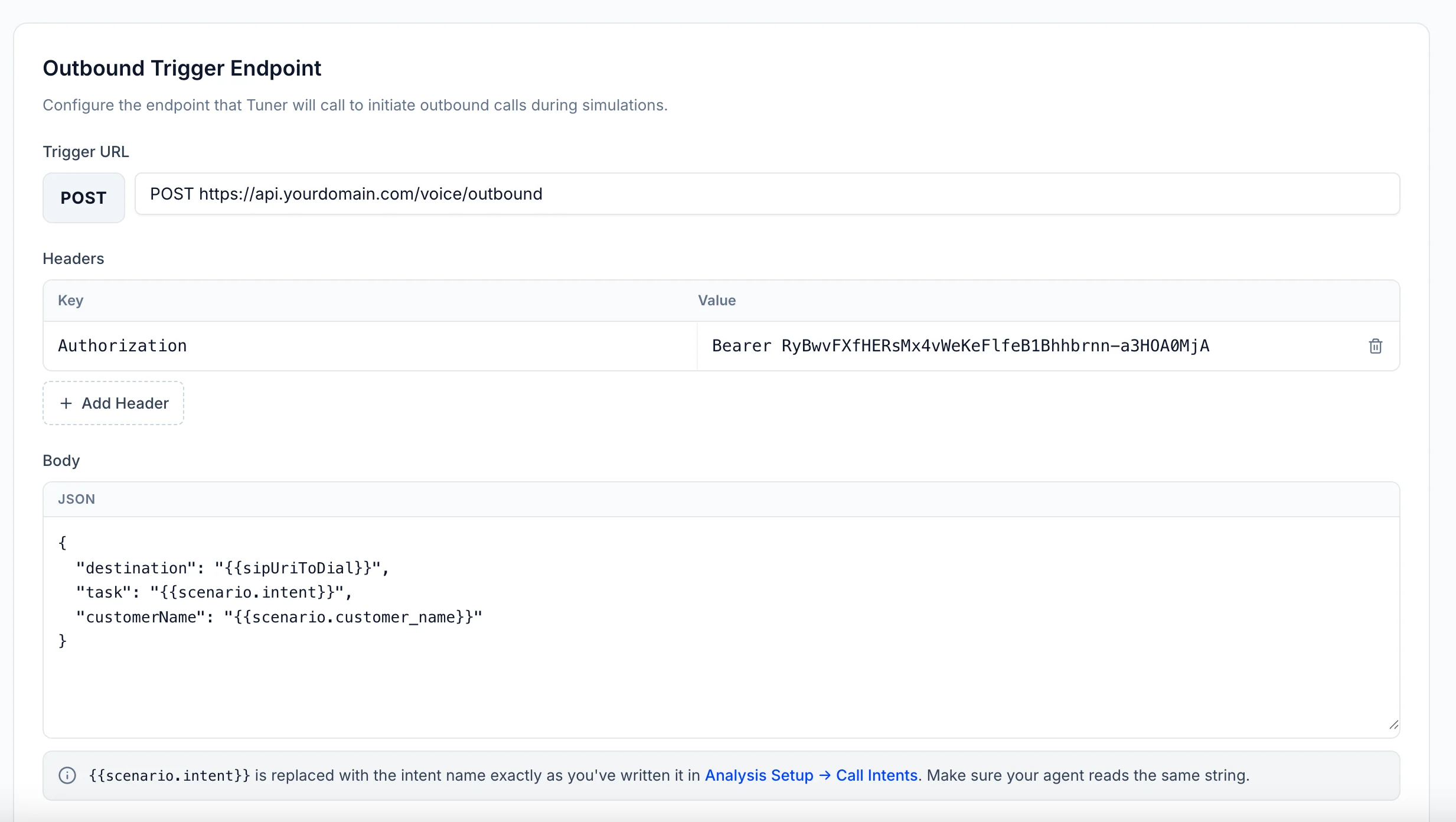 Click **Save**, and every simulation run will trigger your endpoint once per scenario.
## Send the call back with `recipient`
When your integration syncs the finished call to Tuner, the dialed SIP URI must be in the **`recipient`** field, **exactly as Tuner sent it**. Whatever key you put `{{sipUriToDial}}` under, that's the value to send back.
```python theme={null}
TunerPlugin(
session, ctx,
..., # your existing options
recipient=destination, # ← the SIP URI Tuner sent, verbatim
)
```
```ts theme={null}
new TunerPlugin(session, ctx, {
// ...your existing options
recipient: destination, // ← the SIP URI Tuner sent, verbatim
});
```
```python theme={null}
Observer(
..., # your existing options
recipient=destination, # ← the SIP URI Tuner sent, verbatim
)
```
```json theme={null}
{
...,
"recipient": destination
}
```
See the [Create Call API](/docs/api-reference/create-call) for the full payload.
Want **evals** to use the intent or customer name? Echo them back in the call's metadata when you sync (`extra_metadata` on the LiveKit plugin, or `metadata` in the Create Call payload). See [Evaluating agents with dynamic instructions](/docs/evaluation/dynamic-agents).
## Managed platforms
Running your outbound agent on Vapi, Retell, or another managed platform? Step-by-step guides are **coming soon**.
## Troubleshooting
The synced call's `recipient` didn't match the SIP URI Tuner sent: it was never set, was modified, or a different value was sent. Compare the URI your endpoint received byte-for-byte with the `recipient` on the synced call.
The dial failed on your side. Check your platform's logs, and confirm your trunk can dial a SIP URI — some configurations only allow phone numbers.
Check the **Headers** saved in Simulation Setup, and confirm the body template matches the shape your endpoint expects.
***
Configure your simulation mix and start a batch.
Click **Save**, and every simulation run will trigger your endpoint once per scenario.
## Send the call back with `recipient`
When your integration syncs the finished call to Tuner, the dialed SIP URI must be in the **`recipient`** field, **exactly as Tuner sent it**. Whatever key you put `{{sipUriToDial}}` under, that's the value to send back.
```python theme={null}
TunerPlugin(
session, ctx,
..., # your existing options
recipient=destination, # ← the SIP URI Tuner sent, verbatim
)
```
```ts theme={null}
new TunerPlugin(session, ctx, {
// ...your existing options
recipient: destination, // ← the SIP URI Tuner sent, verbatim
});
```
```python theme={null}
Observer(
..., # your existing options
recipient=destination, # ← the SIP URI Tuner sent, verbatim
)
```
```json theme={null}
{
...,
"recipient": destination
}
```
See the [Create Call API](/docs/api-reference/create-call) for the full payload.
Want **evals** to use the intent or customer name? Echo them back in the call's metadata when you sync (`extra_metadata` on the LiveKit plugin, or `metadata` in the Create Call payload). See [Evaluating agents with dynamic instructions](/docs/evaluation/dynamic-agents).
## Managed platforms
Running your outbound agent on Vapi, Retell, or another managed platform? Step-by-step guides are **coming soon**.
## Troubleshooting
The synced call's `recipient` didn't match the SIP URI Tuner sent: it was never set, was modified, or a different value was sent. Compare the URI your endpoint received byte-for-byte with the `recipient` on the synced call.
The dial failed on your side. Check your platform's logs, and confirm your trunk can dial a SIP URI — some configurations only allow phone numbers.
Check the **Headers** saved in Simulation Setup, and confirm the body template matches the shape your endpoint expects.
***
Configure your simulation mix and start a batch.