> ## Documentation Index
> Fetch the complete documentation index at: https://docs.usetuner.ai/llms.txt
> Use this file to discover all available pages before exploring further.
# Individual platforms
> Outbound simulation for LiveKit, Pipecat, custom stacks, and more: connect your outbound-call API to Tuner's trigger endpoint, and sync calls back with the dialed SIP URI in the recipient field.
New to outbound simulation? Start with the [**overview**](/docs/simulation/outbound/overview) to see how the flow works end to end.
## The concept
Your system already has an API that starts an outbound call. You give Tuner that API (URL, headers, body), and Tuner calls it for every simulated call, putting the simulation agent's **SIP URI** where your body expects the phone number.
**What's a SIP URI?** The internet equivalent of a phone number: `sip:sim-abc123@sip.usetuner.ai` instead of `+15551234567`. Most telephony providers (Twilio, Telnyx, LiveKit, etc.) accept one anywhere they accept a phone number, so it gets dialed like any other call.
**Prerequisite:** your agent must already be integrated with Tuner and sending real calls: [LiveKit](/docs/api-and-integrations/connecting-to-livekit), [Pipecat](/docs/api-and-integrations/connecting-to-pipecat), or [Custom API](/docs/api-and-integrations/custom-integration-with-the-tuner-api).
## The Outbound Trigger Endpoint
Open **Agent Settings → Simulation Setup** (your agent must be set up as **outbound**). This is where you describe your API to Tuner:
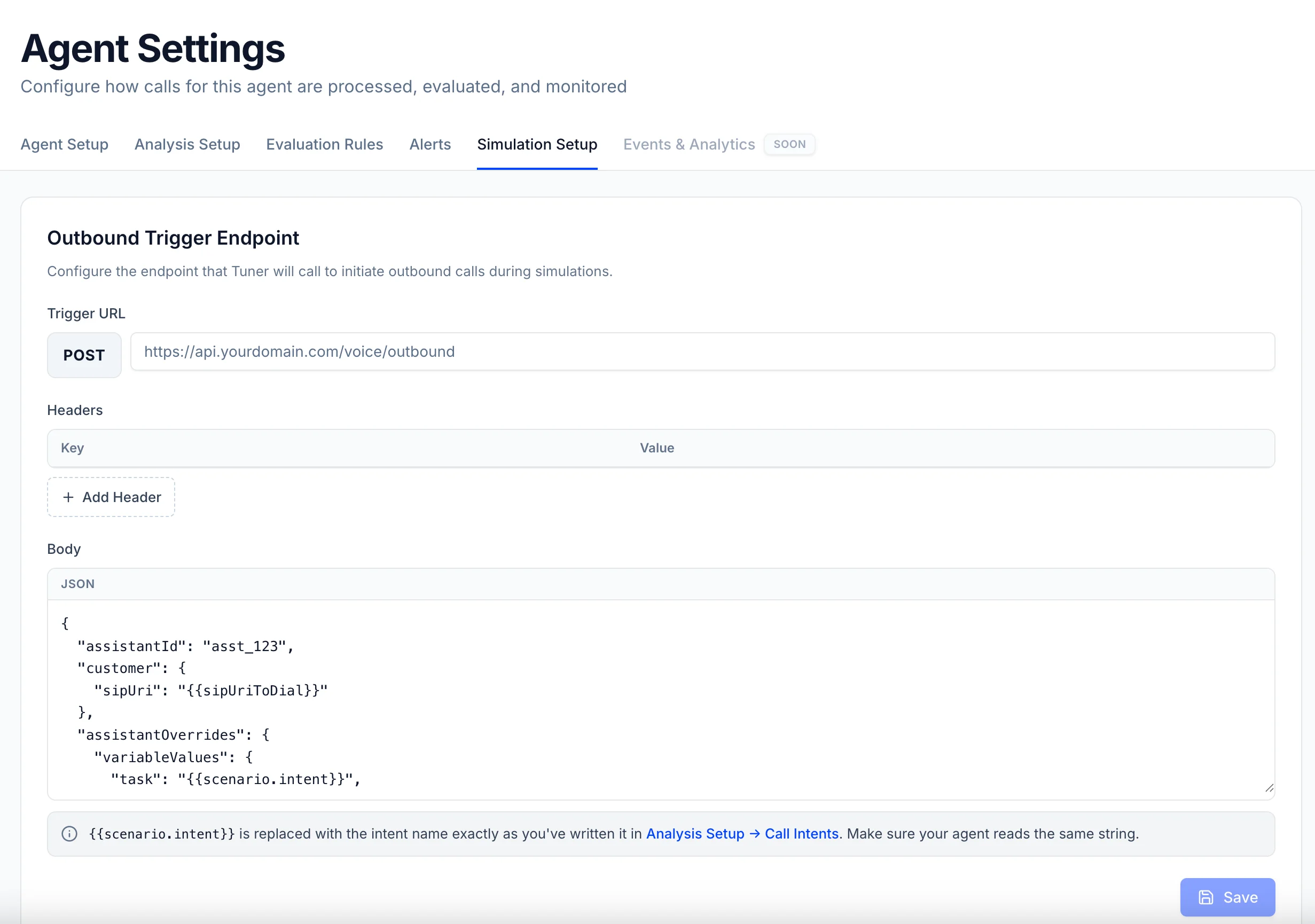 * **Trigger URL**, the endpoint on your side that places an outbound call.
* **Headers**, whatever your endpoint needs to accept the request (an `Authorization` token, for example).
* **Body**, a JSON template in **your** endpoint's shape, containing Tuner's three placeholders:
| Placeholder | Replaced with |
| ---------------------------- | ---------------------------------------------------------------------------------------------------------------------------------------- |
| `{{sipUriToDial}}` | The SIP URI of the simulation agent. **The one value your system must use**, it's who you dial. |
| `{{scenario.intent}}` | The intent of the call, exactly as written in **Analysis Setup → Call Intents**. Useful if you run different agents or logic per intent. |
| `{{scenario.customer_name}}` | The name of the customer being called. Useful to mimic a CRM lookup or a personalized greeting. |
The key names are entirely yours (`destination`, `to`, `phoneNumber`, …). All three placeholders need a key in the template, but if you don't use the intent or the name, just park them under any key, only the SIP URI is essential.
## Example
Say your endpoint takes a `destination` and dials it. Somewhere inside, there's a line like this (LiveKit shown, same concept on any stack):
```python theme={null}
await ctx.api.sip.create_sip_participant(
api.CreateSIPParticipantRequest(
sip_call_to=destination, # the phone number, or Tuner's SIP URI in simulation
...
)
)
```
In Tuner, you mirror that endpoint, with `{{sipUriToDial}}` in the `destination` field since that's where the number normally goes:
**Trigger URL**
```text theme={null}
POST https://api.yourdomain.com/voice/outbound
```
**Headers**
| Key | Value |
| --------------- | ------------------- |
| `Authorization` | `Bearer YOUR_TOKEN` |
**Body**
```json theme={null}
{
"destination": "{{sipUriToDial}}",
"task": "{{scenario.intent}}",
"customerName": "{{scenario.customer_name}}"
}
```
* **Trigger URL**, the endpoint on your side that places an outbound call.
* **Headers**, whatever your endpoint needs to accept the request (an `Authorization` token, for example).
* **Body**, a JSON template in **your** endpoint's shape, containing Tuner's three placeholders:
| Placeholder | Replaced with |
| ---------------------------- | ---------------------------------------------------------------------------------------------------------------------------------------- |
| `{{sipUriToDial}}` | The SIP URI of the simulation agent. **The one value your system must use**, it's who you dial. |
| `{{scenario.intent}}` | The intent of the call, exactly as written in **Analysis Setup → Call Intents**. Useful if you run different agents or logic per intent. |
| `{{scenario.customer_name}}` | The name of the customer being called. Useful to mimic a CRM lookup or a personalized greeting. |
The key names are entirely yours (`destination`, `to`, `phoneNumber`, …). All three placeholders need a key in the template, but if you don't use the intent or the name, just park them under any key, only the SIP URI is essential.
## Example
Say your endpoint takes a `destination` and dials it. Somewhere inside, there's a line like this (LiveKit shown, same concept on any stack):
```python theme={null}
await ctx.api.sip.create_sip_participant(
api.CreateSIPParticipantRequest(
sip_call_to=destination, # the phone number, or Tuner's SIP URI in simulation
...
)
)
```
In Tuner, you mirror that endpoint, with `{{sipUriToDial}}` in the `destination` field since that's where the number normally goes:
**Trigger URL**
```text theme={null}
POST https://api.yourdomain.com/voice/outbound
```
**Headers**
| Key | Value |
| --------------- | ------------------- |
| `Authorization` | `Bearer YOUR_TOKEN` |
**Body**
```json theme={null}
{
"destination": "{{sipUriToDial}}",
"task": "{{scenario.intent}}",
"customerName": "{{scenario.customer_name}}"
}
```
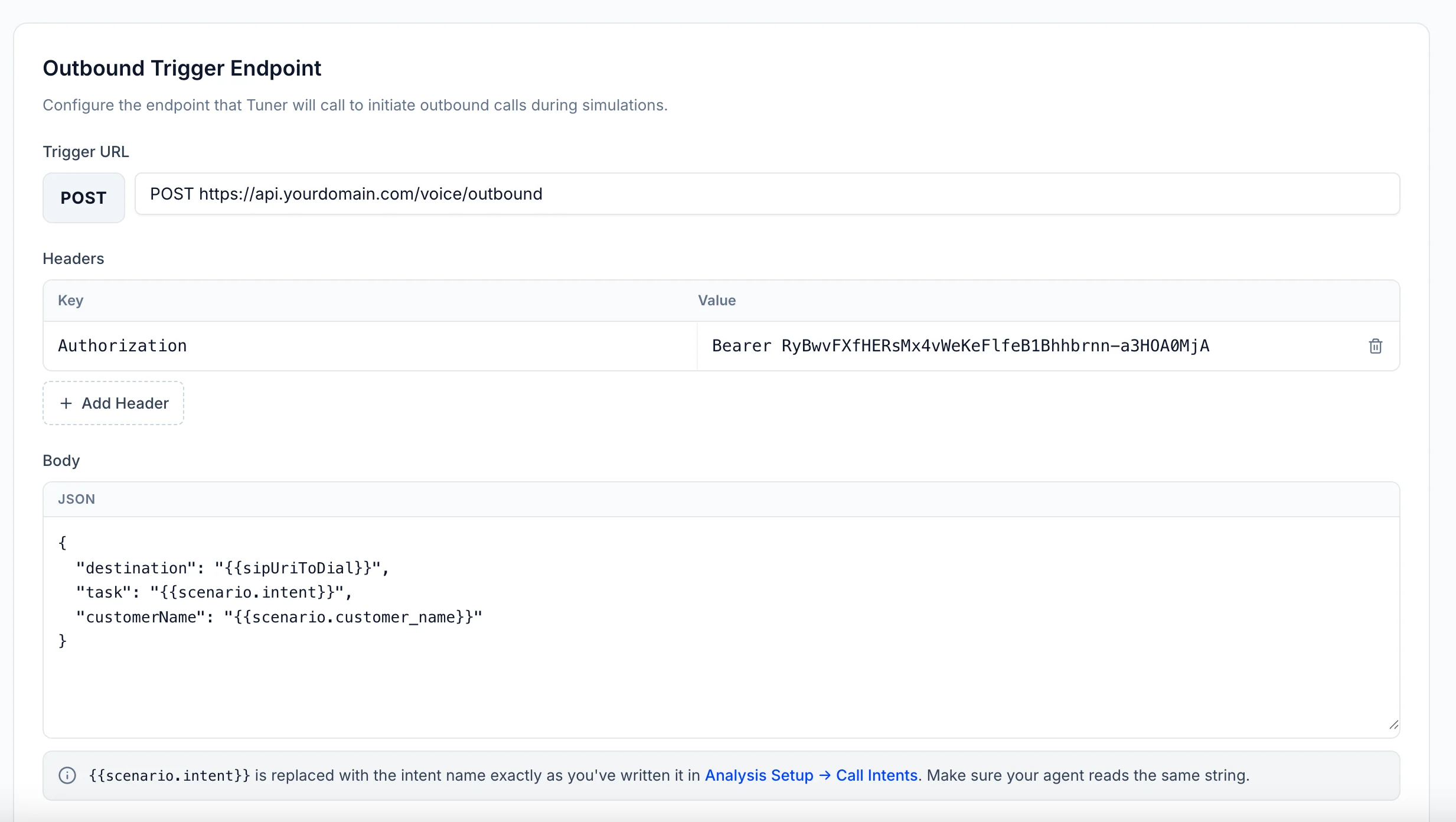 Click **Save**, and every simulation run will trigger your endpoint once per scenario.
## Send the call back with `recipient`
One requirement remains: when your integration syncs the finished call to Tuner, the dialed SIP URI must be in the **`recipient`** field, **exactly as Tuner sent it**. That's how Tuner links the call to its simulation, without it, it shows up as ordinary production traffic. Whatever key you put `{{sipUriToDial}}` under, that's the value to send back.
Full plugin setup: [Connecting to LiveKit](/docs/api-and-integrations/connecting-to-livekit).
```python theme={null}
TunerPlugin(
session, ctx,
..., # your existing options
recipient=destination, # ← the SIP URI Tuner sent, verbatim
)
```
```ts theme={null}
new TunerPlugin(session, ctx, {
// ...your existing options
recipient: destination, // ← the SIP URI Tuner sent, verbatim
});
```
Full observer setup: [Connecting to Pipecat](/docs/api-and-integrations/connecting-to-pipecat).
```python theme={null}
Observer(
..., # your existing options
recipient=destination, # ← the SIP URI Tuner sent, verbatim
)
```
Full integration: [Custom Integration](/docs/api-and-integrations/custom-integration-with-the-tuner-api) and the [Create Call API](/docs/api-reference/create-call).
```json theme={null}
{
...,
"recipient": destination
}
```
Want **evals** to use the intent or customer name? Echo them back in the call's `metadata` when you sync (`extra_metadata` on the LiveKit plugin, or `metadata` in the Create Call payload). See [Evaluating Agents with Dynamic Instructions](/docs/agent-configurations/evaluating-dynamic-agents).
## Putting it all together
When you press **Simulate**:
1. Tuner creates the simulation agents for the run (personalities, accents, languages, and use cases from your mix), each with its own SIP URI.
2. For each one, Tuner calls your trigger endpoint, placing the SIP URI wherever you put `{{sipUriToDial}}`, so your API knows who to call.
3. Your agent dials and has the conversation.
4. Your integration syncs the call back with the SIP URI in `recipient`, so Tuner links it to the simulation and runs your Evals.
## Troubleshooting
The synced call's `recipient` didn't match the SIP URI Tuner sent: it was never set, modified, or a different value was sent. Compare the URI your endpoint received byte-for-byte with the `recipient` on the synced call.
The dial failed on your side. Check your platform's logs, and confirm your trunk can dial a SIP URI (some configurations only allow phone numbers).
Check the **Headers** saved in Simulation Setup, and confirm the body template matches the shape your endpoint expects.
***
Configure your simulation mix and start a batch.
Click **Save**, and every simulation run will trigger your endpoint once per scenario.
## Send the call back with `recipient`
One requirement remains: when your integration syncs the finished call to Tuner, the dialed SIP URI must be in the **`recipient`** field, **exactly as Tuner sent it**. That's how Tuner links the call to its simulation, without it, it shows up as ordinary production traffic. Whatever key you put `{{sipUriToDial}}` under, that's the value to send back.
Full plugin setup: [Connecting to LiveKit](/docs/api-and-integrations/connecting-to-livekit).
```python theme={null}
TunerPlugin(
session, ctx,
..., # your existing options
recipient=destination, # ← the SIP URI Tuner sent, verbatim
)
```
```ts theme={null}
new TunerPlugin(session, ctx, {
// ...your existing options
recipient: destination, // ← the SIP URI Tuner sent, verbatim
});
```
Full observer setup: [Connecting to Pipecat](/docs/api-and-integrations/connecting-to-pipecat).
```python theme={null}
Observer(
..., # your existing options
recipient=destination, # ← the SIP URI Tuner sent, verbatim
)
```
Full integration: [Custom Integration](/docs/api-and-integrations/custom-integration-with-the-tuner-api) and the [Create Call API](/docs/api-reference/create-call).
```json theme={null}
{
...,
"recipient": destination
}
```
Want **evals** to use the intent or customer name? Echo them back in the call's `metadata` when you sync (`extra_metadata` on the LiveKit plugin, or `metadata` in the Create Call payload). See [Evaluating Agents with Dynamic Instructions](/docs/agent-configurations/evaluating-dynamic-agents).
## Putting it all together
When you press **Simulate**:
1. Tuner creates the simulation agents for the run (personalities, accents, languages, and use cases from your mix), each with its own SIP URI.
2. For each one, Tuner calls your trigger endpoint, placing the SIP URI wherever you put `{{sipUriToDial}}`, so your API knows who to call.
3. Your agent dials and has the conversation.
4. Your integration syncs the call back with the SIP URI in `recipient`, so Tuner links it to the simulation and runs your Evals.
## Troubleshooting
The synced call's `recipient` didn't match the SIP URI Tuner sent: it was never set, modified, or a different value was sent. Compare the URI your endpoint received byte-for-byte with the `recipient` on the synced call.
The dial failed on your side. Check your platform's logs, and confirm your trunk can dial a SIP URI (some configurations only allow phone numbers).
Check the **Headers** saved in Simulation Setup, and confirm the body template matches the shape your endpoint expects.
***
Configure your simulation mix and start a batch.