> ## Documentation Index
> Fetch the complete documentation index at: https://docs.usetuner.ai/llms.txt
> Use this file to discover all available pages before exploring further.
# Run a simulation
> Start a simulation run from the Run Simulation dialog: choose Scenarios, set the Simulation Mix, and set the language, background noise, test profile and max call duration.
Runs start from **Simulations** in the Tuner app. Your agent needs [inbound](/docs/simulation/inbound/setup) or [outbound](/docs/simulation/outbound) simulation set up first. See [What your setup needs](/docs/simulation/overview#what-your-setup-needs).
## Start a run
Go to **Simulations** and click **Run Simulation**. Next to **Scenarios:**, keep **AI generated** to have Tuner write new Scenarios, or click **Change ›** and choose **From library** to rerun saved ones (see [Scenario Library](/docs/simulation/scenarios)).
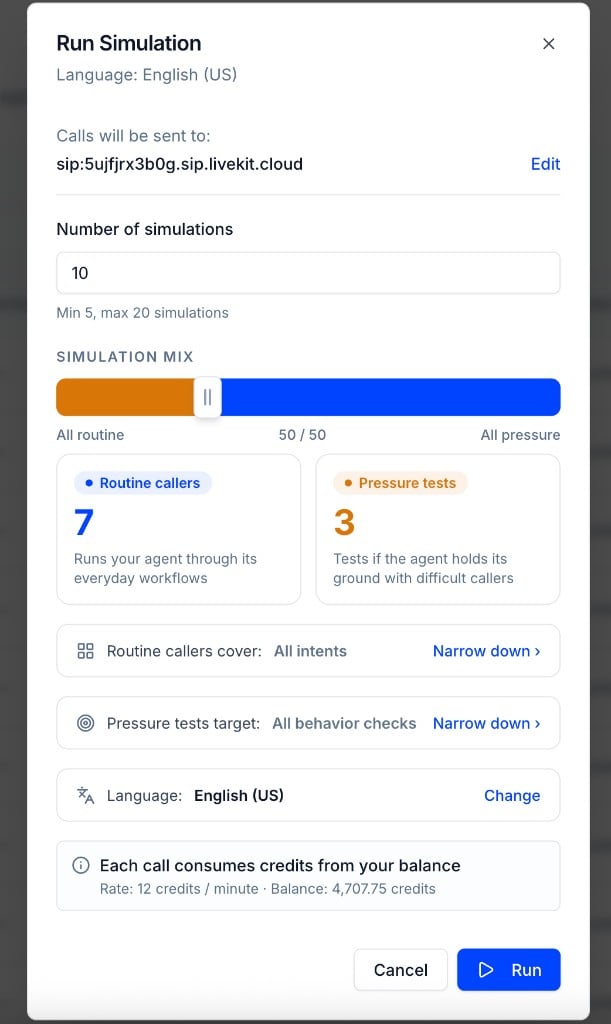
For AI-generated Scenarios, set **Number of simulations** (5 to 20, default 10) and drag the **Simulation mix** slider between **All routine** and **All pressure**. The default is 30% Pressure tests. See [The Simulation Mix](#the-simulation-mix).
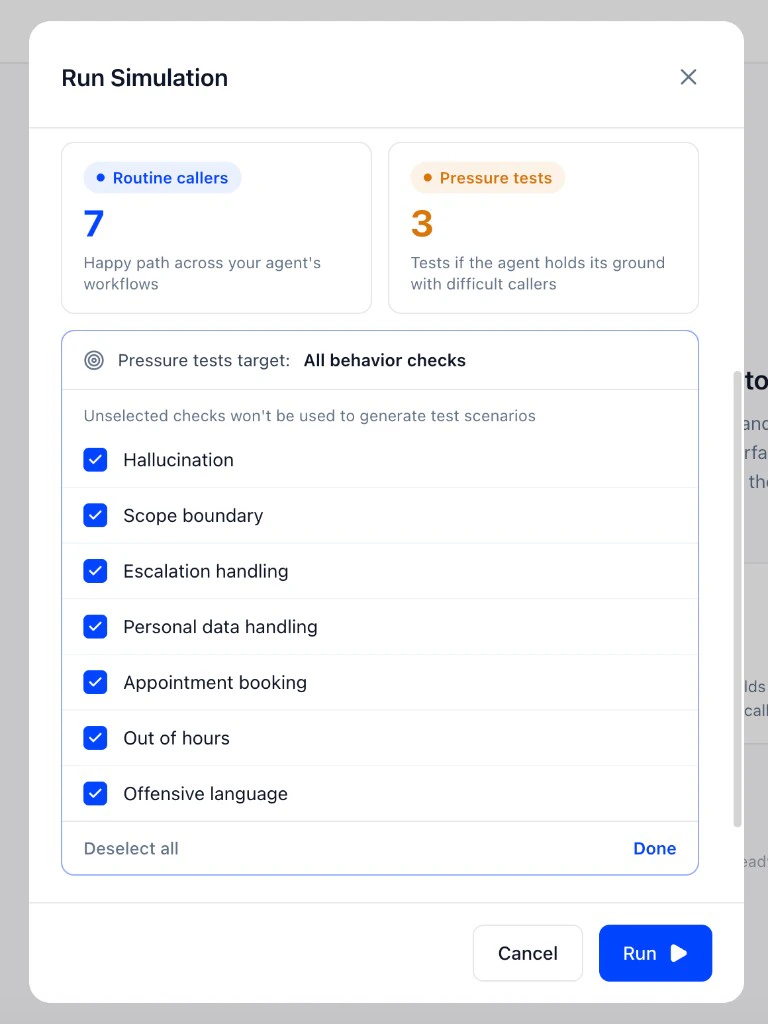
 Click **Narrow down ›** next to **Routine callers cover:** to limit Routine callers to some of your Intents, or next to **Pressure tests target:** to limit Pressure tests to some of your Pass/Fail evals. Unselected Intents and evals don't get Scenarios in this run.
 Under **Call settings**:
* **Max call duration**: use **-** and **+** to cap each call (1 to 12 minutes, default 3). See [Max call duration](#max-call-duration).
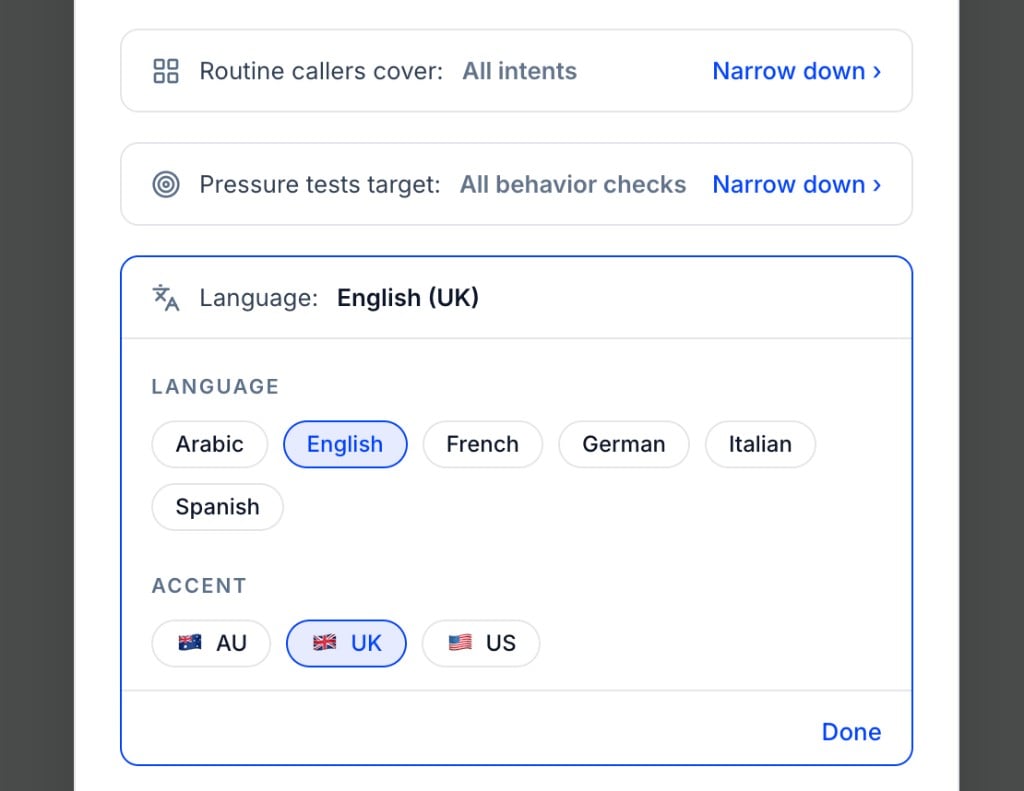
* **Language:** click **Change** to pick the language and accent the Simulated Caller speaks. See [Languages and accents](#languages-and-accents).
* **Environment:** click **Change ›** to add [background noise](#background-noise). The default is **No environment**.
* **Test profile:** click **Change** to give the Simulated Caller a [test profile](#test-profiles). The default is **No profile**.
Under **Call settings**:
* **Max call duration**: use **-** and **+** to cap each call (1 to 12 minutes, default 3). See [Max call duration](#max-call-duration).
* **Language:** click **Change** to pick the language and accent the Simulated Caller speaks. See [Languages and accents](#languages-and-accents).
* **Environment:** click **Change ›** to add [background noise](#background-noise). The default is **No environment**.
* **Test profile:** click **Change** to give the Simulated Caller a [test profile](#test-profiles). The default is **No profile**.
 The dialog shows the credit rate per minute and your balance. Click **Run**. The run appears on the **Runs** tab. See [Run statuses](/docs/simulation/run-statuses).
## The Simulation Mix
| | Routine callers | Pressure tests |
| - | - | - |
| **What they do** | Play your everyday customers: cooperative, on topic, working through your agent's normal workflows | Play the difficult ones: unhappy customers, edge cases, people trying to get around your process or asking for something out of scope |
| **What you learn** | How your agent handles the expected path | Where your agent breaks: hallucination, scope boundaries, escalation handling and other failure modes |
| **How they're generated** | From your agent's configured Intents | From your agent's Pass/Fail evals |
The same intent said in different ways produces different conversations. Running more calls covers more of these variations. Every new run also checks that something you already fixed hasn't broken again. To rerun the exact same Scenarios, save them to your [Scenario Library](/docs/simulation/scenarios).
## Max call duration
**Max call duration** caps how long any single simulated call can run, from 1 to 12 minutes (default 3). A call ends when your agent hangs up or the cap is reached, so the cap keeps a Simulated Caller from looping against an agent that's stuck.
## Languages and accents
In the **Run Simulation** dialog, click **Change** next to **Language:** to choose the language and accent of the Simulated Caller.
| Language | Accents |
| - | - |
| **Arabic** | **AE**, **EG**, **SA** |
| **English** | **AU**, **UK**, **US** |
| **French** | **CA**, **FR** |
| **German** | **AT**, **CH**, **DE** |
| **Italian** | **IT** |
| **Spanish** | **ES**, **MX** |
Use this to test multilingual agents, or to check your agent still performs when callers have a different accent from your default.
## Background noise
Background noise mixes an ambient recording into the Simulated Caller's side of the call, so you can see how your agent's transcription and turn-taking hold up when the caller is in a café or driving.
In the **Run Simulation** dialog, click **Change ›** next to **Environment:**, pick **Café**, **Office**, **Street** or **Car**, and set the **Noise intensity** to **Low**, **Medium** or **High**.
The dialog shows the credit rate per minute and your balance. Click **Run**. The run appears on the **Runs** tab. See [Run statuses](/docs/simulation/run-statuses).
## The Simulation Mix
| | Routine callers | Pressure tests |
| - | - | - |
| **What they do** | Play your everyday customers: cooperative, on topic, working through your agent's normal workflows | Play the difficult ones: unhappy customers, edge cases, people trying to get around your process or asking for something out of scope |
| **What you learn** | How your agent handles the expected path | Where your agent breaks: hallucination, scope boundaries, escalation handling and other failure modes |
| **How they're generated** | From your agent's configured Intents | From your agent's Pass/Fail evals |
The same intent said in different ways produces different conversations. Running more calls covers more of these variations. Every new run also checks that something you already fixed hasn't broken again. To rerun the exact same Scenarios, save them to your [Scenario Library](/docs/simulation/scenarios).
## Max call duration
**Max call duration** caps how long any single simulated call can run, from 1 to 12 minutes (default 3). A call ends when your agent hangs up or the cap is reached, so the cap keeps a Simulated Caller from looping against an agent that's stuck.
## Languages and accents
In the **Run Simulation** dialog, click **Change** next to **Language:** to choose the language and accent of the Simulated Caller.
| Language | Accents |
| - | - |
| **Arabic** | **AE**, **EG**, **SA** |
| **English** | **AU**, **UK**, **US** |
| **French** | **CA**, **FR** |
| **German** | **AT**, **CH**, **DE** |
| **Italian** | **IT** |
| **Spanish** | **ES**, **MX** |
Use this to test multilingual agents, or to check your agent still performs when callers have a different accent from your default.
## Background noise
Background noise mixes an ambient recording into the Simulated Caller's side of the call, so you can see how your agent's transcription and turn-taking hold up when the caller is in a café or driving.
In the **Run Simulation** dialog, click **Change ›** next to **Environment:**, pick **Café**, **Office**, **Street** or **Car**, and set the **Noise intensity** to **Low**, **Medium** or **High**.
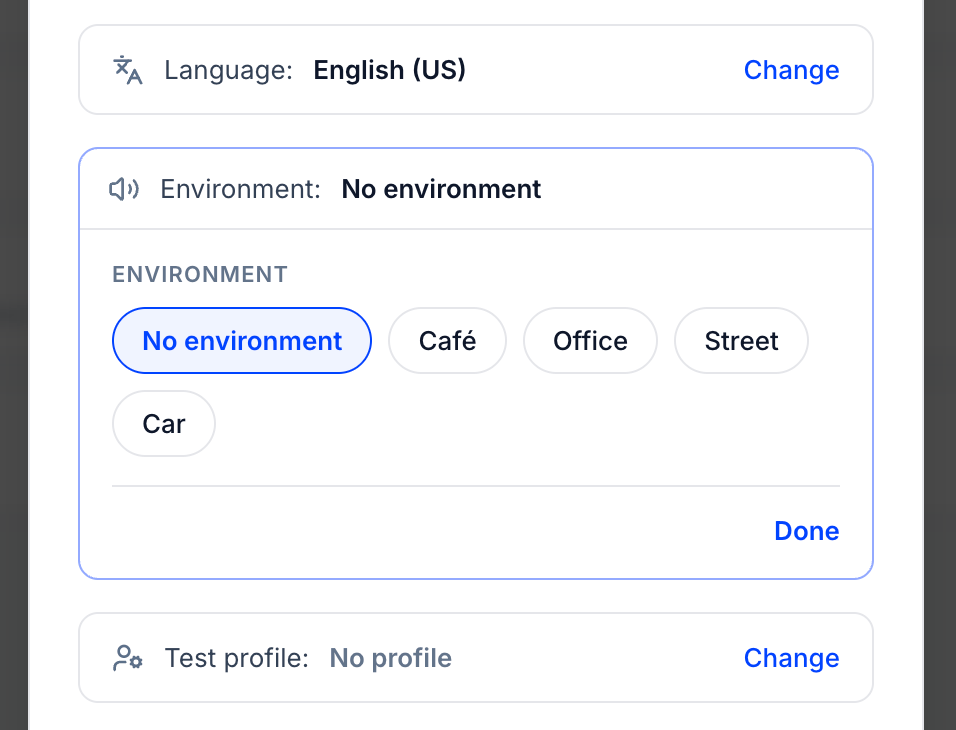 Intensity works the same way across every environment, so Street at Low and Café at Low sit at the same level against the caller's voice. The noise runs for the whole call, including while the caller is silent, so your agent hears it during its own turns too. It applies the same way to inbound and outbound simulations, since it's mixed into the Simulated Caller's audio.
The setting applies to every call in the run and shows on the run card, so you can tell which conditions a result came from. Leave it at **No environment** to test on clean audio.
## Test profiles
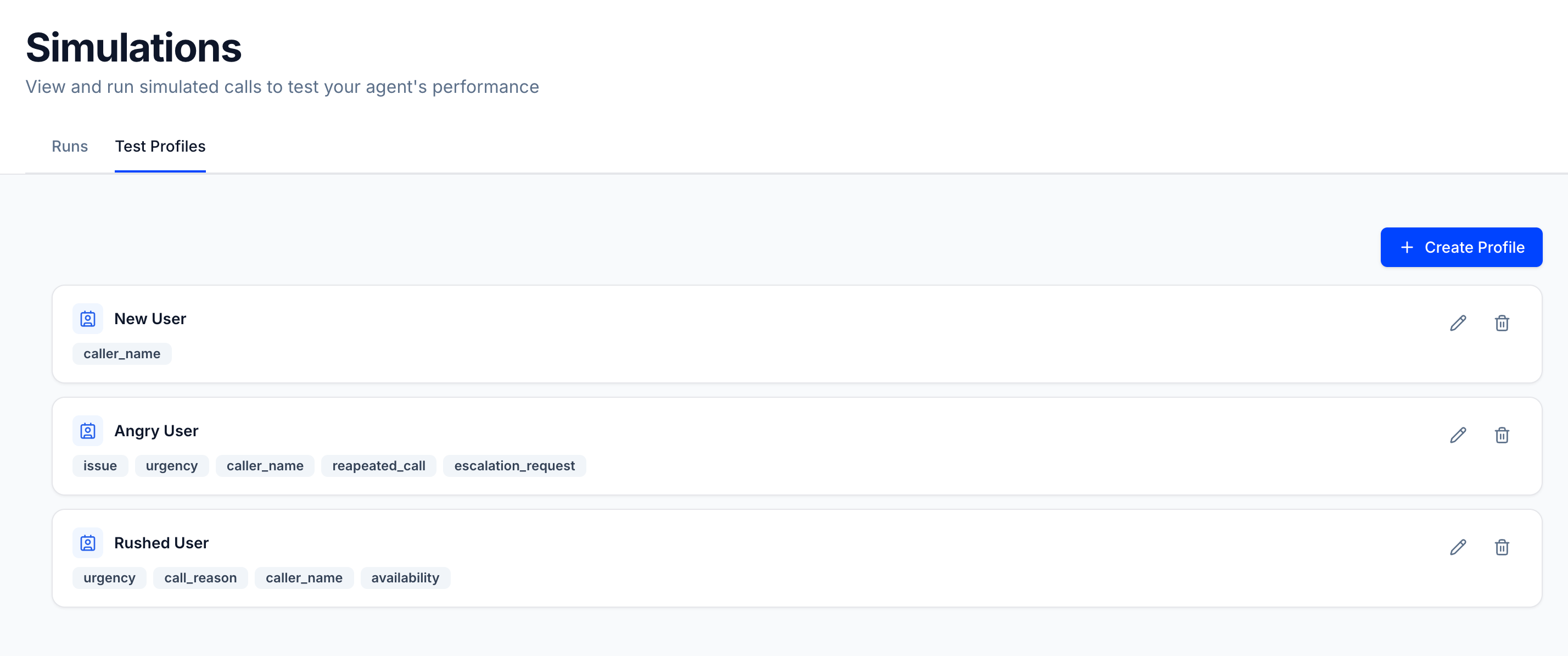
A **test profile** gives the Simulated Caller a specific identity and context before the call starts, such as a new user, an angry repeat caller or someone in a rush. Each profile is a name plus key-value fields, like `caller_name`, `issue` or `appointment_date`.
Create profiles on the **Test Profiles** tab of **Simulations**, then pick one next to **Test profile:** in the **Run Simulation** dialog. It applies to every call in the run.
Intensity works the same way across every environment, so Street at Low and Café at Low sit at the same level against the caller's voice. The noise runs for the whole call, including while the caller is silent, so your agent hears it during its own turns too. It applies the same way to inbound and outbound simulations, since it's mixed into the Simulated Caller's audio.
The setting applies to every call in the run and shows on the run card, so you can tell which conditions a result came from. Leave it at **No environment** to test on clean audio.
## Test profiles
A **test profile** gives the Simulated Caller a specific identity and context before the call starts, such as a new user, an angry repeat caller or someone in a rush. Each profile is a name plus key-value fields, like `caller_name`, `issue` or `appointment_date`.
Create profiles on the **Test Profiles** tab of **Simulations**, then pick one next to **Test profile:** in the **Run Simulation** dialog. It applies to every call in the run.
 See [Test Profiles](/docs/simulation/test-profiles) for the full guide.
## Limits
| Limit | Value |
| - | - |
| Number of simulations (AI generated) | 5 to 20, default 10 |
| Simulation mix | 0% to 100% Pressure tests, default 30% |
| Scenarios from library per run | 1 to 20 |
| Max call duration | 1 to 12 minutes, default 3 |
| Runs in progress per agent | 1, shared by all simulation runs. A run whose calls have all ended doesn't block a new one. |
Simulation runs are also available through the public API: see [Create Run](/api-reference/simulation/create-run) in the **Simulation** group of the API Reference.
## Next steps
What each run status and call result means.
Save Scenarios and rerun the same ones.
This documentation is built and hosted on [Mintlify](https://mintlify.com), a developer documentation platform.
See [Test Profiles](/docs/simulation/test-profiles) for the full guide.
## Limits
| Limit | Value |
| - | - |
| Number of simulations (AI generated) | 5 to 20, default 10 |
| Simulation mix | 0% to 100% Pressure tests, default 30% |
| Scenarios from library per run | 1 to 20 |
| Max call duration | 1 to 12 minutes, default 3 |
| Runs in progress per agent | 1, shared by all simulation runs. A run whose calls have all ended doesn't block a new one. |
Simulation runs are also available through the public API: see [Create Run](/api-reference/simulation/create-run) in the **Simulation** group of the API Reference.
## Next steps
What each run status and call result means.
Save Scenarios and rerun the same ones.
This documentation is built and hosted on [Mintlify](https://mintlify.com), a developer documentation platform.