> ## Documentation Index
> Fetch the complete documentation index at: https://docs.usetuner.ai/llms.txt
> Use this file to discover all available pages before exploring further.
# Simulation SIP setup
> What Tuner needs to place simulation calls (SIP URI and credentials), where to paste them, and which guide matches your platform.
**Prerequisite:** your agent must already be integrated with Tuner and successfully sending real calls before you configure simulation. Simulation reuses the same Evals, Intents, and Call Outcomes your live agent is wired to, so that integration has to be in place first. Set it up here:
* [Connecting to Vapi](/docs/api-and-integrations/connecting-to-vapi)
* [Connecting to Retell](/docs/api-and-integrations/connecting-to-retell)
* [Connecting to LiveKit](/docs/api-and-integrations/connecting-to-livekit)
* [Connecting to Pipecat](/docs/api-and-integrations/connecting-to-pipecat)
* [Custom integration (Tuner API)](/docs/api-and-integrations/custom-integration-with-the-tuner-api)
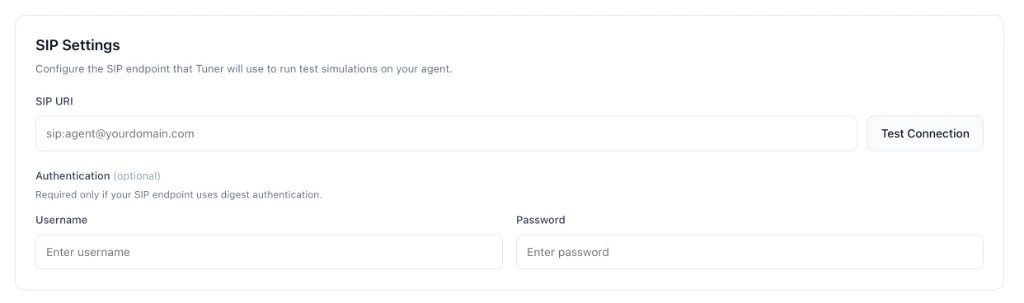
To run simulations, Tuner places SIP calls to your agent. **Agent Settings → SIP Settings** needs a **SIP URI** (for example `sip:agent@sip.vapi.ai`) and, when your SIP edge uses digest authentication, a **username** and **password**. Tuner does not care which vendor supplies those values; they must match whatever your SIP ingress expects. Some stacks only expose a URI (leave username and password empty).
 ## What is SIP, and why does Tuner need it?
**SIP** (Session Initiation Protocol, [RFC 3261](https://datatracker.ietf.org/doc/html/rfc3261)) is the signaling protocol voice platforms use to start, manage, and end a call, every voice agent stack speaks SIP at its ingress. Tuner uses SIP so simulations enter your agent through the same path a real phone call would, same audio pipeline, same transcription, same prompt, same tools. That's why we ask for a **SIP URI** (where to dial) and, if your edge uses digest auth, a **username and password**.
### How a simulation call actually flows
When you click **Run Simulation**, this happens under the hood:
1. **Tuner builds the scenario**, picks a caller persona, an intent, and what to stress-test.
2. **Tuner sends a SIP `INVITE`** to the SIP URI you pasted. This is the "ring", a small text message over the internet that says *"I want to start a call with you."* That `INVITE` carries a SIP `Call-ID` Tuner generated for this simulation, it's the key that links what Tuner dialled out with what your agent syncs back later.
3. **Your SIP edge responds.** If digest auth is on, it replies with a `407 Proxy Authentication Required` challenge. Tuner re-sends the `INVITE` with the username/password you saved. If credentials match, the edge accepts and forwards the call to your agent.
4. **Audio flows.** Once the call is up, Tuner streams the simulated caller's voice (RTP) to your agent, and your agent's responses stream back. From your agent's perspective this is a normal inbound phone call.
5. **Your agent syncs the call back to Tuner with the SIP Call-ID.** When the call ends, your integration posts the transcript and metadata back to Tuner, with the SIP Call-ID included. If you're on **Vapi** or **Retell**, we handle this for you out of the box, no work on your side. **LiveKit** and **Pipecat** integrations read the SIP Call-ID from the inbound call and pass it through the SDK's plugin/observer. **Custom integrations** include `sip_call_id` in their [Create Call API](/docs/api-and-integrations/custom-integration-with-the-tuner-api) payload directly. That value is how Tuner knows this synced call is the one it just simulated, rather than ordinary production traffic.
6. **Evaluation runs.** Once the synced call is matched to the simulation, Tuner records the transcript, latency, tool traces, and runs your production Evals against it.
You never see steps 2–3, they happen in milliseconds. But this is why the URI and credentials have to be exactly right: a typo means the `INVITE` lands at the wrong host, or the `407` challenge fails, and the call never connects. And without `sip_call_id` coming back in step 5, the call still happens, it just shows up as a normal production call instead of a simulation result.
## Anatomy of a SIP URI
```text theme={null}
sip:user-part@host
```
* **`sip:`**, the scheme (like `https://` for web URLs). You may rarely see `sips:` for SIP over TLS; paste it verbatim.
* **`user-part`**, an identifier your provider assigns (Vapi's SIP Identifier, Twilio/Telnyx credential username). Sometimes absent, the host alone is enough.
* **`host`**, the public address of your SIP edge (e.g. `sip.vapi.ai`, `sip.telnyx.com`, `your-project.sip.livekit.cloud`).
A URI may also carry parameters after the host (e.g. `;transport=tcp`). Copy whatever your provider's console shows, verbatim.
## Choose your platform
Pick where **your** SIP URI and credentials come from:
Free Vapi SIP trunk: URI + digest credentials.
SIP URI from Retell for your agent (often URI only).
Twilio, Telnyx, LiveKit Cloud SIP, or any SIP URI you already have.
Paste your SIP URI and credentials into **Agent Settings → SIP Settings**, click **Verify & Save**, and you're ready to run simulations.
***
Configure your simulation mix and start a batch.
## What is SIP, and why does Tuner need it?
**SIP** (Session Initiation Protocol, [RFC 3261](https://datatracker.ietf.org/doc/html/rfc3261)) is the signaling protocol voice platforms use to start, manage, and end a call, every voice agent stack speaks SIP at its ingress. Tuner uses SIP so simulations enter your agent through the same path a real phone call would, same audio pipeline, same transcription, same prompt, same tools. That's why we ask for a **SIP URI** (where to dial) and, if your edge uses digest auth, a **username and password**.
### How a simulation call actually flows
When you click **Run Simulation**, this happens under the hood:
1. **Tuner builds the scenario**, picks a caller persona, an intent, and what to stress-test.
2. **Tuner sends a SIP `INVITE`** to the SIP URI you pasted. This is the "ring", a small text message over the internet that says *"I want to start a call with you."* That `INVITE` carries a SIP `Call-ID` Tuner generated for this simulation, it's the key that links what Tuner dialled out with what your agent syncs back later.
3. **Your SIP edge responds.** If digest auth is on, it replies with a `407 Proxy Authentication Required` challenge. Tuner re-sends the `INVITE` with the username/password you saved. If credentials match, the edge accepts and forwards the call to your agent.
4. **Audio flows.** Once the call is up, Tuner streams the simulated caller's voice (RTP) to your agent, and your agent's responses stream back. From your agent's perspective this is a normal inbound phone call.
5. **Your agent syncs the call back to Tuner with the SIP Call-ID.** When the call ends, your integration posts the transcript and metadata back to Tuner, with the SIP Call-ID included. If you're on **Vapi** or **Retell**, we handle this for you out of the box, no work on your side. **LiveKit** and **Pipecat** integrations read the SIP Call-ID from the inbound call and pass it through the SDK's plugin/observer. **Custom integrations** include `sip_call_id` in their [Create Call API](/docs/api-and-integrations/custom-integration-with-the-tuner-api) payload directly. That value is how Tuner knows this synced call is the one it just simulated, rather than ordinary production traffic.
6. **Evaluation runs.** Once the synced call is matched to the simulation, Tuner records the transcript, latency, tool traces, and runs your production Evals against it.
You never see steps 2–3, they happen in milliseconds. But this is why the URI and credentials have to be exactly right: a typo means the `INVITE` lands at the wrong host, or the `407` challenge fails, and the call never connects. And without `sip_call_id` coming back in step 5, the call still happens, it just shows up as a normal production call instead of a simulation result.
## Anatomy of a SIP URI
```text theme={null}
sip:user-part@host
```
* **`sip:`**, the scheme (like `https://` for web URLs). You may rarely see `sips:` for SIP over TLS; paste it verbatim.
* **`user-part`**, an identifier your provider assigns (Vapi's SIP Identifier, Twilio/Telnyx credential username). Sometimes absent, the host alone is enough.
* **`host`**, the public address of your SIP edge (e.g. `sip.vapi.ai`, `sip.telnyx.com`, `your-project.sip.livekit.cloud`).
A URI may also carry parameters after the host (e.g. `;transport=tcp`). Copy whatever your provider's console shows, verbatim.
## Choose your platform
Pick where **your** SIP URI and credentials come from:
Free Vapi SIP trunk: URI + digest credentials.
SIP URI from Retell for your agent (often URI only).
Twilio, Telnyx, LiveKit Cloud SIP, or any SIP URI you already have.
Paste your SIP URI and credentials into **Agent Settings → SIP Settings**, click **Verify & Save**, and you're ready to run simulations.
***
Configure your simulation mix and start a batch.