> ## Documentation Index
> Fetch the complete documentation index at: https://docs.usetuner.ai/llms.txt
> Use this file to discover all available pages before exploring further.
# Welcome to Tuner
> Get started with Tuner and discover how to bring simulation, analytics, and observability to your voice AI agents. From pre-launch testing to production monitoring and continuous improvement, you’ll have full visibility at every stage.
## What Problem Does Tuner Solve?
Managing voice agents in production can be challenging. Without the right tools, you’re often dealing with:
* *Scattered Logs: Manually parsing endless, unstructured logs to find issues.*
* Manual Call Reviews: Spending hours manually listening to calls to assess quality.
* Manual Self-Testing: Calling your own agent over and over to check changes, without confidence you've covered real-world edge cases.
* No Real-Time Visibility: Finding out about problems from angry users, not your own systems.
* Guesswork: Making changes to your agent without knowing if they actually improve performance
Tuner replaces this with a unified, data-driven workflow, from simulation to production monitoring, with full visibility at every stage.
## How Tuner Helps?
Understand what your agents are doing with structured, queryable data for every call.
Catch failures early with real-time alerts for hallucinations, broken flows, and performance drops.
Bring all your voice agent data into one place, replacing scattered logs with a single source of truth.
Track the impact of changes and validate improvements with real data, not guesswork.
Run hundreds of AI-powered test calls against your agent, before launch, after every change, and whenever production surfaces a new failure mode, scored against the same Evals that monitor live traffic.
## How It Works?
Tuner is built around a continuous improvement loop. You don't just monitor production and react, you simulate, ship, observe, fix, and simulate again.
Integrate in minutes with no-code connections for [**Retell**](/docs/api-and-integrations/connecting-to-retell) and [**Vapi**](/docs/api-and-integrations/connecting-to-vapi), our [**LiveKit SDK**](/docs/api-and-integrations/connecting-to-livekit), our [**Pipecat SDK**](/docs/api-and-integrations/connecting-to-pipecat), [**Dograh**](/docs/api-and-integrations/connecting-to-dograh), or our [**API for custom stacks**](/docs/api-and-integrations/custom-integration-with-the-tuner-api).
Configure [**Evaluations & Guardrails**](/docs/getting-started/core-concepts/introduction-to-evaluations-and-guardrails) to define what quality means for your agent. These same Evals power both production monitoring and simulation.
Use [**Call Simulation**](/user-guide/simulation/introduction-to-call-simulation) to stress-test your agent before launch and after every change. Tuner runs real test calls with your agent, inbound or outbound, with Routine Callers and Pressure Tests, and scores every call against your production Evals, so you catch failures before your customers do.
Every call is automatically converted into structured data. You can perform deep-dive analysis in the [**Call Logs**](/user-guide/quick-start/how-to-review-your-first-call).
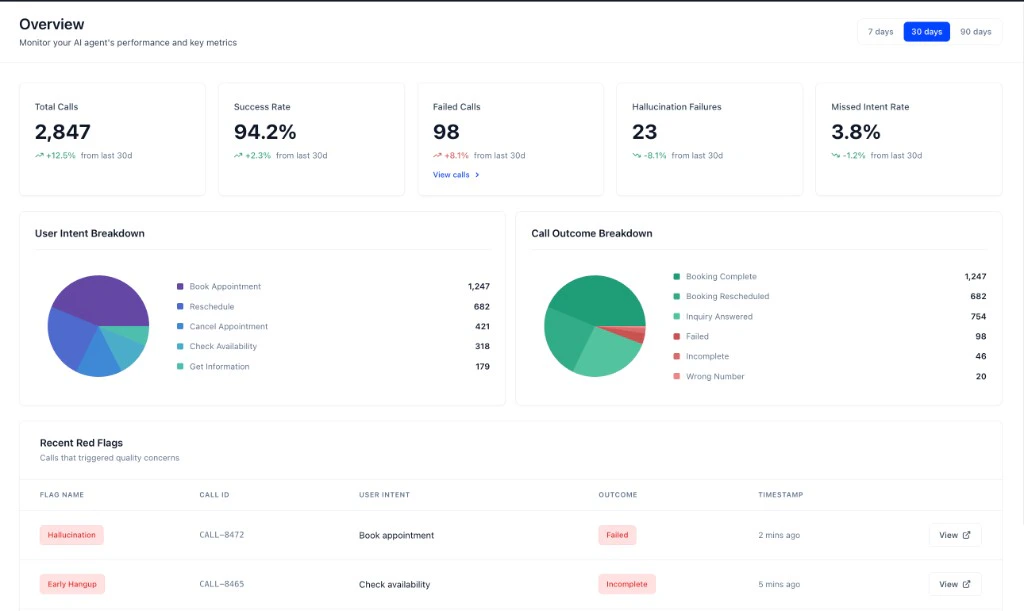
Every live call is automatically converted into structured data. Use the [**Overview dashboard**](/user-guide/agent-observability-and-optimization/gaining-real-time-visibility-with-live-monitoring) and [**Call Logs**](/user-guide/quick-start/how-to-review-your-first-call) to track performance, triage issues, and spot patterns in real traffic.
Set up [**Real-Time Alerts**](/docs/getting-started/core-concepts/introduction-to-real-time-alerts) to be notified of critical issues the moment they happen, such as hallucinations, broken flows, missed intents, and more.
When production surfaces a problem, use the [**MCP Diagnose agent**](/docs/mcp/diagnose-your-agent) to investigate the root cause across all affected calls, fix your agent, and run simulation again to confirm the fix and check for regressions. This loop keeps running as your agent evolves.
 ## Who is Tuner For?
Who need to debug issues, monitor performance, and integrate analytics into their CI/CD workflow.
Who want to understand user behavior, track KPIs, and make data-driven product decisions.
Who need to monitor agent health, respond to incidents, and ensure a high-quality user experience.
## Ready to get started?
Let’s analyze your first call! The entire process takes less than 10 minutes.
A step-by-step guide to connecting your agent and analyzing your first call.
Run simulation batches to validate your agent before launch and after every change.
A technical overview of the Tuner platform for developers.
## Who is Tuner For?
Who need to debug issues, monitor performance, and integrate analytics into their CI/CD workflow.
Who want to understand user behavior, track KPIs, and make data-driven product decisions.
Who need to monitor agent health, respond to incidents, and ensure a high-quality user experience.
## Ready to get started?
Let’s analyze your first call! The entire process takes less than 10 minutes.
A step-by-step guide to connecting your agent and analyzing your first call.
Run simulation batches to validate your agent before launch and after every change.
A technical overview of the Tuner platform for developers.