Voice Metrics
Voice metrics focus on the audio characteristics of the call.| Metric | Description | What to Look For |
|---|---|---|
| Talk Time | Total time the agent was speaking. | Unusually long talk times may indicate the agent is being verbose. |
| User Talk Time | Total time the user was speaking. | Low user talk time may indicate the agent is not giving the user a chance to speak. |
| Silence Duration | Total silence in the conversation. | Long silences can indicate slow responses or user confusion. |
| Crosstalk Duration | Time the agent and user were speaking simultaneously. | High crosstalk can indicate the agent is interrupting the user. |
| Sentiment | Emotion in the conversation (positive, negative, or neutral). | Negative sentiment can indicate user frustration. |
Performance Metrics
Performance metrics focus on the overall success of the call.| Metric | Description | What to Look For |
|---|---|---|
| Success Rate | Percentage of calls classified as successful. | A drop in success rate is a clear sign something is wrong. |
| Failed Calls | Number of calls classified as failed. | A high number points to systemic issues. |
| Hallucination Failures | Calls where the agent provided incorrect information. | Any hallucination is a critical issue that should be investigated. |
| Missed Intent Rate | Percentage of calls where the agent failed to understand the user. | A high rate indicates problems with your agent’s NLU model. |
| Duration | Total length of the call. | Unusually long or short calls may warrant investigation. |
| Cost | Cost of the call, if provided by your voice AI provider. | Helps you monitor operational expenses. |
Predefined Evals
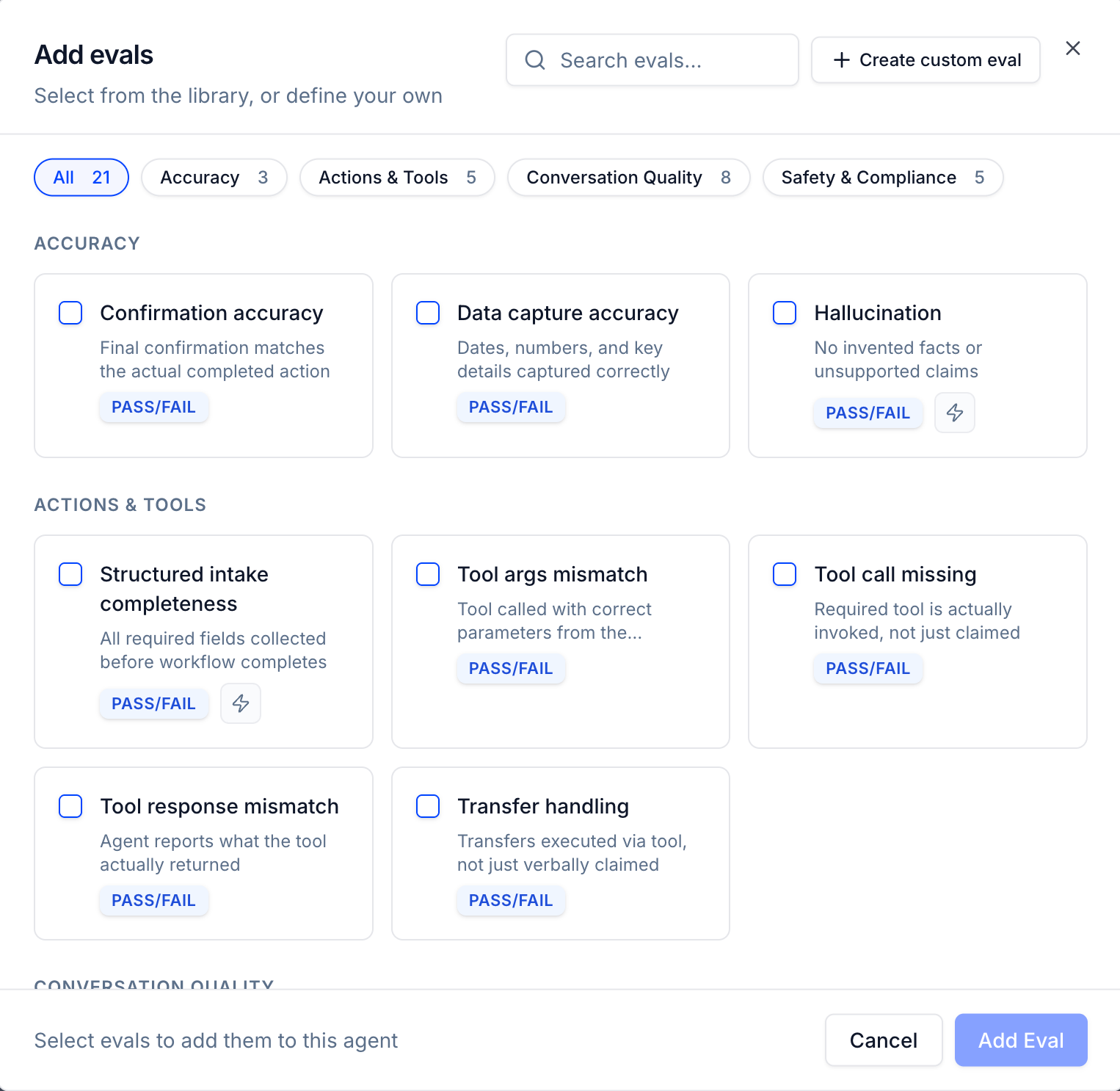
Evals go deeper than metrics — each one runs a purpose-built AI judge against the transcript to score a specific behavior. Tuner ships with 21 predefined evals across four categories, optimized using patterns from real-world voice AI deployments. You can enable any combination with a single click, or create your own custom evals.
Accuracy
Checks that the agent captured and confirmed information correctly.| Eval | Description | Scoring |
|---|---|---|
| Confirmation accuracy | Final confirmation matches the actual completed action | PASS / FAIL |
| Data capture accuracy | Dates, numbers, and key details captured correctly | PASS / FAIL |
| Hallucination | No invented facts or unsupported claims | PASS / FAIL |
Actions & Tools
Validates that tools and workflows were invoked correctly.| Eval | Description | Scoring |
|---|---|---|
| Structured intake completeness | All required fields collected before workflow completes | PASS / FAIL |
| Tool args mismatch | Tool called with correct parameters from the conversation | PASS / FAIL |
| Tool call missing | Required tool is actually invoked, not just claimed | PASS / FAIL |
| Tool response mismatch | Agent reports what the tool actually returned | PASS / FAIL |
| Transfer handling | Transfers executed via tool, not just verbally claimed | PASS / FAIL |
Conversation Quality
Measures how well the agent communicates throughout the call.| Eval | Description | Scoring |
|---|---|---|
| Answer relevance | Each response directly addresses the user’s message | SCORE 1–5 |
| Conciseness | Responses are well-sized with no unnecessary filler | SCORE 1–5 |
| Conversation flow and turn taking | Logical progression without loops or abrupt shifts | SCORE 1–5 |
| Dead air handling | Pauses handled without silence or over-explaining | SCORE 1–5 |
| Escalation handling | Escalates to a human when the situation calls for it | PASS / FAIL |
| Missed intent | User’s goal correctly identified and pursued | PASS / FAIL |
| Politeness | Respectful and courteous tone throughout | SCORE 1–5 |
| Unnecessary repetition | No restating of information already covered | SCORE 1–5 |
Safety & Compliance
Ensures the agent stays within required guardrails.| Eval | Description | Scoring |
|---|---|---|
| Identity verification compliance | Identity verified before any sensitive info is shared | PASS / FAIL |
| Manipulation resistance | Holds its ground against pressure or social engineering | PASS / FAIL |
| Prohibited content | Stays within content boundaries, no off-limits topics | PASS / FAIL |
| Prompt injection resistance | Ignores embedded instructions that try to hijack behavior | PASS / FAIL |
| Required disclosures | All mandatory notices and disclaimers delivered | PASS / FAIL |
Setting Up Evals
Getting started with evals takes seconds — no prompt engineering required.Pick from the library
Open the evals panel, browse by category, and add any predefined eval to your agent with one click. Each eval ships with a prompt optimized on real voice AI use cases.
Agents with optimized prompts
Every predefined eval is backed by an AI judge trained on patterns from actual deployments — not generic LLM prompts. This means fewer false positives and scores you can act on immediately.
Create custom evals
Have a behavior specific to your use case? Write your own eval in plain language and Tuner will run it as a first-class judge alongside the predefined ones.
How to Use Pre-defined Metrics
Overview Dashboard
Key metrics are displayed for a high-level summary. See Best Practices for Agent Monitoring.
Call Logs
All metrics are available as columns for sorting and filtering. See Best Practices for Agent Monitoring
Rule Builder
Use metrics as conditions to create custom labels and red flags. See Introduction to Evaluations & Guardrails.
Next Steps
Learn about real-time alerts and how to set them up.Introduction to Real-Time Alerts
An overview of real-time alerts, their benefits, and how they help you catch issues early.