

What is an alert?
An alert is a notification Tuner sends when calls matching your conditions cross a threshold within a time window, for example “5 calls in 1 hour where Hallucination is FAIL”. Tuner checks your alerts after it finishes analyzing each call and notifies you by Email, Webhook or both.Create an alert
1
Open the Alerts tab
Go to Agent Settings and open the Alerts tab. It lists your existing alerts with their channels, status and last triggered time.
2
Click Create Alert
Click Create Alert to open the alert form.
3
Name the alert and pick a severity
- Alert name: a name for the alert, such as “Hallucination spike”.
- Description (optional): a note for your team.
- Severity: Info, Warning (default) or Critical. Severity tells your team how urgent the alert is.
4
Add trigger conditions
Under Trigger Condition, build each condition from three parts:
- Select field: what to check. Fields are grouped by source (see Condition fields).
- Op: how to compare. The operators offered depend on the field (see Operators).
- Select value: the value to compare against. For a pass/fail eval, pick PASS or FAIL.
5
Set the threshold
Under Trigger when, choose Count or Percentage.
- Count: enter a number of calls and pick a time window. The alert fires when that many matching calls occur within the window, for example “10 calls in 1 hour”.
- Percentage: enter Percentage (%), Minimum calls and Time window. The alert fires when that share of calls match and at least the minimum number of calls match within the window. Percentage mode supports exactly one condition.
6
Choose notification channels
Under Notification channels, select one or both: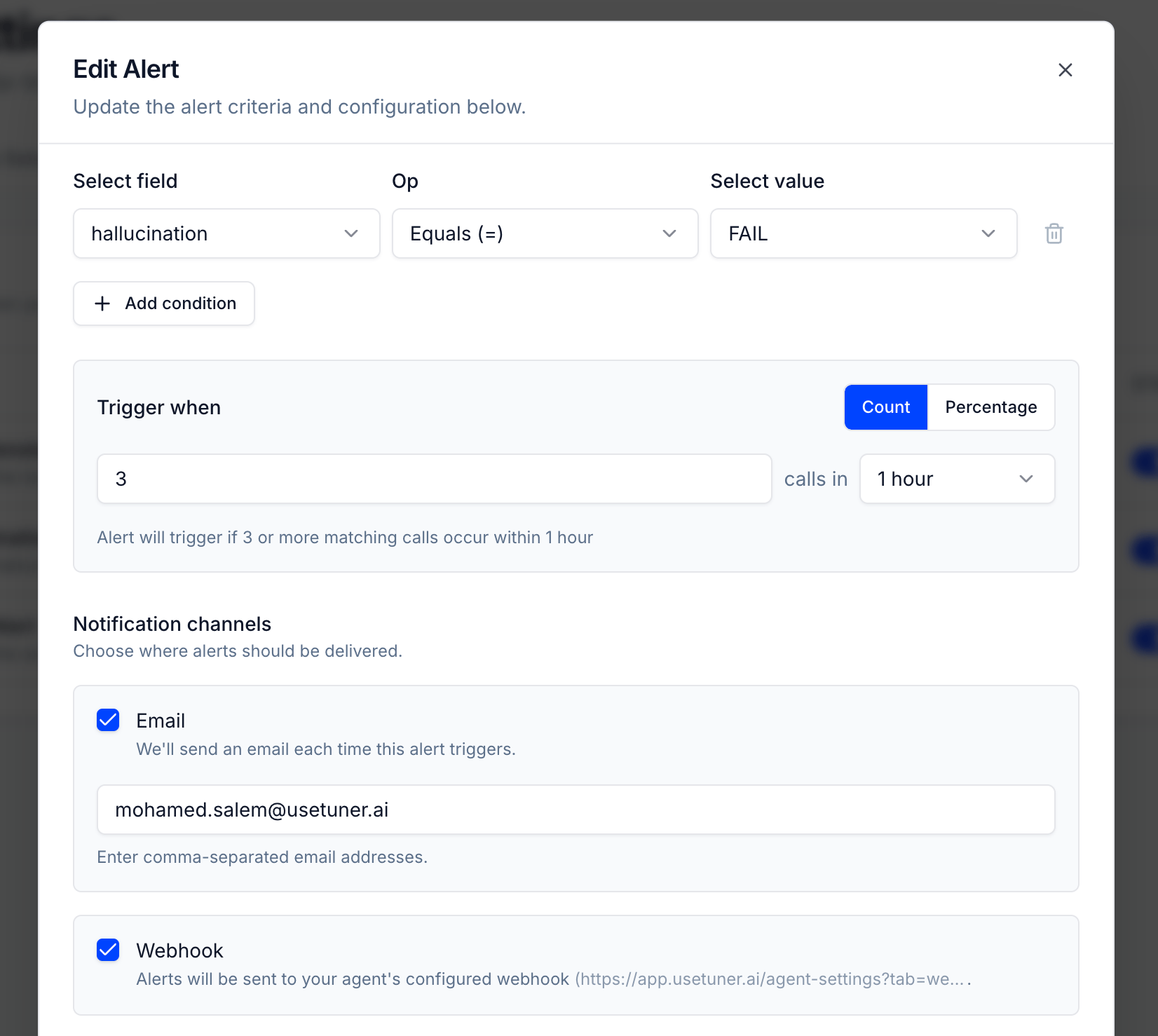
- Email: enter one or more addresses, separated by commas.
- Webhook: Tuner sends an
alert.firedevent to your agent’s webhook. If the agent has no webhook URL yet, selecting it prompts you to configure one. See Webhooks for the payload.
7
Save the alert
Click Save alert. The alert appears in the list and is active.
Condition fields
The Select field list groups fields by source. A group only lists items that exist for this agent.Operators
When alerts fire
- Tuner checks alerts after it analyzes a call. If any analysis step failed for that call, Tuner doesn’t check alerts for it.
- After an alert fires, it doesn’t fire again for 15 minutes, even if more calls match.
- Paused alerts are not checked.
Example alerts
Hallucination spike
Hallucination spike
Alert name: Hallucination spike
Severity: Critical
Condition: Hallucination Equals (=) FAIL
Trigger when: Count, 5 calls in 1 hourNotifies you when the agent gives inaccurate information on several calls.
Severity: Critical
Condition: Hallucination Equals (=) FAIL
Trigger when: Count, 5 calls in 1 hourNotifies you when the agent gives inaccurate information on several calls.
Identity verification failures
Identity verification failures
Alert name: Identity not verified
Severity: Warning
Condition: Identity verification compliance Equals (=) FAIL
Trigger when: Percentage, 10% with Minimum calls 5, 1 hourUseful for agents that must verify identity before sharing sensitive information.
Severity: Warning
Condition: Identity verification compliance Equals (=) FAIL
Trigger when: Percentage, 10% with Minimum calls 5, 1 hourUseful for agents that must verify identity before sharing sensitive information.
Slow responses
Slow responses
Alert name: Slow responses
Severity: Warning
Condition: P90 Latency Greater than (>) 2500
Trigger when: Count, 15 calls in 1 hourTells you when many calls have slow agent responses.
Severity: Warning
Condition: P90 Latency Greater than (>) 2500
Trigger when: Count, 15 calls in 1 hourTells you when many calls have slow agent responses.
Manage alerts
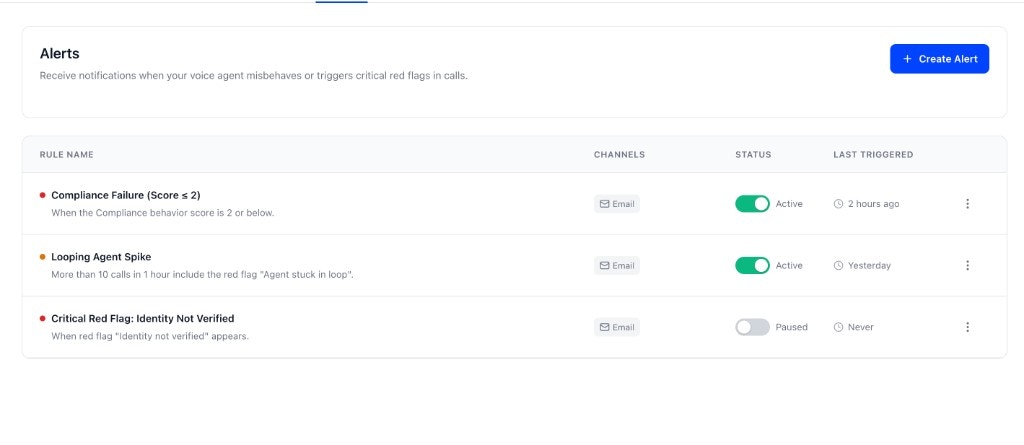
- Pause or resume: use the switch in the STATUS column. The status shows Active or Paused.
- Edit: click the edit icon, change the alert, then click Update Alert.
- Delete: click the delete icon and confirm. This can’t be undone.
Best practices
- Start with high-signal alerts. Alert on clear, critical problems only, so the important ones don’t get ignored.
- Tune thresholds after you see real volume. Too low creates noise; too high misses issues. Percentage mode with a Minimum calls value helps when volume varies.
- Route by urgency. Send critical alerts to a webhook connected to a channel your team watches. Email works for the rest.
- Review regularly. Revisit your alerts when the agent changes.
Limits
Alerts are also available through the public API, in the Agent Settings group of the API Reference, starting with Create alert definition and List alert conditions.
Next steps
Red flags and labels
Define the rules you can alert on.
Webhooks
The
alert.fired payload and how to set up your endpoint.