

What problem it solves
Running voice agents in production without the right tools means:- Scattered logs — parsing endless unstructured output to find one issue
- Manual call reviews — listening to calls by hand to judge quality
- Manual self-testing — calling your own agent over and over, never sure you covered the edge cases
- No real-time visibility — hearing about problems from angry users instead of your own systems
- Guesswork — changing your agent without knowing whether it got better
The loop
Tuner is built around a continuous loop. You don’t just monitor production and react — you simulate, ship, observe, fix, and simulate again.1
Simulate
Stress-test your agent with Call Simulation before launch and after every change. The same Evals that score production calls score every simulated call.
2
Observe
Every call arrives as structured data — transcript, per-turn timing, tool calls, eval results. Dig into individual calls in Call Logs to find what went wrong.
3
Monitor
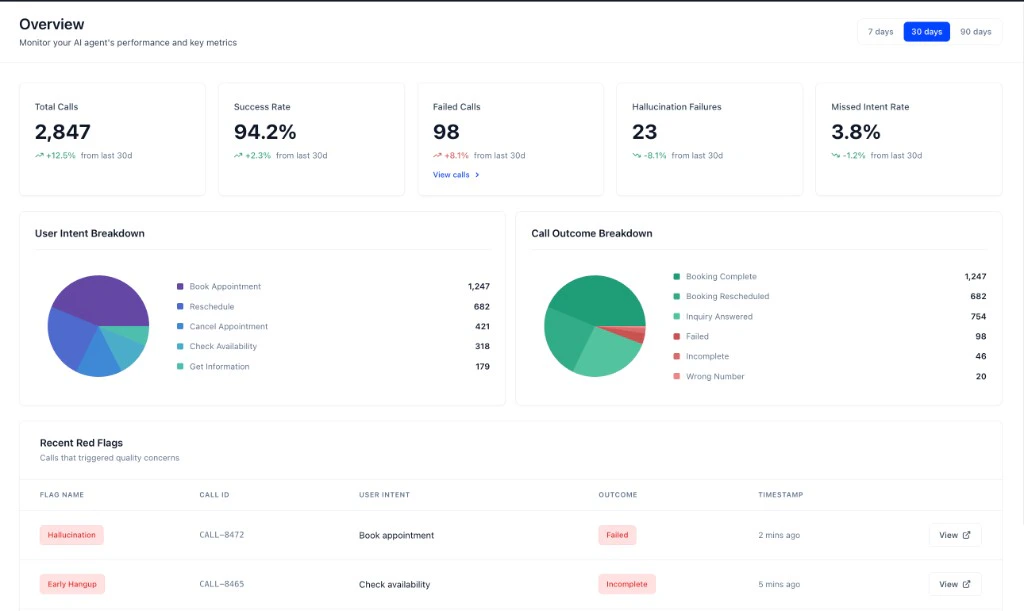
Track performance in real time on the Overview dashboard, with real-time alerts for the things you can’t afford to miss.
4
Optimize
Fix the agent, confirm the fix against production data, and re-simulate to catch regressions. Diagnose with MCP finds root causes across every affected call at once.
Three ways to connect
No-code platforms
Retell, Vapi, Dograh. Add a key, create an agent, done. Calls sync automatically.~5 minutes
SDKs
LiveKit, Pipecat, or your own Python stack. The SDK captures per-turn timing and latency your platform never exposes.~2–10 minutes
Direct API
Any language. You build the call timeline and POST it after the call ends.~30 minutes
Vocabulary
The six things Tuner is built from. Each links to the page that covers it properly.
Every other term used across Tuner is in the Glossary.
Ready to start?
Quickstart
Connect an agent and get your first call analyzed — about 5 minutes.