

What Problem Does Tuner Solve?
Managing voice agents in production can be challenging. Without the right tools, you’re often dealing with:- Scattered Logs: Manually parsing endless, unstructured logs to find issues.
- Manual Call Reviews: Spending hours manually listening to calls to assess quality.
- Manual Self-Testing: Calling your own agent over and over to check changes, without confidence you’ve covered real-world edge cases.
- No Real-Time Visibility: Finding out about problems from angry users, not your own systems.
- Guesswork: Making changes to your agent without knowing if they actually improve performance
How Tuner Helps?
Full Visibility
Understand what your agents are doing with structured, queryable data for every call.
Proactive Monitoring
Catch failures early with real-time alerts for hallucinations, broken flows, and performance drops.
Unified View
Bring all your voice agent data into one place, replacing scattered logs with a single source of truth.
Data-Driven Optimization
Track the impact of changes and validate improvements with real data, not guesswork.
Call Simulation
Run hundreds of AI-powered test calls against your agent, before launch, after every change, and whenever production surfaces a new failure mode, scored against the same Evals that monitor live traffic.
How It Works?
Tuner is built around a continuous improvement loop. You don’t just monitor production and react, you simulate, ship, observe, fix, and simulate again.Connect Your Agent
Integrate in minutes with no-code connections for Retell and Vapi, our LiveKit SDK, our Pipecat SDK, Dograh, or our API for custom stacks.
Define What Matters
Configure Evaluations & Guardrails to define what quality means for your agent.
Define What Matters
Configure Evaluations & Guardrails to define what quality means for your agent. These same Evals power both production monitoring and simulation.
Simulate and Validate
Use Call Simulation to stress-test your agent before launch and after every change. Tuner runs real test calls with your agent, inbound or outbound, with Routine Callers and Pressure Tests, and scores every call against your production Evals, so you catch failures before your customers do.
Analyze Calls
Every call is automatically converted into structured data. You can perform deep-dive analysis in the Call Logs.
Monitor Production
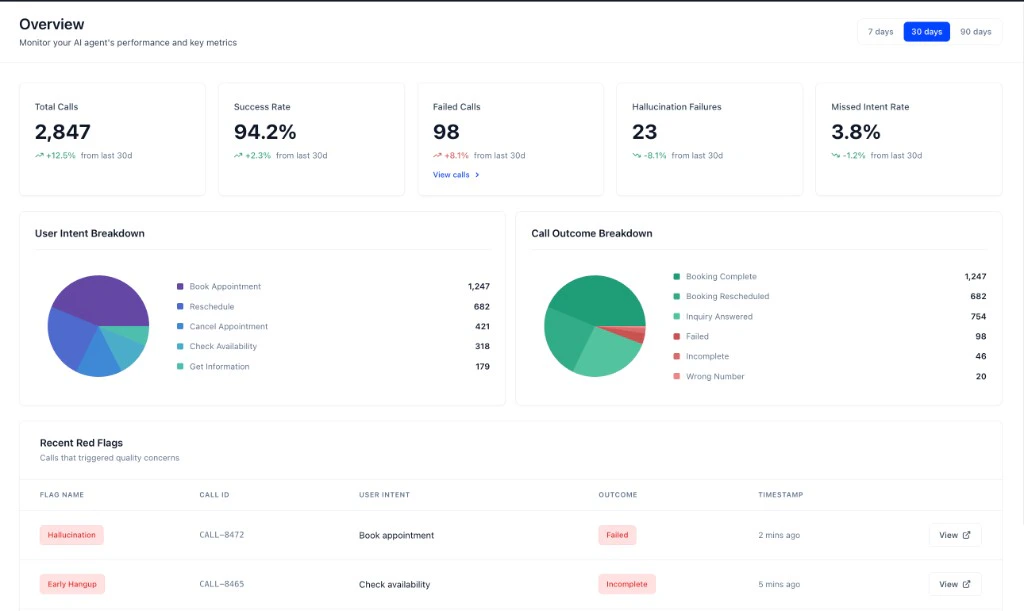
Every live call is automatically converted into structured data. Use the Overview dashboard and Call Logs to track performance, triage issues, and spot patterns in real traffic.
Get Proactive Alerts
Set up Real-Time Alerts to be notified of critical issues the moment they happen.
Get Proactive Alerts
Set up Real-Time Alerts to be notified of critical issues the moment they happen, such as hallucinations, broken flows, missed intents, and more.
Who is Tuner For?
Developers
Who need to debug issues, monitor performance, and integrate analytics into their CI/CD workflow.
Product Managers
Who want to understand user behavior, track KPIs, and make data-driven product decisions.
Business Teams
Who need to monitor agent health, respond to incidents, and ensure a high-quality user experience.
Ready to get started?
Let’s analyze your first call! The entire process takes less than 10 minutes.How to Review Your First Call
A step-by-step guide to connecting your agent and analyzing your first call.
Introduction to Call Simulation
Run simulation batches to validate your agent before launch and after every change.
Developer Overview
A technical overview of the Tuner platform for developers.