

The Goal of a Root Cause Analysis
The goal of a root cause analysis is to move beyond simply identifying that a problem occurred and to understand why it occurred. By uncovering the root cause, you can implement a lasting solution that prevents the issue from happening again.When to Perform a Root Cause Analysis
You should perform a root cause analysis when:- A critical red flag is triggered (e.g., hallucination, system prompt compliance failure).
- A user reports a poor experience.
- You notice a recurring issue in your Call Logs.
How to Perform a Root Cause Analysis
1
Open the Call Details View
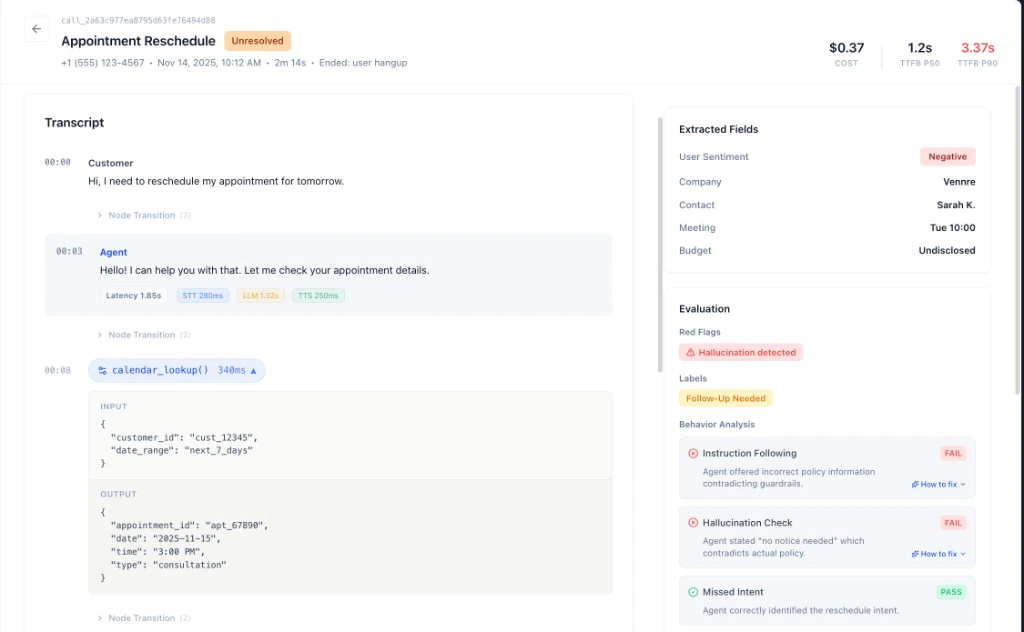
From the Call Logs or Recent Red Flags, click on a call to open the Call Details view.
2
Review the Transcript
Read the full conversation to understand the context. Pay close attention to the moments leading up to the issue.
3
Analyze the Events and Metrics
Use the Events and Metrics tabs to get a more detailed view. Look for anomalies like long silences, high crosstalk, or unexpected events.
4
Form a Hypothesis
Based on your review, form a hypothesis about the root cause. For example: “The agent hallucinated because the prompt was ambiguous,” or “The agent failed to follow the system prompt because a specific instruction was missing.”
5
Validate Your Hypothesis
Look for other calls with similar issues to see if your hypothesis holds true. If it does, you’ve likely found the root cause.
Common Root Causes
Ambiguous Prompts
The agent’s instructions were not clear, leading to unexpected behavior.
NLU/ASR Errors
The agent misheard or misunderstood the user.
Integration Issues
A problem with a backend system or API caused the agent to fail.
Diagnose Across All Calls
Manual root cause analysis is the right tool for investigating a single call in depth. When you want to find the root cause of a pattern across many calls at once — for example, why a specific intent keeps failing, or which eval is consistently failing on your worst calls — use the MCP Diagnose agent. It reads your call logs, red flags, and eval results in bulk, identifies the pattern, and tells you what to fix.Diagnose Your Agent
Analyze patterns across all your calls, find the root cause, and get specific fix recommendations.
Next Steps
Now that you know how to analyze and triage issues, it’s time to learn how to configure your agent to prevent them in the first place.Configuring Your Agent
A guide to the agent configuration settings in Tuner.