Tuner places the call into your LiveKit SIP inbound trunk. A dispatch rule routes the call into a new room and dispatches your registered agent worker. Your agent’s TunerPlugin then syncs the session back to Tuner, correlated to the simulation by sip.callIDFull.
You can do this through the LiveKit Cloud UI or by running the provided setup script — both produce the same result. Pick whichever fits your workflow.
Numbers — leave empty to accept calls for any number, or list specific numbers
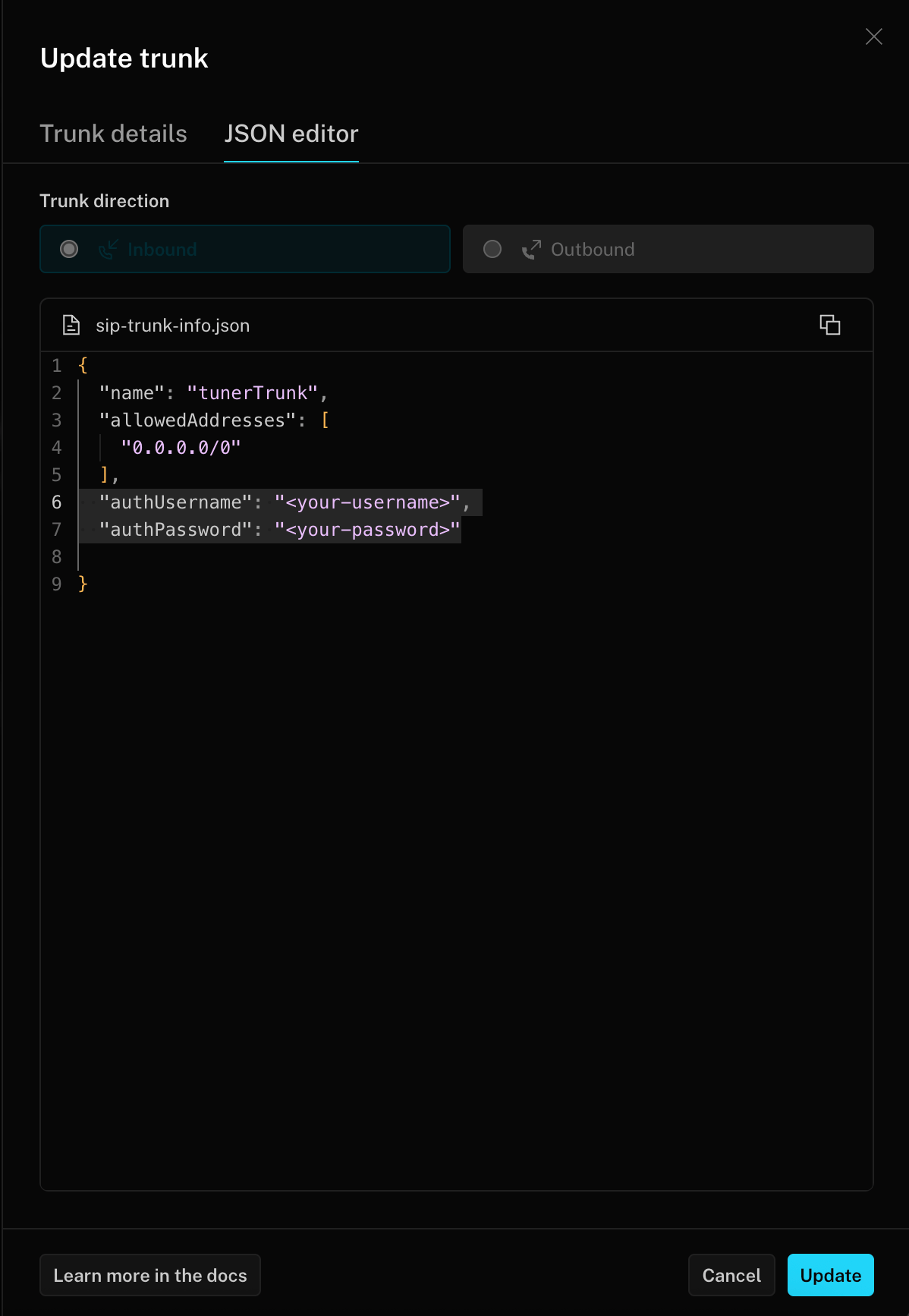
Allowed addresses — 0.0.0.0/0 to accept all callers
Switch to the JSON editor tab and add authUsername and authPassword fields with values of your choice. This step is required — Tuner uses these credentials to authenticate when placing simulated calls into your trunk, and you’ll enter them in Tuner in Step 4.
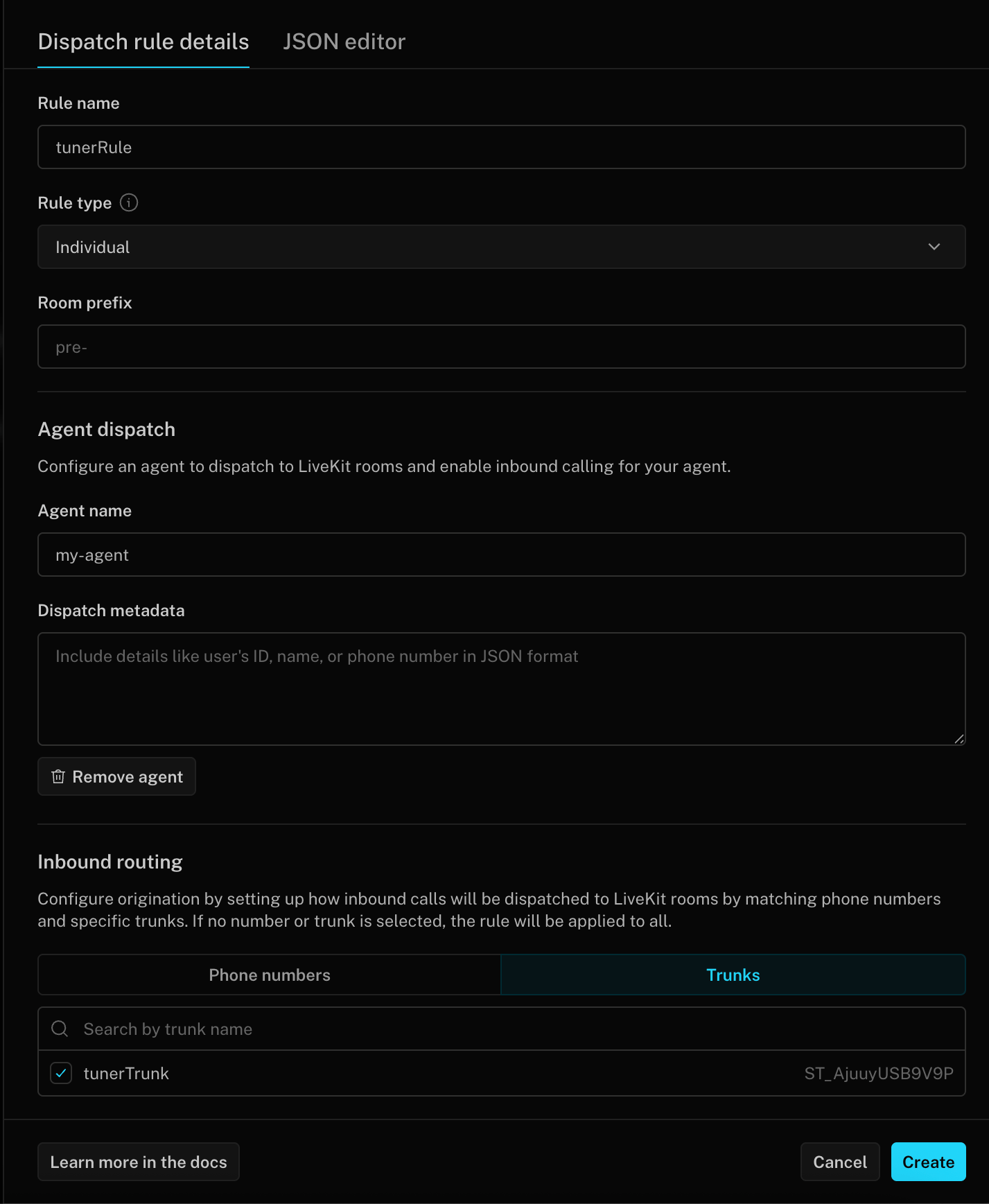
Go to Telephony → Dispatch rules → Create new dispatch rule.
Fill in:
Rule name — e.g. tunerRule
Rule type — Individual
Room prefix — e.g. tuner- (each call gets its own room with this prefix)
Under Agent dispatch, set Agent name to exactly match the agent_name your worker registers with. Without this, the room is created but no worker is dispatched and the call rings until it times out with a 408.
Under Inbound routing → Trunks, select the trunk you created in the previous step.
Change AGENT_NAME near the top of the script to match the agent_name your worker registers with. The dispatch rule won’t dispatch a worker if this doesn’t match exactly.
sip_setup.py — full script
"""One-shot script to create a LiveKit SIP inbound trunk and dispatch rule.Usage: uv run python scripts/sip_setup.py # create trunk + dispatch rule uv run python scripts/sip_setup.py --list # list existing trunks and rulesReads credentials from .env.local. Requires these vars to be set: LIVEKIT_URL, LIVEKIT_API_KEY, LIVEKIT_API_SECRET SIP_AUTH_USERNAME, SIP_AUTH_PASSWORD, SIP_GATEWAY_HOST"""import argparseimport asyncioimport osimport sysfrom dotenv import load_dotenvfrom google.protobuf import symbol_databasefrom livekit import apifrom livekit.protocol import room as room_protofrom livekit.protocol import sip as sip_protoload_dotenv(".env.local")LIVEKIT_URL = os.environ.get("LIVEKIT_URL", "")LIVEKIT_API_KEY = os.environ.get("LIVEKIT_API_KEY", "")LIVEKIT_API_SECRET = os.environ.get("LIVEKIT_API_SECRET", "")SIP_TRUNK_NAME = os.environ.get("SIP_TRUNK_NAME", "")SIP_AUTH_USERNAME = os.environ.get("SIP_AUTH_USERNAME", "")SIP_AUTH_PASSWORD = os.environ.get("SIP_AUTH_PASSWORD", "")SIP_GATEWAY_HOST = os.environ.get("SIP_GATEWAY_HOST", "")SIP_ALLOWED_NUMBERS = [ n.strip() for n in os.environ.get("SIP_ALLOWED_NUMBERS", "").split(",") if n.strip()]AGENT_NAME = "Nova-Clinic"RoomAgentDispatch = symbol_database.Default().GetSymbol("livekit.RoomAgentDispatch")def check_env() -> None: missing = [ k for k, v in { "LIVEKIT_URL": LIVEKIT_URL, "LIVEKIT_API_KEY": LIVEKIT_API_KEY, "LIVEKIT_API_SECRET": LIVEKIT_API_SECRET, "SIP_TRUNK_NAME": SIP_TRUNK_NAME, "SIP_AUTH_USERNAME": SIP_AUTH_USERNAME, "SIP_AUTH_PASSWORD": SIP_AUTH_PASSWORD, "SIP_GATEWAY_HOST": SIP_GATEWAY_HOST, }.items() if not v ] if missing: print(f"Missing env vars: {', '.join(missing)}") print("Set them in .env.local and re-run.") sys.exit(1)async def create_trunk(lk: api.LiveKitAPI) -> str: existing = await lk.sip.list_inbound_trunk(sip_proto.ListSIPInboundTrunkRequest()) if existing.items: match = next((t for t in existing.items if t.name == SIP_TRUNK_NAME), None) if match: print(f" Using existing trunk: {match.sip_trunk_id} ({match.name})") return match.sip_trunk_id ids = ", ".join(f"{t.sip_trunk_id} ({t.name})" for t in existing.items) print(f" Cannot create trunk — conflicting trunk(s) already exist: {ids}") print(" LiveKit only allows one trunk with open number matching at a time.") print() print(" Options:") print( " 1. Reuse an existing trunk: set SIP_TRUNK_NAME to one of the names above and re-run." ) print( " 2. Create fresh: delete the conflicting trunk(s) in LiveKit Cloud → SIP → Inbound Trunks, then re-run." ) print( " 3. Restrict to specific numbers: set SIP_ALLOWED_NUMBERS in .env.local to avoid the conflict." ) sys.exit(1) trunk = await lk.sip.create_inbound_trunk( sip_proto.CreateSIPInboundTrunkRequest( trunk=sip_proto.SIPInboundTrunkInfo( name=SIP_TRUNK_NAME, auth_username=SIP_AUTH_USERNAME, auth_password=SIP_AUTH_PASSWORD, allowed_addresses=["0.0.0.0/0"], allowed_numbers=SIP_ALLOWED_NUMBERS, ) ) ) print(f" Trunk created: {trunk.sip_trunk_id}") return trunk.sip_trunk_idasync def get_or_create_dispatch_rule(lk: api.LiveKitAPI, trunk_id: str) -> str: existing = await lk.sip.list_dispatch_rule(sip_proto.ListSIPDispatchRuleRequest()) for rule in existing.items: if trunk_id in rule.trunk_ids: print( f" Using existing dispatch rule: {rule.sip_dispatch_rule_id} ({rule.name})" ) return rule.sip_dispatch_rule_id rule = await lk.sip.create_dispatch_rule( sip_proto.CreateSIPDispatchRuleRequest( dispatch_rule=sip_proto.SIPDispatchRuleInfo( name="tuner-rule", trunk_ids=[trunk_id], rule=sip_proto.SIPDispatchRule( dispatch_rule_individual=sip_proto.SIPDispatchRuleIndividual( room_prefix="tuner-", ) ), room_config=room_proto.RoomConfiguration( agents=[RoomAgentDispatch(agent_name=AGENT_NAME)] ), ) ) ) print(f" Dispatch rule created: {rule.sip_dispatch_rule_id}") return rule.sip_dispatch_rule_idasync def list_resources(lk: api.LiveKitAPI) -> None: trunks = await lk.sip.list_inbound_trunk(sip_proto.ListSIPInboundTrunkRequest()) rules = await lk.sip.list_dispatch_rule(sip_proto.ListSIPDispatchRuleRequest()) print("Inbound trunks:") if trunks.items: for t in trunks.items: print(f" {t.sip_trunk_id} {t.name}") else: print(" (none)") print("Dispatch rules:") if rules.items: for r in rules.items: agent = r.room_config.agents[0].agent_name if r.room_config.agents else "—" print(f" {r.sip_dispatch_rule_id} {r.name} agent={agent}") else: print(" (none)")async def main() -> None: parser = argparse.ArgumentParser() parser.add_argument( "--list", action="store_true", help="List existing trunks and dispatch rules" ) args = parser.parse_args() missing = [ k for k, v in { "LIVEKIT_URL": LIVEKIT_URL, "LIVEKIT_API_KEY": LIVEKIT_API_KEY, "LIVEKIT_API_SECRET": LIVEKIT_API_SECRET, }.items() if not v ] if missing: print(f"Missing env vars: {', '.join(missing)}") sys.exit(1) url = LIVEKIT_URL if LIVEKIT_URL.startswith("wss://") else f"wss://{LIVEKIT_URL}" async with api.LiveKitAPI(url, LIVEKIT_API_KEY, LIVEKIT_API_SECRET) as lk: if args.list: await list_resources(lk) return check_env() print("Setting up inbound trunk...") trunk_id = await create_trunk(lk) print("Setting up dispatch rule...") rule_id = await get_or_create_dispatch_rule(lk, trunk_id) sip_uri = f"sip:{SIP_GATEWAY_HOST}" print("\nSIP setup complete.") print(f" Trunk ID: {trunk_id}") print(f" Dispatch Rule: {rule_id}") print(f" Agent Name: {AGENT_NAME}") print() print("Enter these in Tuner → Agent Settings → SIP Settings:") print(f" SIP URI: {sip_uri}") print(f" Username: {SIP_AUTH_USERNAME}") print(f" Password: {SIP_AUTH_PASSWORD}")asyncio.run(main())
Once you’ve created both resources, head back to Telephony → Dispatch rules to confirm the rule appears and shows your agent in the Agents column. If the column is empty, the rule won’t dispatch your worker and calls will time out.
To connect a simulated call to the corresponding session synced from your agent, Tuner uses sip.callIDFull as a correlation key. LiveKit attaches this value as a participant attribute on the SIP participant, so it can be read directly from the room state — no additional infrastructure required.
The SIP participant only becomes visible after the agent joins the room. Call ctx.connect() first, then read the correlation ID, then pass it to TunerPlugin:
async def entrypoint(ctx: JobContext): # 1. Connect to the room FIRST so SIP participants are reachable await ctx.connect() # 2. Extract the SIP correlation ID from the room's remote participants sip_correlation_id = _extract_sip_correlation_id(ctx) session = AgentSession(...) TunerPlugin( session, ctx, sip_correlation_id=sip_correlation_id, # ... your other TunerPlugin options ) await session.start(...)
If ctx.connect() runs after you try to read participants, ctx.room.remote_participants will be empty and sip_correlation_id will be None. Simulated calls will still complete, but they won’t be correlated to their Tuner sessions.
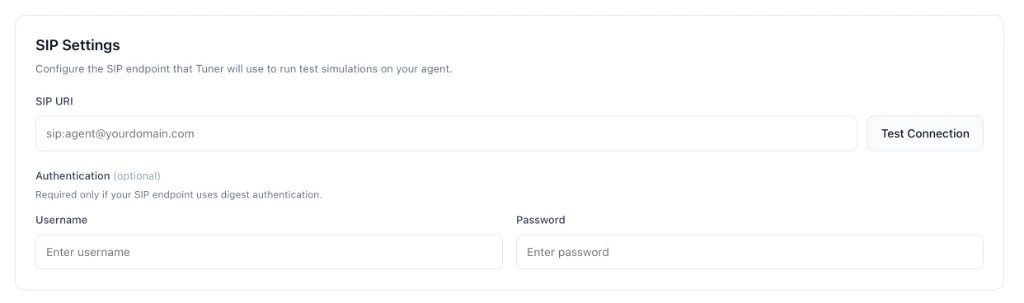
With the inbound trunk and dispatch rule in place, go to Agent Settings → SIP Settings in your Tuner dashboard and enter the credentials you just created:
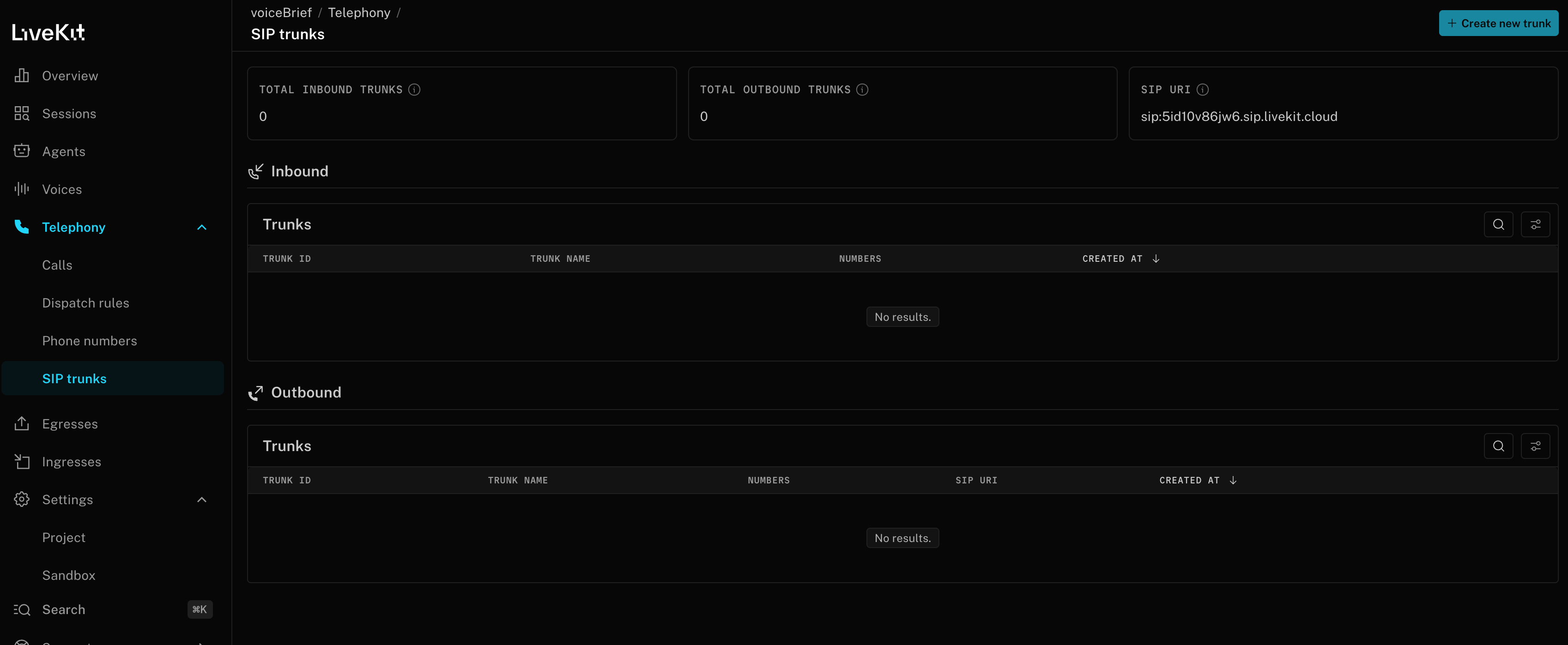
SIP URI — your project’s SIP gateway URI from Step 1 (e.g. sip:XXXXXXXX.sip.livekit.cloud)
Username — the authUsername you set on the inbound trunk
Password — the authPassword you set on the inbound trunk
Click Test Connection, then Save. A Verified badge appears next to the SIP URI once the connection succeeds.