

New to outbound simulation? Start with the overview to see how the flow works end to end.
The concept
Your system already has an API that starts an outbound call. You give Tuner that API (URL, headers, body), and Tuner calls it for every simulated call, putting the simulation agent’s SIP URI where your body expects the phone number.What’s a SIP URI? The internet equivalent of a phone number:
sip:sim-abc123@sip.usetuner.ai instead of +15551234567. Most telephony providers (Twilio, Telnyx, LiveKit, etc.) accept one anywhere they accept a phone number, so it gets dialed like any other call.Prerequisite: your agent must already be integrated with Tuner and sending real calls: LiveKit, Pipecat, or Custom API.
The Outbound Trigger Endpoint
Open Agent Settings → Simulation Setup (your agent must be set up as outbound). This is where you describe your API to Tuner: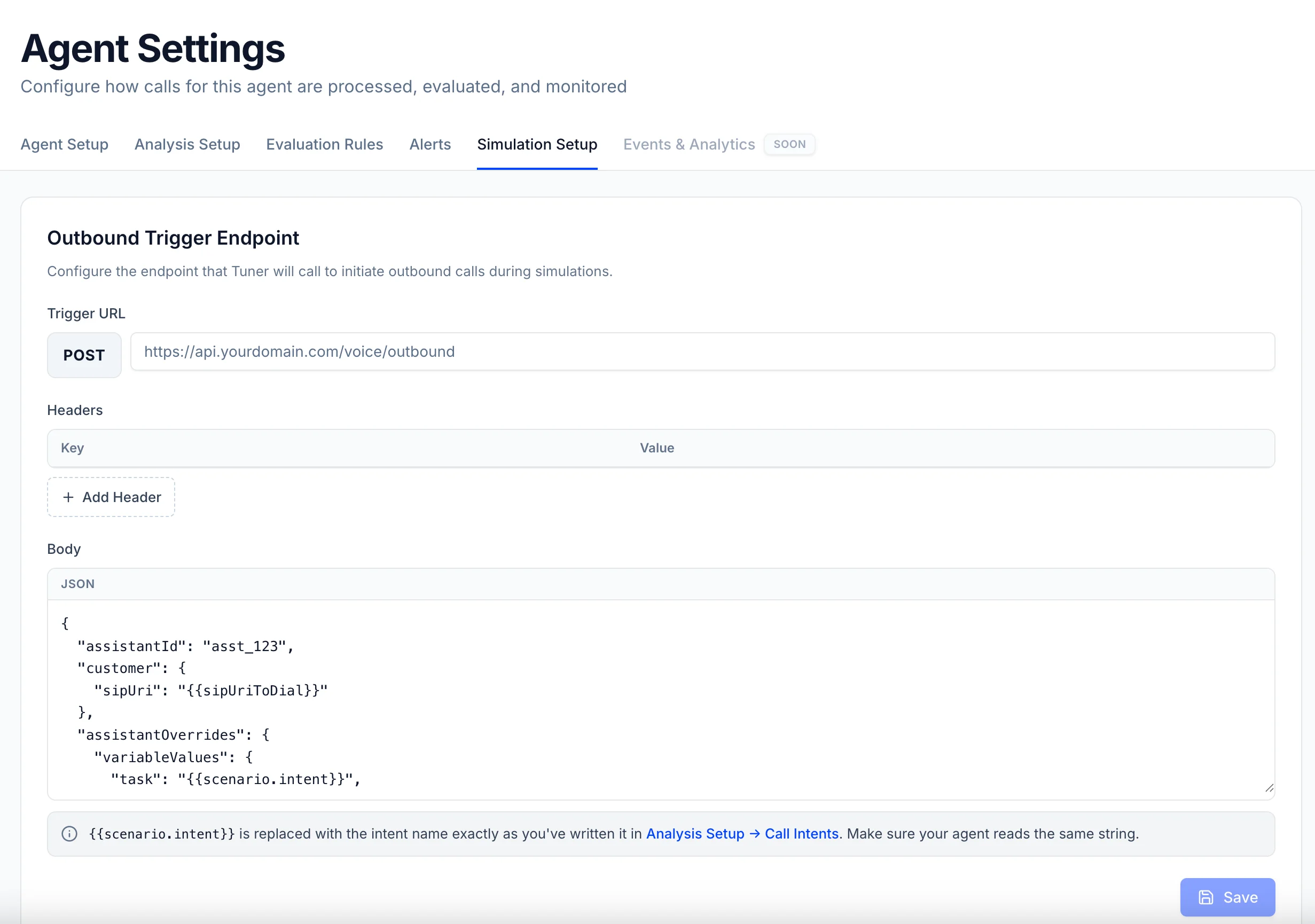
- Trigger URL, the endpoint on your side that places an outbound call.
- Headers, whatever your endpoint needs to accept the request (an
Authorizationtoken, for example). - Body, a JSON template in your endpoint’s shape, containing Tuner’s three placeholders:
The key names are entirely yours (
destination, to, phoneNumber, …). All three placeholders need a key in the template, but if you don’t use the intent or the name, just park them under any key, only the SIP URI is essential.
Example
Say your endpoint takes adestination and dials it. Somewhere inside, there’s a line like this (LiveKit shown, same concept on any stack):
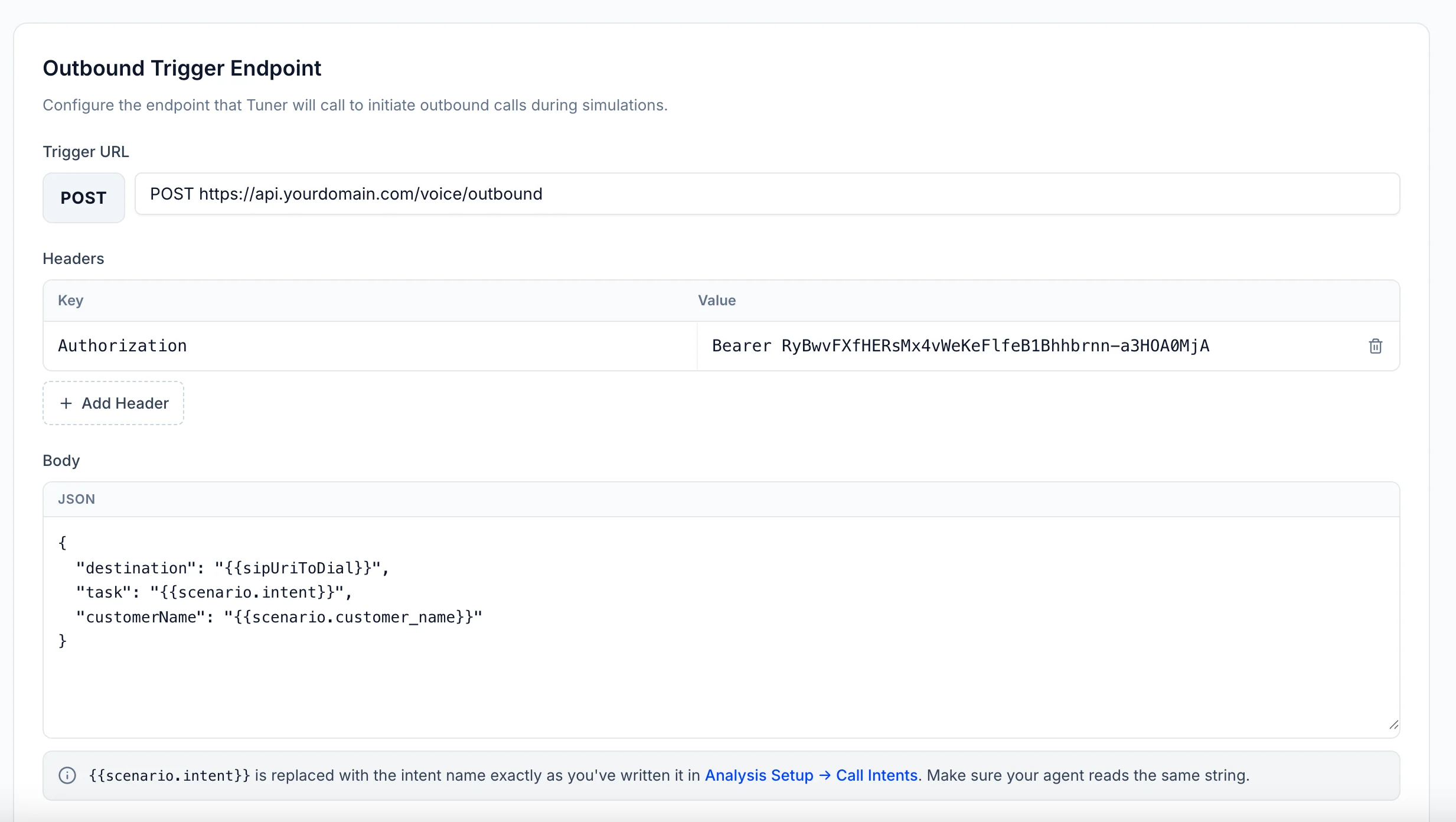
{{sipUriToDial}} in the destination field since that’s where the number normally goes:
Trigger URL
Body
Send the call back with recipient
One requirement remains: when your integration syncs the finished call to Tuner, the dialed SIP URI must be in the recipient field, exactly as Tuner sent it. That’s how Tuner links the call to its simulation, without it, it shows up as ordinary production traffic. Whatever key you put {{sipUriToDial}} under, that’s the value to send back.
- LiveKit
- Pipecat
- Custom API
Full plugin setup: Connecting to LiveKit.
- Python
- Node.js
Putting it all together
When you press Simulate:- Tuner creates the simulation agents for the run (personalities, accents, languages, and use cases from your mix), each with its own SIP URI.
- For each one, Tuner calls your trigger endpoint, placing the SIP URI wherever you put
{{sipUriToDial}}, so your API knows who to call. - Your agent dials and has the conversation.
- Your integration syncs the call back with the SIP URI in
recipient, so Tuner links it to the simulation and runs your Evals.
Troubleshooting
Simulated calls show up as ordinary production calls
Simulated calls show up as ordinary production calls
The synced call’s
recipient didn’t match the SIP URI Tuner sent: it was never set, modified, or a different value was sent. Compare the URI your endpoint received byte-for-byte with the recipient on the synced call.Tuner triggers my endpoint but no call arrives
Tuner triggers my endpoint but no call arrives
The dial failed on your side. Check your platform’s logs, and confirm your trunk can dial a SIP URI (some configurations only allow phone numbers).
My endpoint returns an error to Tuner
My endpoint returns an error to Tuner
Check the Headers saved in Simulation Setup, and confirm the body template matches the shape your endpoint expects.
Run your first simulation
Configure your simulation mix and start a batch.