

Prerequisite: your agent must already be integrated with Tuner and successfully sending real calls before you configure simulation. Simulation reuses the same Evals, Intents, and Call Outcomes your live agent is wired to, so that integration has to be in place first. Set it up here:
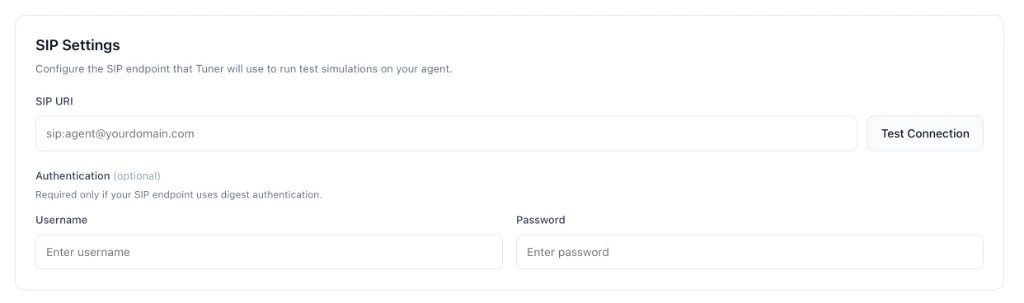
sip:agent@sip.vapi.ai) and, when your SIP edge uses digest authentication, a username and password. Tuner does not care which vendor supplies those values; they must match whatever your SIP ingress expects. Some stacks only expose a URI (leave username and password empty).
What is SIP, and why does Tuner need it?
SIP (Session Initiation Protocol, RFC 3261) is the signaling protocol voice platforms use to start, manage, and end a call, every voice agent stack speaks SIP at its ingress. Tuner uses SIP so simulations enter your agent through the same path a real phone call would, same audio pipeline, same transcription, same prompt, same tools. That’s why we ask for a SIP URI (where to dial) and, if your edge uses digest auth, a username and password.How a simulation call actually flows
When you click Run Simulation, this happens under the hood:- Tuner builds the scenario, picks a caller persona, an intent, and what to stress-test.
- Tuner sends a SIP
INVITEto the SIP URI you pasted. This is the “ring”, a small text message over the internet that says “I want to start a call with you.” ThatINVITEcarries a SIPCall-IDTuner generated for this simulation, it’s the key that links what Tuner dialled out with what your agent syncs back later. - Your SIP edge responds. If digest auth is on, it replies with a
407 Proxy Authentication Requiredchallenge. Tuner re-sends theINVITEwith the username/password you saved. If credentials match, the edge accepts and forwards the call to your agent. - Audio flows. Once the call is up, Tuner streams the simulated caller’s voice (RTP) to your agent, and your agent’s responses stream back. From your agent’s perspective this is a normal inbound phone call.
- Your agent syncs the call back to Tuner with the SIP Call-ID. When the call ends, your integration posts the transcript and metadata back to Tuner, with the SIP Call-ID included. If you’re on Vapi or Retell, we handle this for you out of the box, no work on your side. LiveKit and Pipecat integrations read the SIP Call-ID from the inbound call and pass it through the SDK’s plugin/observer. Custom integrations include
sip_call_idin their Create Call API payload directly. That value is how Tuner knows this synced call is the one it just simulated, rather than ordinary production traffic. - Evaluation runs. Once the synced call is matched to the simulation, Tuner records the transcript, latency, tool traces, and runs your production Evals against it.
INVITE lands at the wrong host, or the 407 challenge fails, and the call never connects. And without sip_call_id coming back in step 5, the call still happens, it just shows up as a normal production call instead of a simulation result.
Anatomy of a SIP URI
sip:, the scheme (likehttps://for web URLs). You may rarely seesips:for SIP over TLS; paste it verbatim.user-part, an identifier your provider assigns (Vapi’s SIP Identifier, Twilio/Telnyx credential username). Sometimes absent, the host alone is enough.host, the public address of your SIP edge (e.g.sip.vapi.ai,sip.telnyx.com,your-project.sip.livekit.cloud).
;transport=tcp). Copy whatever your provider’s console shows, verbatim.
Choose your platform
Pick where your SIP URI and credentials come from:SIP for Vapi
Free Vapi SIP trunk: URI + digest credentials.
SIP for Retell
SIP URI from Retell for your agent (often URI only).
SIP for other platforms
Twilio, Telnyx, LiveKit Cloud SIP, or any SIP URI you already have.
Run your first simulation
Configure your simulation mix and start a batch.