

Your agent must already be connected to Tuner and sending real calls, with its Call Direction set to Inbound.
Find your platform
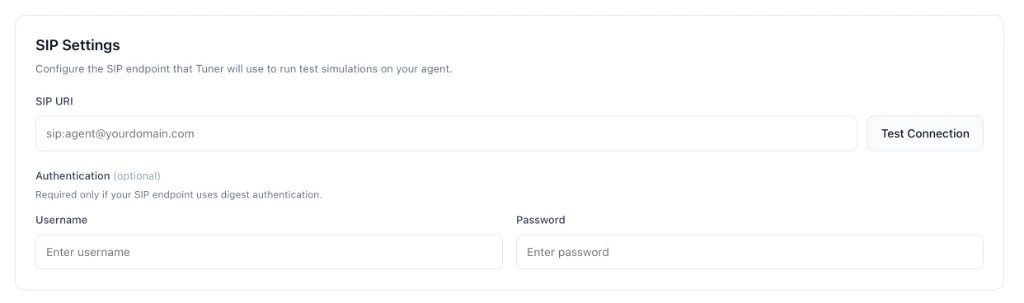
Every platform except Retell ends the same way: you paste the SIP URI into the SIP Settings card in Agent Settings > Simulation Setup and click Verify & Save. Tuner places a short test call to check the connection.
Retell
Retell agents need no setup. Tuner starts each simulation call through Retell, using your agent’s Agent Remote ID and the Retell API key saved on its integration, so there’s no SIP URI and the SIP Settings card isn’t shown. Retell supports inbound simulation and replays. Outbound simulation isn’t available for Retell agents.Vapi
1
Create a free Vapi SIP trunk
- Open the Vapi dashboard and go to Phone Numbers.
- Click Create Phone Number and choose Free Vapi SIP.
- Fill in the SIP Identifier (it becomes part of your SIP URI), a Label for your own reference, and a Username and Password.
- Click Import SIP URI.
sip:<SIP Identifier>@sip.vapi.ai.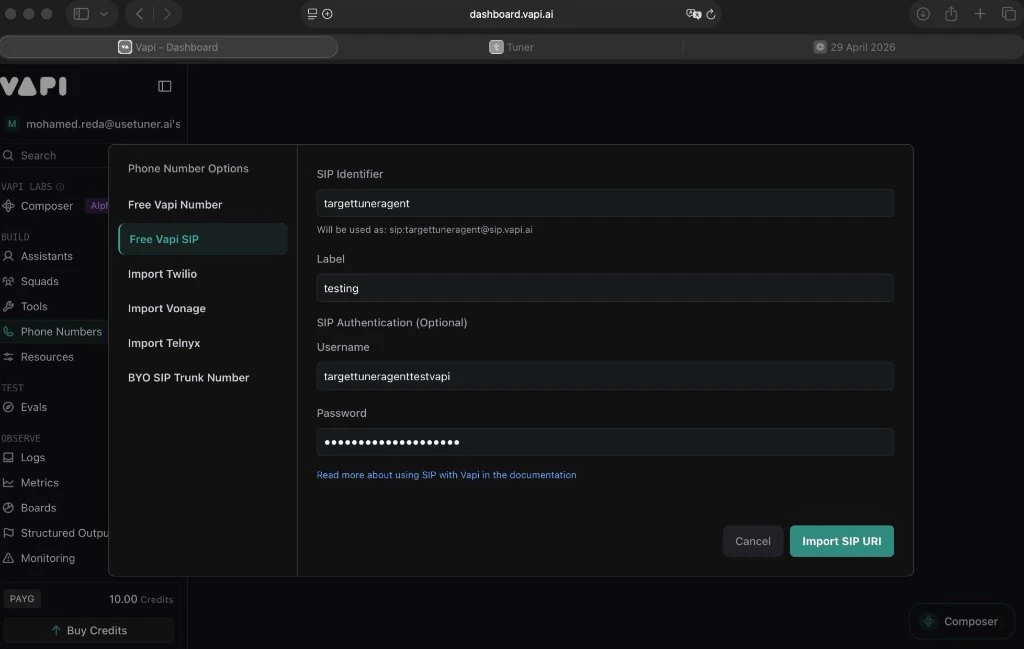
2
Link your assistant
Simulation calls won’t connect without this step.
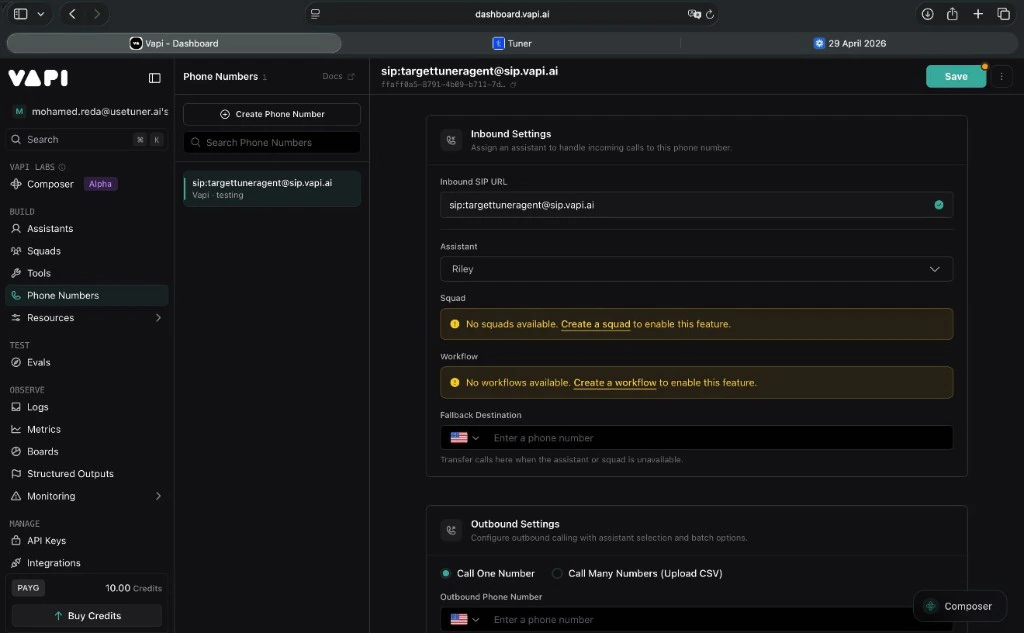
- In Phone Numbers, click your SIP trunk.
- Under Inbound Settings, set Assistant to the assistant Tuner should reach.
-
Click Save.
3
Paste it into Tuner
In Agent Settings > Simulation Setup, in the SIP Settings card, enter the SIP URI. Under Authentication (optional), enter the Username and Password from the first step. Click Verify & Save.
Troubleshooting Vapi
Troubleshooting Vapi
Dograh
Before you start:- Dograh v1.48.0 or later. Earlier versions don’t reliably send Tuner the SIP call ID, so simulation calls can land in Call Logs as production traffic instead of linking to their run.
- The Tuner node enabled on your Dograh workflow, and the workflow published. Inbound calls run the published version, so a Tuner node that exists only in a draft sends nothing to Tuner. See Connecting to Dograh.
- In Dograh, a phone number under Telephony configurations > Dograh Cloudonix SIP > Phone numbers with its Inbound workflow set to your agent. A short extension such as
101works; it doesn’t need to be a real number. See Dograh’s SIP guide if you haven’t set one up.
1
Build the SIP URI
The URI is
sip:<address>@<hostname>:For example:
sip:101@a1b2c3d4-0000-0000-0000-9f8e7d6c5b4a.sip.cloudonix.net. If the UDP/TCP port under SIP connectivity isn’t 5060, add it to the end, for example sip:101@<hostname>:9060.2
Paste it into Tuner
In Agent Settings > Simulation Setup, in the SIP Settings card, enter the SIP URI. Dograh’s inbound endpoint doesn’t use SIP authentication, so leave Username and Password empty. Click Verify & Save.
Known issue. With both authentication fields empty, verification can fail with “endpoint did not answer.” Enter any placeholder values, for example
tuner and tuner. Dograh never checks them.Troubleshooting Dograh
Troubleshooting Dograh
LiveKit, Pipecat and custom stacks
1
Get your SIP URI
Use the SIP URI and credentials from your phone or SIP provider. SIP providers covers Twilio, Telnyx, Plivo, Exotel, Jambonz, Daily and LiveKit SIP.
2
Paste it into Tuner
In Agent Settings > Simulation Setup, in the SIP Settings card, enter the SIP URI. If your SIP endpoint uses digest authentication, open Authentication (optional) and enter the Username and Password. Otherwise leave them empty. Click Verify & Save.
3
Add the simulation step to your integration
Your integration has to send each call back with the ID Tuner put on it, so Tuner can link the call to the run. Follow Enable simulation on your LiveKit, Pipecat or custom stack integration page. On LiveKit, the SDK does this for you.
Check it works
Follow Run your first simulation. If calls show Unreported, the call reached your agent but didn’t link back to the run. See Fix an Unreported run. Replays of your Dataset calls reach your agent the same way, so once simulations connect, replays will too. Replays also work with outbound simulation.How SIP works
You don’t need this to set up simulation. It helps when a call doesn’t connect.What is SIP and why does Tuner use it?
What is SIP and why does Tuner use it?
SIP (Session Initiation Protocol, RFC 3261) is the protocol voice platforms use to start, manage and end calls. Tuner uses it so simulated calls reach your agent through the same path as a real phone call: the same audio pipeline, transcription, prompt and tools.
What happens when Tuner places a call
What happens when Tuner places a call
- Tuner sends a SIP
INVITEto your SIP URI. It carries a SIPCall-IDand anX-Correlation-Idheader that Tuner generated for this call. - If your SIP endpoint uses digest authentication, it replies with a
407 Proxy Authentication Requiredchallenge, and Tuner sends theINVITEagain with your username and password. - Your endpoint accepts the call and passes it to your agent. Audio flows both ways, and to your agent it’s a normal inbound call.
- When the call ends, your integration sends it to Tuner with one of those IDs, and Tuner links it to the run. See How simulated calls are linked.
INVITE to the wrong place, and wrong credentials fail the 407 challenge. Either way, the call never connects.Anatomy of a SIP URI
Anatomy of a SIP URI
sip:: the scheme, likehttps://for web addresses. You may seesips:for SIP over TLS; paste it as shown.user-part: an identifier your provider assigns, such as Vapi’s SIP Identifier or a Twilio or Telnyx credential username. Sometimes there isn’t one and the host is enough.host: the public address of your SIP endpoint, for examplesip.vapi.ai,sip.telnyx.comoryour-project.sip.livekit.cloud.
;transport=tcp. Copy whatever your provider’s console shows.Next steps
Run a simulation
Every option in the Run Simulation dialog.
Run statuses
What each run status and call result means.