

Where runs appear
Every simulation run appears as a card on the Runs tab of Simulations. The card header shows when the run started, what it ran (for example “7 routine · 3 pressure”, or “5 from library”, plus the language, test profile and environment), a counts line and a status badge. Click the card to expand it.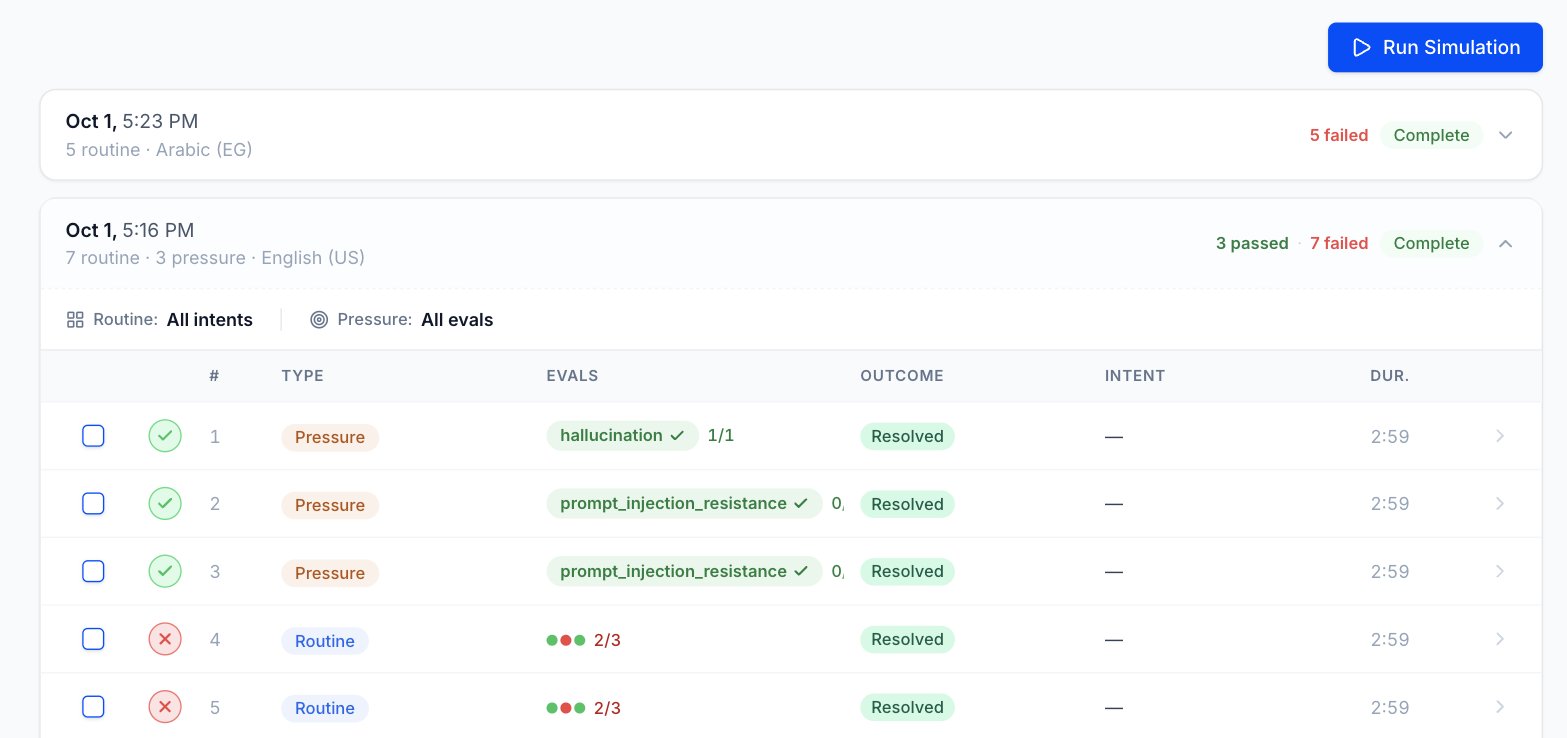
Run status
Only Unreported and Analysis failed show a tooltip when you hover the badge. It says what went wrong and what to check, as in the fix sections below.
Call results
Expand a run to see one row per call, with the columns #, Type (Routine or Pressure), Evals, Outcome, Intent and Dur. The icon at the start of each row shows the call’s result:
Hover an Unreported or Analysis failed icon for the same tooltip as on the run badge. Hovering a Ran check shows “Ran — no evals were expected for this run”. The other icons have no tooltip.
A call whose outcome has Stop Analysis turned on counts as done and shows Passed, since Tuner skips its evals.
Once Tuner has received a call, click its row to open the call details. On the Scenarios tab and on a Scenario’s page, the same results show as Passed, Failed, Unreported, Analysis failed or Pending.
Counts line
The counts line next to the badge sums up the calls, for example “6 passed · 2 failed · 2 remaining”. It can show:Fix an Unreported run
Unreported means Tuner placed the call but never received a matching call from your agent’s integration.1
Look for the call
Open Call Logs and look for the call.
2
If it's there, check the link
Tuner couldn’t match it to the simulation. Check that your integration sends back the value Tuner links on. See How simulated calls are linked.
3
If it isn't there, check the integration
Check that your integration is sending calls to Tuner.
The Call-ID may arrive under a different name
This is the most common cause of Unreported inbound calls on LiveKit, Pipecat and custom stacks. When Tuner dials your agent, it sends a standard SIPINVITE that contains a Call-ID header:
INVITE, accepts the call, and captures that Call-ID. It then surfaces the value to your application, which passes it back to Tuner.
SIP is a standard, but every provider wraps it in their own platform. By the time the call reaches your application code, the original Call-ID header may have been renamed, nested inside a larger object, or even dropped entirely unless you opt in to forwarding it. Here are some real-world examples of how this happens:
- Renamed field: A provider receives the SIP
Call-IDbut exposes it to your app asSipCallId,sip_call_id, orcall_id. The value is the same, but the key is different from the original SIP header name. - Nested inside metadata: Instead of a top-level field, the
Call-IDmay appear inside a nested object likesip.headers["Call-ID"]or within acustom_headerslist that you need to iterate through. - Not forwarded by default: Some providers split the call into two legs: an HTTP webhook (which receives SIP context) and a WebSocket (which carries the audio). The SIP fields may only be available on the webhook side, and you need to explicitly configure your webhook response to forward them to the WebSocket as custom parameters.
- Replaced with a provider-native ID: If the provider does not forward the SIP
Call-IDat all, your app may only see the provider’s own internal identifier (e.g. aCallSid,call_control_id, orcall_sid). This is not the same as the original SIPCall-IDthat Tuner sent, and simulation linking will not work unless you configure forwarding. - Regenerated across hops: If the call passes through multiple SIP intermediaries (for example a SIP bridge, then a PBX, then your provider), each hop may generate its own
Call-ID. In these cases, look for a correlation header likeX-CIDthat carries the original value across all hops.
Call-ID will be there. Check your provider’s documentation for how SIP headers are surfaced to your application, and verify that the value you’re sending back to Tuner matches the one Tuner originally sent. When in doubt, capture a test call and inspect the raw payload your application receives.
If the value is lost, the call still arrives in Tuner, but as production traffic, and the simulated call shows Unreported in the run.
Fix Analysis failed
Analysis failed means the call arrived but its evals couldn’t be completed. Run the Scenario again. If it keeps happening, contact support.How simulated calls are linked
Tuner links each call your integration sends back to the simulated call it placed. A call that isn’t linked is still ingested, but it appears as production traffic and the simulated call shows as Unreported.
If the ID is lost in transit, the run shows Unreported. Some telephony providers rename or drop the SIP Call-ID before it reaches your application. See The Call-ID may arrive under a different name.
Next steps
Scenario Library
Save Scenarios from a run and rerun them to check a fix.
Call Logs
Open a simulated call’s details once it reaches Tuner.